
Proton Pass & Authenticator
635 results found
-
Customization to the expiration date for the credit cards
Is it possible to add more customization to the expiration date for the credit cards? For example to be able to type in the whole year or 026? Sometimes credit card autofill does not work because of this.
2 votes -
Make the CLI available in the free plan
It would make sense to offer the CLI to all Proton Pass users, including those on the free plan. This would allow users to test all the product's features without committing to a paid subscription. Perhaps a low rate limit (x requests/hour) could be introduced for free users instead, but the functionality itself should be available. All your competitors offer the CLI as part of their free plans.
3 votes -
Item title partly visable in browser plugin
In the item title in the browser only the first 1- characters are visable. The rest is blocked by the edit and share button.
Request: Please make the full item title visable in the browser plugin.
4 votes -
Spell Checker for Secure Notes on Windows
We need autocorrect for Secure Notes on Windows Desktop. The dramatic red squiggle of shame appears under a misspelled word… and then just sits there. Mocking me. Offering no help. No suggestions. No mercy.
I almost had to consult an ancient artifact known only as the Dictionary - a massive, dust-covered relic whispered about in legends. I swear I inhaled a century of library air just thinking about it.
Please. Save us from the dark ages. Add autocorrect.
2 votes -
Create alias with custom domain
Hi there,
What I would like to see is an addition as to how the aliases are created.
I have my own domain so I usually just do website@mydomain.ioThe logic is already here since creating an alias does exactly that website+suffix@custom-protonmain.com
I'd like to be suggested instead an alias with my domain and only the name of the website i'm in
for example. If I want to create a discord account I should be suggested this email: discord@mydomain.io
Sorry if this is a duplicate. I wasn't able to find anything about it.
Thank you,4 votes -
Richer “account details” fields (username, backup email, linked services, etc)
The core feature is nice, but somewhat limiting. it would be good to add optional, encrypted “extra‑details” fields to each entry (secondary/recovery email, extra passwords, numeric IDs, and linked‑service references) so we can store the full set of credentials a site may require without resorting to separate notes.
Numeric IDs are usually asked when I'm trying to get support for a game account, and the linked-service references is just a nice touch that I really hope to get implemented. For example, in Discord, you can link you Steam and Epic Games. It's be nice if we could have that as…
3 votes -
pass-cli navigation mode
with the launch of the cli i'd love to see a navigation mode where one can run "pass-cli nav" and have it display a folder structure of vaults, then items, then fields that can be edited by using the right arrow key or e key. this would majorly enhance usability and hotkeys can be used for things like search. for a reference, if this ui worked similar to the ncdu command that would be ideal.
this would make cli an effective alternative to the full ui in terminals which would be awesome
2 votes -
Copying a field should bump that entry to the top of the recent view
Right now, when I sort the entries in the vault by "recent," an entry is only bumped to the top of the list when it was recently autofilled, but sometimes the autofill doesn't work or I choose to copy & paste for whatever other reason, and I would like those to be counted as interactions that would push an entry to the top of the "recent" list.
4 votes -
Bulk change/update email address for routing for aliases.
Ability to bulk change/update the email address routing for aliases.
3 votes -
Passphrase by character length, like passwords.
Create passphrases by character length, like passwords.
6 votes -
Enhance filter by type adding bank account, passport... (instead of just "others")
Now is possible to create additional items like:
- Passport
- Bank Account
- Software license
- Etc.However, those are just templates falling under the category "others".
While it is fine to have them group under "others" when creating a new item, it would be great if those extra items (mentioned above) would have its own category too, not just "others".This would help to filter them by type/category.
E.g.: Show only software licenses.11 votes -
Stop using IT Jargon
Stop using software geek jargon. Or at least, put an informational pop-up next to it to explain WTF the word means!
This is Proton's biggest problem. Not all of us are steeped in IT techno-babble to understand each feature's function.
Ex: "API Credential", "SSH Key", "Host/Port"... Ugh. Why do I need to do a google search every time I try to learn to use your apps!?
And while I'm at it: Do a better job at writing user manuals.
Yes, a written manual. Not a YouTube video!
Privacy shouldn't be this difficult.
4 votes -
7 votes
-
Make emails found in data breaches case insensitive
If one of your emails has been found in a data breach in Pass Monitor, Proton Pass will currently only show logins where you saved your email in lowercase.
For example, if I have a login saved as My.Name@example.com, Proton Pass will say "Breaches detected for my.name@example.com" and the "Used in" section will currently be empty because it didn't match My.Name@example.com.
This is a request to show all matching logins in the "Used in" section regardless of case.
11 votes -
Monitoring Credit Cards on Dark Web
Add the monitoring of the, in Proton Pass, stored Credit Cards to the Dark Web Monitoring Feature
2 votes -
Improving Support for Manually Importing from Unsupported Password Managers
I really wanted to buy Proton Unlimited for 1 year but had to first test a few things.
And unfortunately ProtonPass doesn't support importing 2FA codes, Notes, Wi-Fi passwords and custom fields from HeyLogin password manager.
Currently my only option is to manually rewrite HeyLogin's exported CSV file to ProtonPass format.
And rearranging almost 700 items just to use ProtonPass is just not going to happen.
If the only thing I needed to do was changing the words of the headers inside the CSV file (1st line of the file) from HeyLogin's to ProtonPass's format without moving them around, that…
14 votes -
Reduction of redundant confirmations for existing entries
When updating existing password entries, double confirmation is currently required. This slows down the workflow and offers no discernible added security value. A single, clearly understandable confirmation would significantly improve usability without reducing the level of security.
3 votes -
Unlock with biometrics AND pin code on mobile
Add an option to unlock with biometrics AND pin code on mobile so shoulder surfers will not be able to login and if i'm asleep/drunk nobody can use my finger to open Proton Pass.
9 votes -
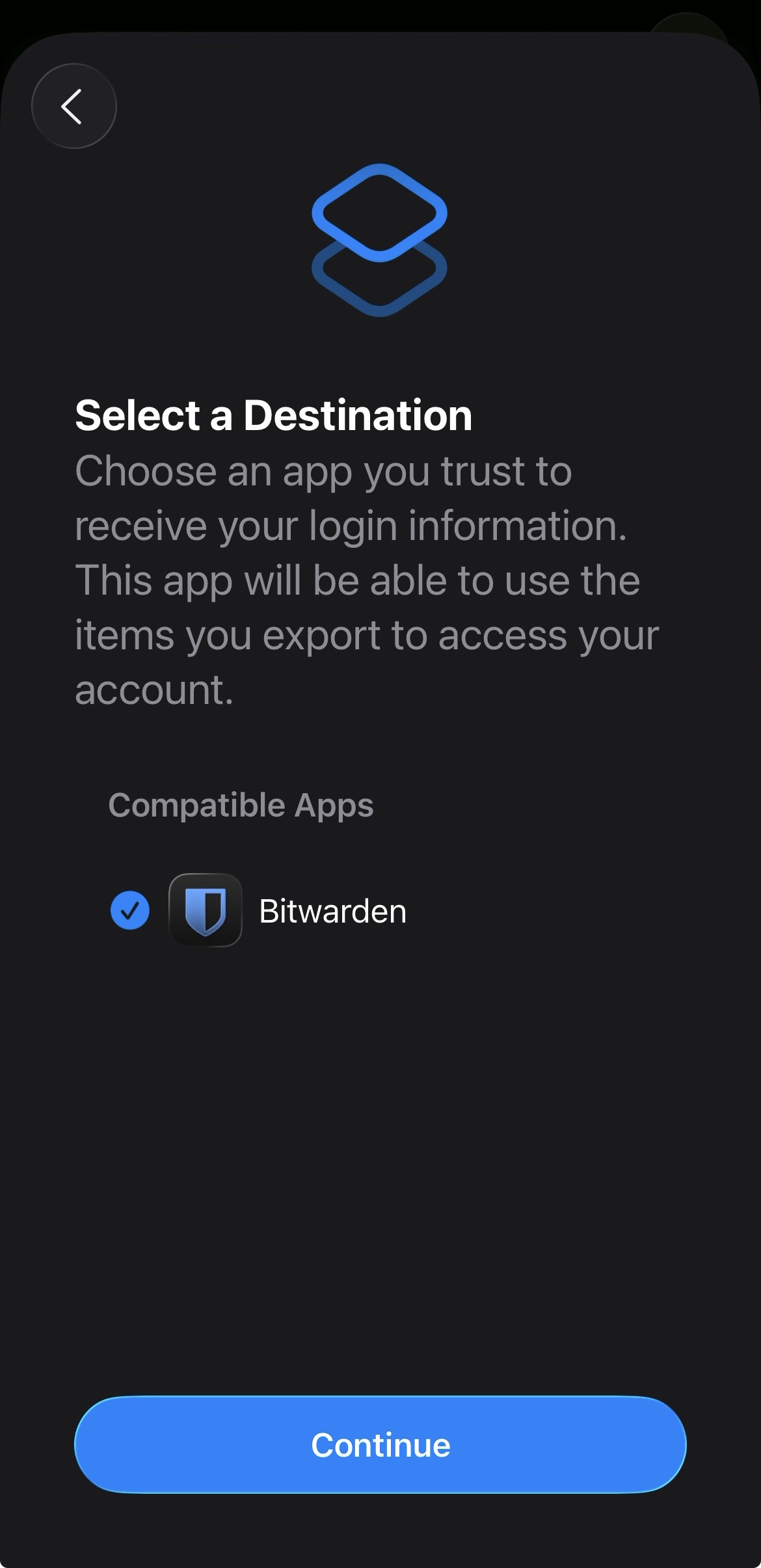
Add proper support for importing passwords from the apple ios passwords app
In the apple passwords app on ios it has a button to export passwords but the problem is that proton pass does not show up in the list of compatible apps
img: https://salty-mat.github.io/IMG_5693.jpg
In the image it only shows bitwarrden as a compatible app even though i have proton pass installed
5 votes -
Proton pass - give more details about the data breach
When you receive an alert saying that your personal information and bank account have leaked with no more information (where it's available for example) it's highly stressful because it's useless (where the leak comes from for example, so I can at least update my personal info, change my payment info, etc.)
5 votes
- Don't see your idea?