
Proton Pass & Authenticator
1084 results found
-
Generate a random alias in Proton Pass
Currently, if you want to create a SimpleLogin alias from Proton Pass, you have to manually set a name for the alias, and by default it uses the title field to generate it.
Would be great to have a button just like the SL UI that lets you click a button which generates a random alias.
Bonus if there's a drop down to that option that lets you further customise by domain.
4 votes -
A floating key permanently displayed to force the display of the Proton Pass autofill menu
This would solve the problem of autofill not being automatically offered and would allow DeX users to benefit from it as well.
4 votes -
e-wallet Import
Add imports from Illumsoft e-wallet
4 votes -
Possibility to export Data from Proton Pass to Excel
I always copy the Data from Proton Pass to Excel for getting the data on paper (print) just for security if my digital data get lost or i dont get access of different reasons
4 votes -
Isolated Vaults
Like mail second password, I think we should have the option to set a second password for each vault, preferably that second password should be used for the encryption of the vault.
Vaults SHOULD be isolated, current implementation feels more like folders. I do not get why my browser extension is fetching hundreds of records and decrypting all of them when most of them are like medical records..
4 votes -
Ignore apps or sites on mobile
There are certain apps or websites that I don't want to store passwords for.
Currently the only options on the password pop up are "No, thanks" and "Save".
If the Proton mobile apps could have a "never from this website" on the pop up and if the app settings could have a "choose apps to ignore" I wouldn't have to keep dismissing the pop up and would also solve the complaint about the save password prompt popping up for Microsoft authenticator prompts amongst other edge cases I'm sure.
4 votes -
Aging Passwords
Using Proton Pass -> Pass Monitor -> Password Health
I think it would be helpful in this area to be able to monitor the age of passwords so that passwords beyond some threshold, 1 year for example, could be indicated as a candidate to have its password updated. It seems to me that old passwords become more vulnerable when they hang around for years. Perhaps there is already some way view passwords in this way.
4 votes -
Make the "Install Proton Pass for Brave to quickly autofill your logins." popup closeable
When using Brave browser without the Proton Pass extension, you will see a permanent popup asking you to install the extension. Please add a "close button".
4 votes -
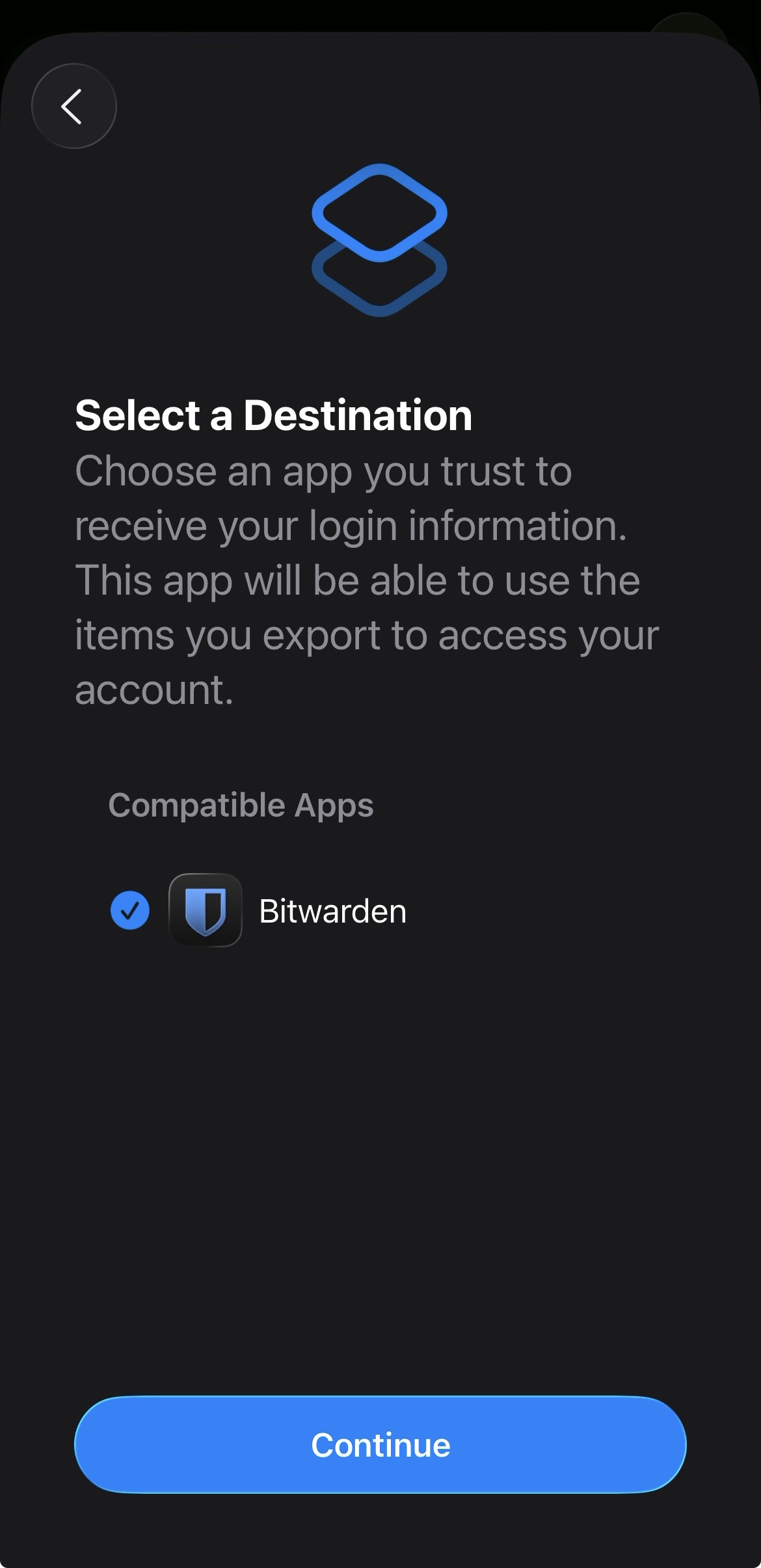
Add proper support for importing passwords from the apple ios passwords app
In the apple passwords app on ios it has a button to export passwords but the problem is that proton pass does not show up in the list of compatible apps
img: https://salty-mat.github.io/IMG_5693.jpg
In the image it only shows bitwarrden as a compatible app even though i have proton pass installed
4 votes -
Move passkeys below core information
Currently in the chrome extension, on each item card, the passkeys are displayed then username, password & TOTP. I used to be able to see username, password & TOTP without scrolling. Now that passkeys are displayed at the top, I have to scroll to see my TOTP codes.
There aren't many scenarios where you would need to manually access passkey info. The core (username, password, TOTP) info is far more frequently accessed.
By moving the passkeys below the core info, information a user needs to copy can be accessed without any additional scroll.
4 votes -
Have Proton Pass and Mail share the same structure
Essentially i would like the option to sync Vaults in ProtonPass with the Folders in ProtonMail. This way you could automatically have the same structure in both apps without having to painstakingly configure and check both of them on any change.
(Additionally this could be added to Auth assuming it gets Folders.)4 votes -
Web access for Authenticator.
I like to use Proton Authenticator, but there is a major problem for me that forces me to use another service. I often require 2FA in cases where I do not have my phone and I am unable to install applications to the computer. Ideally I would be able to access Proton Authenticator through the web, using my hardware OTP. From there I would be able to access OTP for the rest of my accounts. This issue has forced me to use a different provider for an authenticator, which I hate to do, especially since I already pay for Proton.
4 votes -
Expand the notes field in Proton Pass (MacOS)
In Edit mode, the notes field only displays 5 lines, which makes reading and scrolling through longer notes very difficult. I suggest to expand that field to at least 20 lines (or make it user-resizeable). In View mode, the notes field is more usable (with 12 lines displayed), but in view mode one cannot scroll. Consider letting the user scroll through the note in view mode. Of the two suggestion, the first is more important than the second.
4 votes -
browser restart
Another vastly popular password manager has a "lock on browser restart" option for their browser extension. Please implement this.
4 votes -
Add Hide-My-email-Aliasses from custom domain automatically to the dark web monitoring
Currently all custom domain Hide-my-email-Aliasses have to be added separately to the dark web monitoring.
It would be nice to add them automatically to the dark web monitoring when creating a new custom domain alias.4 votes -
Onetime password
Is is possible to somehow have a timebound pw for a few minutes or hour? Or even a onetime password?
So I can have this option on my main device/pass-manager, and add a one-time password that i can use when opening up my email e.g. at the library or signing into my phone that I keep set to stay logged in after that login.
4 votes -
Password Generation on the website (Android)
It would be great to have an option to change a password on mobile without leaving the website. At this moment you have to generate a password in Proton Pass. You have to copy and paste it afterwards. There could be a pop up like the one when logging in, to change the passwort. After generating, it automatically changes in Pass. Without leaving the website.
4 votes -
Improve compatibility with Orion Browser
Multiple people have been reporting that on Orion Browser (Built on WebKit, supporting both Firefox and Chrome extensions) by Kagi, Proton Pass suffers from lag and intermittently tells one that the vault is empty. Since Orion is one of the most popular privacy-focused Browsers right now, I hope Proton will put some effort into improving compatibility.
Edit: Currently, the Firefox extension works best with Orion, the Chrome extension is unusable (login fails for me, it cannot communicate with the extension)
4 votes -
Edit entries in Android app
Currently the Android app does not allow for editing the entries. I can only drag and drop the entries to change their order.
I would like to adjust at least the title and issuer.
4 votes -
Resizable sidebar
It would be useful to resize the sidebar because the names of the vaults are truncated. Furthermore, with the shared icon, there is even less space.
4 votes
- Don't see your idea?