
Proton Pass & Authenticator
1452 results found
-
Make the "generated password history" cross-plateform
Could you make the "generated password history" cross-plateform ?
Because if I generate one on my phone, and after that I check on my PC, the generated password does not appear there.... also happens the other way round.3 votes -
Make Autenticator Codes visible in App
Currently it is only possible to either see every code at once or see none at all. Please add an "eye"-button next to every code that makes this specific code visible, while all the others remain hidden.
Similar to the passwords in Pass.
6 votes -
Passwatch Import Integration support
Please add support to import passwords from Passwatch.
The current CVS file from Passwatch when imported only creates blank passwords.
In addition, Please also make a auto duplicate password detection and merge feature.
When Kaspersky no longer became available in the US, users were switched over to Passwatch. I can only add in my old passwords from Kaspersky. Later on, when I import the new passwords from Passwatch, it will duplicate the same amount of passwords needlessly. Adding this merge feature will eliminate this problem.
3 votes -
Timeout option
I would like to have the option to set a timeout on the logged in ProtonPass session. This would enable PP to log itself out without the user having to manually sign out.
5 votes -
Authenticator: Implement a security question when deleting items in the Android app
It is too easy to delete an item by accident.
So I am missing the "are you really sure" question when deleting items in the Android app - as it is available e.g. in the Windows app.4 votes -
Include Proton Authentication in IOS Auto-Fill List
As a user of Proton Authenticator, I would like to configure Proton Authenticator for auto-fill so I don't have to copy and paste.
3 votes -
Improve search results display
Searching for vault items on the android client is currently a nightmare that makes the search almost unusable as the name of items in the vault are not always fully displayed. Instead, in some instances the vault item retrieved is shortened to: ...look.com as opposed to outlook.com
Please fix this to always show the full item name in the search results.
8 votes -
Passkey Management Enhancement with search ability
When managing or confirming passkeys for a large number of accounts, there's currently no way to search or filter specific entries. This makes it difficult to navigate and manage accounts efficiently, especially for users with extensive credentials saved.
10 votes -
Please add a 'Link entries' option so duplicates auto-sync passwords when the original is updated.
Please add a ‘Link entries’ or ‘Auto‑sync on password change’ option when duplicating an entry. This would allow duplicated items to automatically update their passwords whenever the original entry is modified.
3 votes -
Add QR code as an additional field
Add QR code as an optional additional field to Proton Pass. This would allow event tickets to be easily stored and used on entry to gigs. New field could either import/scan an existing QR code or be input by typing it's text representation.
3 votes -
Implement import from UI Verify
UI Verify already has several great export options, none of which Proton Authenticator supports importing. Seeing as Proton Authenticator already supports imports from quite a few niche authenticator apps, I'd expect this to be a pretty easy implementation.
6 votes -
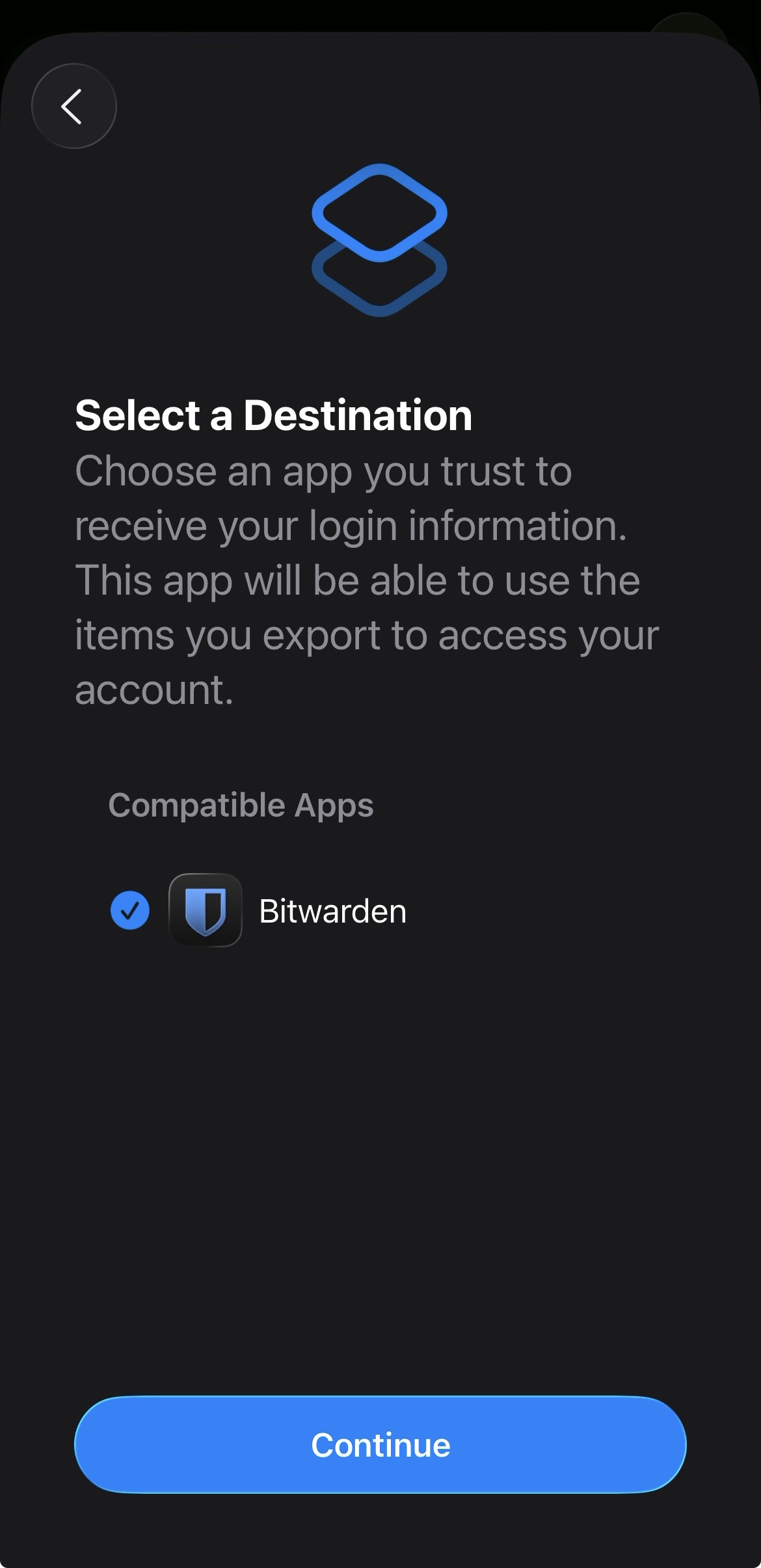
Add proper support for importing passwords from the apple ios passwords app
In the apple passwords app on ios it has a button to export passwords but the problem is that proton pass does not show up in the list of compatible apps
img: https://salty-mat.github.io/IMG_5693.jpg
In the image it only shows bitwarrden as a compatible app even though i have proton pass installed
4 votes -
Limited vault administrator
Please create a separate user role which is able to manage all vaults like an vault-owner or vault-admin, can see all items in a vault, but is not able to reveal, copy or use any hidden field like the password filed.
Would be very helpful in larger organizations where the central IT creates and manages all vaults, but should not be able to see all passwords from all users.2 votes -
Suspending User Access
I would like to have the ability to suspend a user (in Proton Business).
Currently, an admin is only able to revoke all sessions or completely delete a user, but there are situations where we'd like the ability to (temporarily) suspend a user.
2 votes -
Create reverse alias from Proton pass CLI
It would be nice to have the ability to create a reverse alias straight from the CLI instead of having to use the extension, or simplelogin interface etc...
3 votes -
Allow changed cert fingerprint for Proton pass
If the fingerprint for proton.me (cert chain) been changed. Eg many companies unpack and repack the tls packages and self sign the packages before sending it to the client.
It is great that Proton pass notice this, really awesome, maybe the only password manager that check this?
However instead of just hang the win-app, perhaps ask the user if this is OK and allow it. I mean there is a valid root cert in the store that is approved by me.2 votes -
Allow Proton Duo account holders to share a vault in Proton Pass
Allow a vault to be shared between Proton Duo family members. We used this is Lastpass. There was a shared folder which allowed the admin to move a password entry into which gave the other user read only access to that password.
3 votes -
Proton Pass/Authenticator as UI for TOTPs stored in Yubikeys
I would love to use Proton Pass (or probably Authenticator would be a better fit?) to generate the TOTPs instead of the yubico app, while keeping the secrets on the yubikey.
3 votes -
Disable saving Authenticator keys
Hi!
ProtonPAss offers saving 2FA/MFA Authenticator keys on my Android phone, which is pointless. Can you add some detection logic to skip offering password/key saving inside Authenticator app?3 votes -
Search results should show count for results from other vaults
Way too often, I will search for a password, only to end up with no results, or otherwise feel like my passwords are missing. This creates panic, but the real issue is I had a vault selected (which wasn't the vault containing the item I was looking for). I've talked to other users and they have also experienced this.
I see this as an easy fix: at the bottom of the search results, it should say something like "and ## additional items in other vaults. [search all items]"
I've experienced this on mobile (android), desktop (mac), and browser (chrome).
3 votes
- Don't see your idea?