
Proton Mail & Calendar
2292 results found
-
Android: Always display emails in light mode while keeping the app in dark mode
Please add a setting to control the email content theme independently from the app theme on Android.
I would like to keep the app interface in dark mode while always displaying email content in light mode, preserving the original colors and formatting.
The existing “View message in light mode” option requires manually switching each email. Please allow users to make this the default for all emails.
1 vote -
Adding moon phases and equinoxes and solstices to Calendar
I would like to see moon phases represented on calendar by a moon icon, or by the four major phases, perhaps. I would also like to see Equinoxes and Solstices (or Spring begins, Summer begins..., etc.) represented for everyone in their respective regions /countries.
7 votes -
Allow increase of tiny composer font size in iOS app
The composer font size in the iOS app is tiny and there is currently no way to increase the size. Changing font size in the per app settings under accessibility (in iOS) has no effect (it increases the font in the UI, but not in composer). This makes the iOS app next to useless for actually writing emails for anyone with any level of visual impairment, or just poor middle-aged eyes. Right now the only option is to compose emails in the Notes app and paste them in. Please fix this! It's a basic accessibility issue that discriminates against the…
7 votes -
Calendar Booking page for teams
A booking page for teams checks the availability of several of our employees.
There should be two options:
a) All team members must be available at the scheduled time. The appointment is scheduled for all employees and the client. Example: There is a dedicated team that works with a client. The client would like to schedule a meeting when all of our colleagues are available.b) At least one team member (any member) must be available at the scheduled time. The system automatically selects an available employee and schedules an appointment for them and the customer. Example: A customer needs…
4 votes -
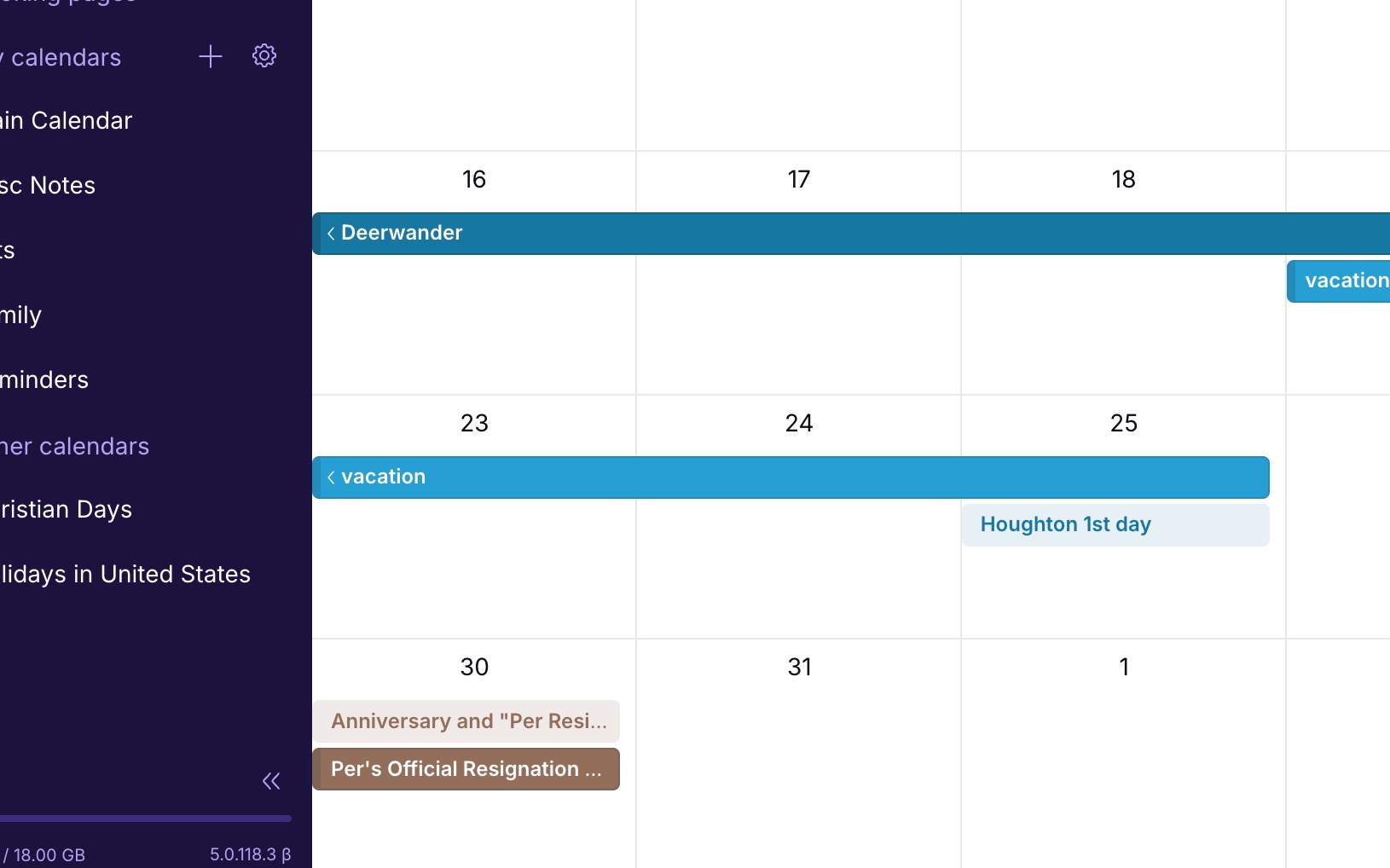
Calendar event color option for light/non-bold events
Currently all the color options for calendar events are dark/bold blocks. There should be a toggle to make each of these colors a light-block or non-bold-block. I would like some of my events/calendars to be much less visually strong than some others. Simply applying the bold color to the text adding transparency to the background color, would give this effect.
Here's an example: https://jakeparis.com/wp-content/uploads/2026/06/Screenshot-2026-06-16-at-12.54.10-PM.jpg
2 votes -
newsletter view, option to disable for email domain/address
I regularly look in the newsletter view and have to choose under the dot-menu for the option to remove the message from the newsletter list.
But the next newsletter from that same domain will again end up in the newsletter view.A lot of the newsletters i see, i do not keep (delete) after i read it.
But i do want some/most newsletters to keep coming, so i do not want to Unsubscribe these letters.It would be nice to have an option in the menu (or as button) to acknowledge the newsletter in the newsletter view, but never see…
3 votes -
Block email tracking via whitelist/blacklist to enable/disable per domain/email address
The option to block email tracking (settings -> All settings -> Email Privacy -> Block email tracking) sometimes screws up the layout of some emails.
These emails also get some layout from there own website and then this layout is blocked as if it is tracking info (and it might be).But if i disable this option, i disable it for all mails and not just for a few domains/addresses and that is not what i want. I want to keep for almost all emails the blocking active.
It would be nice if i read a mail that is screwed…
3 votes -
Having a button to archive an email while we are reading it without having to click on « Move to » or « … »
On iOS, when I read an email I most often want to archive it but I have to do it either through the « Move to » menu or through the « … » menu. It would be useful to have the archive button right there alongside the « Mark as unread », « Trash », « Move To », etc., buttons at the bottom of the screen when reading the email.
3 votes -
Timer to delete notification emails after # of days since they arrived.
When creating filters I'd like to add a timer to run it. For example, when I get a certain email automatic notification wait 7 days or 30 days then delete it.
Maybe you can create an automatic category where all notification emails will be automatically marked with a timer to then be move to trash. In trash they have another 30 days until permanently deleted.3 votes -
reconcile differences between proton contacts and google contacts
I have used the import feature to bring contacts from google contacts into proton contacts. I still need google contacts for phone calls, however. The issue is that when a contact changes, I have to update both locations.
I'd like to suggest adding a reconcile differences feature that could compare the 2 contact lists, and allow the user to merge/edit differences.
13 votes -
Use Proton Calendar (on iOS) without signing in
I would love to be able to use Proton Calendar without signing in, just as a simple phone calendar for reference.
I use my smartphone like a dumbphone and I do not need a logged in calendar with synced events. I just need and want a simple private local calendar.
1 vote -
Support BIMI & Gravatar similar to Fastmail
It is much easier to thumb through emails using Fastmail since most emails have an avatar. Proton only uses favicons which either don't show up or are low quality, even with popular domains like Google. Instead, Proton should use BIMI logos or Gravatar when they are available, then fall back to favicons when it's the only option. Since some people might have privacy concerns with Gravatar, that should be optional or it can be routed through Proton's servers similar to how they do with favicons.
1 vote -
Truly native macOS app instead of an Electron-based one.
The recent release triggers a Keychain access prompt every time the app launches. Loading an entire browser-based runtime feels unnecessarily heavy, especially on Macs with Limited Memory.
A native app built with Swift and AppKit could offer better memory efficiency, faster startup, and deeper integration with macOS features like Keychain. For a company focused on privacy, a lightweight, well-integrated native app would also inspire greater confidence in the overall user experience.1 vote -
"Upcoming Birthdays" Widget from the Proton Mail App
Currently, the highly requested feature of integrating contact birthdays into the calendar seems delayed, likely due to the technical complexities of Zero-Access Encryption and syncing data between the Contacts and Calendar backends. However, a dedicated client-side solution could solve this issue efficiently for mobile users.
Since the Proton Mail app already decrypts our contacts locally on the device to display the address book, it has access to the birth dates in plain text. My proposal is to build an "Upcoming Birthdays" widget for Android/iOS that is directly tied to the Proton Mail app.How it would work:
Instead of building…4 votes -
Proton Mail & @duck.com email integration.
I route emails to proton mail via @duck.com email. This strips out all trackers and simplifies the email address. However, when I wish to write a new email, I have to use the email format 'recipientatdomain.com_yourduck@duck.com' in the ' sending to' field. I would like to have an option to put this into my proton mail settings once, and have the option to select this method as preferred routing. This does not have to be specifically for duck.com.
2 votes -
email newsletter software
I would like to be able to use Proton Mail as my news letter software. Replacing programs like Mail Chimp and Brevo
A group would have to have up to 1000 contacts in a group.
2 votes -
Rearranging Calendar Items
I'm a Proton Calendar user and I'd like to suggest a feature that would greatly improve the usability of the calendar: the ability to resize events by dragging their edges directly on the calendar view, without having to manually edit the start or end time.
Most mainstream calendar apps (like Google Calendar) support this, and it makes scheduling much faster and more intuitive — especially when rearranging a busy day.
I hope this is something you'd consider adding in a future update. Thanks for building a great privacy-focused calendar!
Best regards
5 votes -
Please make Proton Scribe available in Android
Please make Proton Scribe available on Android. Paid users deserve the same experience on mobile they current have on Web and Desktop.
1 vote -
Encrypt More Calendar Details
Currently Proton Calendar does not end-to-end encrypt the Title, Colour and Description of the individual calendars inside the Proton Calendar app. I think this is a risk in regards to privacy, since with the names of the calendars and the times of the events in those calendars one can reconstruct a lot about a single person. I think it's in the interest of Proton to also end-to-end encrypt the information of the individual Calendars themselves.
4 votes -
Automatic alphabetical sorting of folders and subfolders
Hi! It's a waste of time to go and click on the sort button. It would be so ùuch easier if the sorting could be automatic. And we would have the choice between automatic and manual.
15 votes
- Don't see your idea?