
Proton Mail & Calendar
- or
No existing idea results
- ~ No ideas found ~
2327 results found
-
2 votes
-
Android auto integration
I want the calendar app to display my events in my car, and be able to click on event to launch navigation to its address.
9 votes -
Creation of shared inboxes
I would like to create shared inboxes to use together with other Proton users. They should have a seperate email address that can't be used to login, but can be seen when logged in to the personal account.
The inbox should be sharable, so I can share it with anyone with a Proton account. If one of the users that the inbox is shared with has a paid account, these features should be available for the shared inbox as well :)
25 votes -
Enforce Username Privacy via Primary Email Address Lockdown
As a Proton mail user,
I want all incoming mail sent to my primary Proton username (email address) to automatically bounce back to the sender as "undeliverable" (as if the account does not exists), unless the email originates from an official Proton mail domain,
So that I an keep my primary account username entirely hidden and free of clutter, forcing all external correspondence (i.e. everything except for official Proton correspondence) to go through my managed aliases or Proton Pass aliases*I understand I can have something similar by creating a custom Sieve with reject or discard, but it is not the same as having Proton at the mail gateway level automatically reject all non-official-proton mail (i.e. a hard bounce; which in effect unlike the Sieve implementation would lead a sender to believe the email address does not exists)
**This problem in part exists because proton usernames by default have an email addresses with the same username linked to them (if this were not the case then this feature would not be needed because there wouldn't necessarily be an email address that matches the given username)
***There must be strict whitelisting if this feature is implemented: Emails from Proton administrative, billing, an system alerts) should bypass this block and be delivered.
****The feature could for example be modifiable to allow emails from other proton users (i.e. proton.me, protonmail.com, proton.me, etc.) if the user chooses, which would bypass the block for them but reject any mail from any non-proton domain
As a Proton mail user,
I want all incoming mail sent to my primary Proton username (email address) to automatically bounce back to the sender as "undeliverable" (as if the account does not exists), unless the email originates from an official Proton mail domain,
So that I an keep my primary account username entirely hidden and free of clutter, forcing all external correspondence (i.e. everything except for official Proton correspondence) to go through my managed aliases or Proton Pass aliases*I understand I can have something similar by creating a custom Sieve with reject or discard, but it is not…
5 votes -
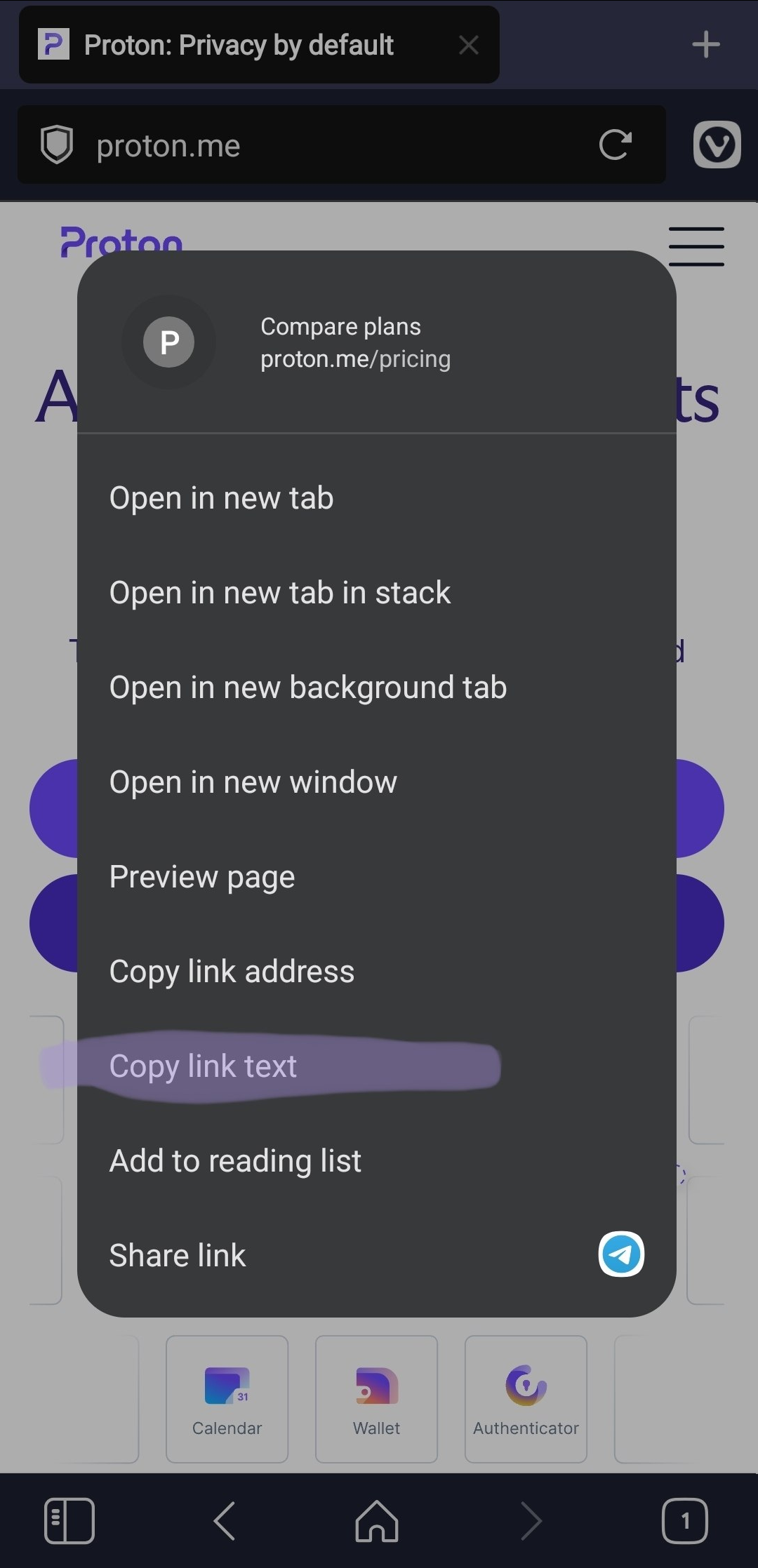
Add an option to copy link text
Add an option to copy the visible text of a link when right-clicking it.
This is useful because selecting anchor link is difficult or impossible.
Real behavior https://i.ibb.co/fV1YWBx8/image.png
Expected behavior https://i.ibb.co/qL6ZRHrT/image.png5 votes -
sort inbox by oldest first and by sender in android
I would like to see options for the above in the Android app. I don't like threads, and want to be able to catch up with older information before reading newer email. I like that I can work that way in the Windows app, but get frustrated when using Android.
2 votes -
What happened to the mail notification counter for the task bar?
As i see, this question came up already, but the feature didn't return. A small counter number in the tas bar's icon would be nice again.
2 votes -
Add email or domain into sorting categories (Or is it available and I didn’t find it)
I love the new feature of sorting emails, and I wonder if there can be feature to add a specific domain or email into a category. Would that be something possible? Or already existing?
2 votes -
search results in mail should have columns for folder and kategorie.
search results in mail should have columns for folder and kategorie. one should be able to sort and filter by these with a mouse click
2 votes -
Remind me if no reply
I frequently send emails where I need to follow up at a later time. An example might be boarding passes for a flight, or a thread that will be relevant when I meet a particular contact on a certain day.
Boomerang for Gmail does this well. I can schedule an email to return to my inbox at a given time. But what really makes this useful is that I can define a condition in some cases. "If plumber does not respond within two weeks, THEN return this email to my inbox" or better yet "If plumber does not respond within two weeks, THEN send this follow-up email that I've drafted."
This feature is critical for me to migrate to a new email platform, as it is highly potent for productive workflow.
I frequently send emails where I need to follow up at a later time. An example might be boarding passes for a flight, or a thread that will be relevant when I meet a particular contact on a certain day.
Boomerang for Gmail does this well. I can schedule an email to return to my inbox at a given time. But what really makes this useful is that I can define a condition in some cases. "If plumber does not respond within two weeks, THEN return this email to my inbox" or better yet "If plumber does not respond within…
455 votes -
Increase attachment size
The 25M limit on attachments, I get from a server load perspective, but it sucks as a user. Every time I grab a video clip these days the codecs create enormous files and even when you trim them the frame rates and resolution are always too high to create something under 25M. That cap should really be raised because I can't use proton whenever I need to get something like to someone else.
6 votes -
Which Email Migration Software Is Suitable for Business Users?
Business users generally need email migration software that can handle multiple accounts while keeping mailbox data organized. Important considerations include bulk processing, mailbox mapping, folder structure, attachments, filtering, and migration reports. Support for different email platforms is also useful when an organization is moving data between services or consolidating mailboxes. For these requirements, Aryson Email Migration Software can be a practical option to consider. It supports bulk migration and CSV-based mailbox mapping, which helps manage multiple accounts during a migration project. Depending on the selected source and destination, it can also migrate emails with attachments, contacts, calendars, metadata, and existing folder hierarchy. Preview capabilities allow users to review mailbox data before starting the migration. When comparing email migration software, it is useful to evaluate the migration sources, destinations, and controls offered by each solution. Features such as date and item-type filters, duplicate removal, incremental migration, and detailed reports can be valuable for business projects. Reviewing different email migration approaches beforehand can also help organizations select a method that fits their mailbox size and migration requirements.
Read More: https://www.arysontechnologies.com/blog/best-email-migration-tools-and-services/
Business users generally need email migration software that can handle multiple accounts while keeping mailbox data organized. Important considerations include bulk processing, mailbox mapping, folder structure, attachments, filtering, and migration reports. Support for different email platforms is also useful when an organization is moving data between services or consolidating mailboxes. For these requirements, Aryson Email Migration Software can be a practical option to consider. It supports bulk migration and CSV-based mailbox mapping, which helps manage multiple accounts during a migration project. Depending on the selected source and destination, it can also migrate emails with attachments, contacts, calendars, metadata, and existing…
1 vote -
Improve Android Tablet and Desktop Resizability
Please improve proton android apps to support Android Tablets, Android Desktop, Chromebook and Googlebook. https://developer.android.com/about/versions/17/changes/ff-restrictions-ignored
3 votes -
Allow event colours to be transferred to all users in a shared calendar
When a user in a shared calendar changes the colour of an event, there should be an option to change the colour of that event for all other users.
It means I would be able to create one shared calendar with lots of different event types, rather than lots of different calendars with different colours.
It could come in the form of an option under the calendars settings. "Allow users to change event colours" etc...
6 votes -
Calendar Reminders/Tasks with Checkboxes
Adding a task checkbox to an individual calendar item that can be viewed in day/week/month views and activated in agenda would greatly help to manage and track task-based items like financial dates each month, similar to how Apple reminders works with repeating tasks, only incorporated into the calendar.
430 votes -
Please stop enabling new UI features by default – and let us hide the Unread button
I would like to see two changes in Proton Mail:
Allow users to hide the permanent “Unread” button at the bottom of the mobile app (Android). I don't need it, especially when it constantly shows “Unread 0”, and it unnecessarily takes up screen space.
Don't enable new features such as Email Categories by default. I never asked for categories and didn't want them, yet they were automatically enabled and I had to spend time finding the setting to turn them off.
One of the reasons I use Proton is that I prefer software that respects user choice. Automatically enabling new features and making users search for ways to disable them feels too similar to the approach increasingly used by Windows, Google and other large platforms: introduce something as the default and make the user opt out.
Please make new features opt-in where possible, or at least ask the user when introducing them.
And please give us more control over the interface, including the option to hide the Unread button.
I would like to see two changes in Proton Mail:
Allow users to hide the permanent “Unread” button at the bottom of the mobile app (Android). I don't need it, especially when it constantly shows “Unread 0”, and it unnecessarily takes up screen space.
Don't enable new features such as Email Categories by default. I never asked for categories and didn't want them, yet they were automatically enabled and I had to spend time finding the setting to turn them off.
One of the reasons I use Proton is that I prefer software that respects user choice. Automatically enabling new…
3 votes -
Sub-accounts to not show emails sent to any other account
When I log in using a sub-account name all of the emails from the default parent account are shown. Can logging in using a sub-account show only emails sent to that sub-account email address please. This is requested for security reasons, wanting only a sub-account to be used on my mobile so if someone accesses the device they can't view emails sent to any of the other parent/default or sub-account email addresses. Ideally sub-accounts would have their own passwords, too.
4 votes -
Option to remove mail counter in conversation view
The current view of emails in the inbox shows a small counter of emails in the conversation like this:
[5] subject of the message
Allthough it is sometimes interesting to know how much emails a conversation has, most of the time this counter is visually distracting and creating too much noise for me.
It would be best to have an option for deactivating the counter.
Thanks and keep up the good work!
Martin5 votes -
show business logo in all Proton apps
Right now the business logo is only visible when accessing Proton via the website, it would be nice having the business logo on all apps from the Proton Workspace.
3 votes -
Enable filtering, or sieve filtering, on Labels
User Story: As I process my INBOX, adding Labels to categorise my emails, I want a filter to be triggered manually or recurrently, which take certain actions on the emails in the INBOX, based on how I have manually - or automatically - labelled those emails.
This was possible, using a client like Thunderbird, against an IMAP server - maybe 7 years ago; it was frustrating to realise, that this was not at all built into the web GUI and server implementation of proton email.
I've tried sieve filters, ex.
if hasflag ["labelname", "\\labelname", "Labelname", "\\Labelname"]in the filter, and have applied the label "labelname" to the emails - but obviously hasflag has nothing to do with labels or folders, nor is there anything in the documentation hinting on how to create a filter that reacts on a specific folder or label.- Since flags are part of sieve RFC, could that be used to do server side filtering on tags implemented as IMAP4 flags; or is the issue here the risks of server side cyclic filter implementations?
It would be nice to have this feature on the server side, so that we could use it across platforms - ie. a user can tag stuff with labels from a handheld device, using the proton mail client application, and it would work the same way as on a laptop with another mail client; noted that thunderbird is available as a mail client on android systems - ill get back to this idea if I find a solution working for this use case.
User Story: As I process my INBOX, adding Labels to categorise my emails, I want a filter to be triggered manually or recurrently, which take certain actions on the emails in the INBOX, based on how I have manually - or automatically - labelled those emails.
This was possible, using a client like Thunderbird, against an IMAP server - maybe 7 years ago; it was frustrating to realise, that this was not at all built into the web GUI and server implementation of proton email.
I've tried sieve filters, ex.
if hasflag ["labelname", "\\labelname", "Labelname", "\\Labelname"]in the filter, and…3 votes
- Don't see your idea?