
Proton Mail & Calendar
965 results found
-
Enhanced filter and newsletter management
Someone already suggested dynamic filter creations and it's an amazing idea. I want to expand it and suggest something similar for newsletters.
The pop-up saying "This message is from a mailing list should include 3 actions, and after one is selected, the pop-up should never appear again for that newsletter:
- Accept
- Unsubscribe
- Filter (this prompts the user to select what to do with these emails like in the filter creation flow and automatically creates a filter for the newsletter)7 votes -
Move Multiple Messages Simultaneously
For better organisation it would be useful to be able to move multiple messages (in a single conversation) to another mailbox by selecting the "Move to" function in the highest message in that conversation.
Unless anyone can tell em otherwise this does not appear to be the case at present.
3 votes -
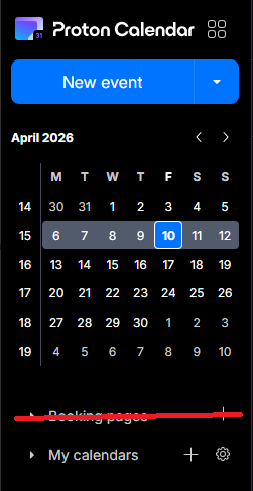
Booking Page - Disable feature altogether
The booking pages form a great feature for business users, but seeing as I use Proton as my personal account, I now have a permanent button to a feature that I don't use - and thus - have a cluttered calendar. I would prefer if I was able to disable the booking pages feature altogether, via the integrations settings, for example.
3 votes -
Option to disable email notifications when editing events with guests
Currently, editing any detail of an event with guests (even minor typos or description tweaks) forces an email update to all attendees. This creates unnecessary noise and inbox clutter.
Request: Add a checkbox in the edit dialog: "Send update to guests" (default: checked).
- If unchecked, save changes silently without emailing attendees.
- Essential for correcting typos or adding minor notes without spamming guests.
Why: Other calendar tools allow this granularity. Proton Calendar needs a way to distinguish between major changes (requiring notification) and minor edits.
Thank you,
Regards2 votes -
Waytime
Waytime - Please… add to the Time - Waytime like Apple or others do.
2 votes -
Auto-spam emails from unsubscribed lists
It'd be nice if it were possible to automatically flag as spam any email from a distribution list for which I used Proton Mail's "Unsubscribe" feature to remove myself from the list. The idea is that if the list owner is not going to honor unsubscribe requests, and since I already indicated that I do not want to receive those emails, then the emails from that list are spam and should be treated as such. An automatic method to take care of this would be handy.
2 votes -
Move calendar events
I know this is an option on the web version but on the IOS/mobile apps we NEED to be able to drag and drop events without having to open them and reselect the date or time. This is a critical feature for any functioning calendar app in my opinion.
8 votes -
incremental download
Allow email download to begin at a certain date and time. I back up my email every month. It's not really necessary to download the entire thing every time.
2 votes -
Inbox view - dislpay most recent label
The inbox view currently displays the top-most label in the hierarchy of labels if an email chain has more than one label. It should display the label assigned to the most recent email, the one actually displayed in the inbox view. The one relevant to the email entry right next to it. For example the most recently received email has a label L but previously there was a label A assigned to one of the past emails from the same sender. Label A is displayed incorrectly where a more recent and more accurate label L should be showing. Label A…
2 votes -
Auto-delete unwanted messages options
Would be useful to enable auto-delete only for trash or spam separately, and being able to decide the number of days to wait (at least among a list of presets)
3 votes -
Self-destruct multiple emails
Currently, the self-destruct option can only be selected for each email individually. It would be really useful to be able to select multiple emails and choose a self-destruct time for all of them.
5 votes -
conversation thread
could we have a way to follow thread that makes the multi-persons conversation obvious with some indentation? I found the present all in the same group confusing. I had to revert back to Thunderbird to have a clear idea of who answered to whom.
10 votes -
Allow moving sent email to inbox
The same as Gmail allows, I want to be able move a sent email to my inbox after sending. This is a highly common activity if you want to check in a few days that someone has responded to your email and not forget about it. It's not possible currently without the suggested features. There is currently a 'mark as unread' feature, but that doesn't put the email in your inbox, so you'll never check it again.
8 votes -
Ability to print a daily, weekly, monthly calendar
I "voted" for the development as a "Critical" feature but wanted to more fully express my dissatisfaction with the continued delay in activating this functionality. I happen to be a mail app user that frequently needs to print a hardcopy of the day's/week's/month's calendar. The fact that I STILL cannot do this in ProtonMail is beyond frustrating-seems like a relatively basic ask. C'mon team!
3 votes -
Filters to apply to existing messages when a flag changes
Add flag changes as a trigger for filters. For example when an email is marked as read, check if a filter is applicable and then process it. Other triggers could be applying a star or manually applying a label.
If the server load would be heavy, it could be set up as an up to 24-hours until the filter will apply to spread the load.
My pipe dream for my Proton (and work) mailbox is for all mail to land in my inbox and be filed away automatically into a folder after i read it
3 votes -
Increase the cap on address deletions for paid users and display clear UI about cap limit
There is a very strict cap on how many and how often addresses can be deleted. As a Mail Plus customer, I get 10 addresses in total - which is a solid value - but I can apparently only delete one every year (?) or so. The actual cap limit is not published - the app simply fails with an error when try to delete a second address "too soon".
I understand why deleting addresses is strictly capped: to prevent abuse, and it also appears to be a technologically somewhat expensive, plus that address is now forever unavailable to anyone.
…
5 votes -
Can I just point out that the mail export function is unwieldy and doesn't work properly.
Just a thought. It's not a priority but I had occasion to want to back up my Protonmail emails yesterday, and I don't know whether you've tried it, but it's an unnecessarily convoluted process involving downloading an EXE, then typing a bunch of stuff into the terminal. Due to there being no cursor, I had to go back in and turn off 2FA and change my password to something siimple so I could get it to work. After which, it crashed twice and I eventually gave up. I'd like to think it should be easier just to download a load…
1 vote -
Allow labels to be marked as current or archived
Basically, I have a lot of labels from an old project that aren't applicable anymore. I'd like to mark them as 'archived' so I can still search on them, but they won't be an option to apply to new items anymore. With too many old labels the list is very long. By archiving some this list well be much easier to scroll through.
3 votes -
Customize Side Panel in Mail
I would very much like to hide a couple of the elements in the Proton Mail side panel. I would like to be able to hide "Views" and "Folders" as I don't use them and they just take up space.
At the very least, it would be nice to have the option of moving them to the bottom so the Labels element (which I use a lot) is higher in the left panel.Thanks!
8 votes -
Allow custom accent colors for individual email accounts in the Android app
Currently, when multiple accounts are logged into the Android app, they are distinguished only by email address and a predefined color. Having multiple accounts yields in my case to random colors, three having the same color, one having another color.
Users cannot assign custom colors to specific accounts to make visual identification easier.
Please add an 'Account Color' setting in the Android app's account settings, similar to what is available on iOS (if it exists there) or web, allowing users to pick from a palette to distinguish their accounts.
3 votes
- Don't see your idea?