
Proton Pass & Authenticator
1438 results found
-
Proton Pass: Have a separate section for vaults that is hidden with a pin.
A private folder in the vaults list, that has a different pin lock on it. (Would be used for people who share computers.)
6 votes -
Add Authenticator to Proton Unlimited bundle
Is there plans to add Authenticator to Proton unlimited?
2 votes -
Force passkey interception
Now, if proton pass is lock, proton extension will not catch the passkey request.
I see someone ask for no interception at all
I think the default behavior is important (catch if proton is unlocked, else let OS manage)
But add a 3rd option to always catch passkey and prompt to unlock the extension29 votes -
Aging Passwords
Using Proton Pass -> Pass Monitor -> Password Health
I think it would be helpful in this area to be able to monitor the age of passwords so that passwords beyond some threshold, 1 year for example, could be indicated as a candidate to have its password updated. It seems to me that old passwords become more vulnerable when they hang around for years. Perhaps there is already some way view passwords in this way.
4 votes -
Reorder Items When Creating/Editing New Login
When creating a new item such as a login, note, etc, or editing an existing item, it would be helpful to be able to reorder the default and custom values. Right now, if I put in recovery phone and recovery email, and then later decide I want the email to be above the phone, I have to delete the phone and re-enter it in order for it to be below the email. If I had other items under the email, I would have to delete and re-enter more information. This is less than ideal. Better organization options would go a…
10 votes -
accessibility
Accessibility! It's 2025, modern products should have (keyboard) accessibility. Especially for the Authenticator app, it should not be too difficult to build in that you can just go to the search box with Cmd+F / Ctrl+F, type, hit enter or Cmd+C/Ctrl+C and be done!
9 votes -
linked passwords
Ability to link the password from an entry to different entries that, maybe, differ for the username structure.
I'm referring to different services (firewall, exchange server, web application) that use, for example, ldap (same user and same password) but with different username format (username, domain\username, username@domain.tld).
Changing the user password would result in a single entry change (the base entry) in Proton Pass.
All the other entries would inheritate the new password.14 votes -
Suggest existing aliases as a username when creating a new login item
When creating new login item, Proton Pass only suggests my primary email as a username. I think it should provide a searchable list of all my existing aliases. Most often, when creating new accounts, I want to use one of my aliases instead of my primary address.
I know I can do it the other way around and start by creating the login item, and in that process tap the "Hide my email" button for creating a new alias. But there are situations in which the alias I want to use already exists. And people using the free tier probably…
6 votes -
Proton pass does not seem to auto-populate pages/apps on Samsung Galaxy Tab S10+
Proton pass does not seem to auto-populate pages/apps on Samsung Galaxy Tab S10+
Norton password manager fails also...4 votes -
Please add the option to import the SafeInCloud.xml database from the "SafeinCloud" password manager
Please add the option to import the SafeInCloud.xml database from the "SafeinCloud" password manager
13 votes -
Clear Search box when selecting Filter Vault Items
It is great that when I'm filtering on logins I get the current site selected by default. Super hel\pful. BUT when I want to use a credit card and I choose Cards, the box stays filled and so no cards show. I always then have to click the little x to clear the box so I can see my cards. Same for other valut filters too like Notes. Can you please make changing of the filter type clear the selection box if it's not logins. Cheers!
3 votes -
Paste images in the note
I want to get rid of OneNote and a good start may be to be able to copy images or printouts into Proton Pass Notes directly.
3 votes -
Make the "Install Proton Pass for Brave to quickly autofill your logins." popup closeable
When using Brave browser without the Proton Pass extension, you will see a permanent popup asking you to install the extension. Please add a "close button".
4 votes -
Android widget for autofill
It would be good to have a widget, so thst we can click & it would automatically fill the field with the appropriate password. Would also be wonderful if this could be applied to authenticator as well.
2 votes -
Autofill on android browser
I am unable to autofill on brave browser on android. No popup or anything appears.
7 votes -
Add proper support for importing passwords from the apple ios passwords app
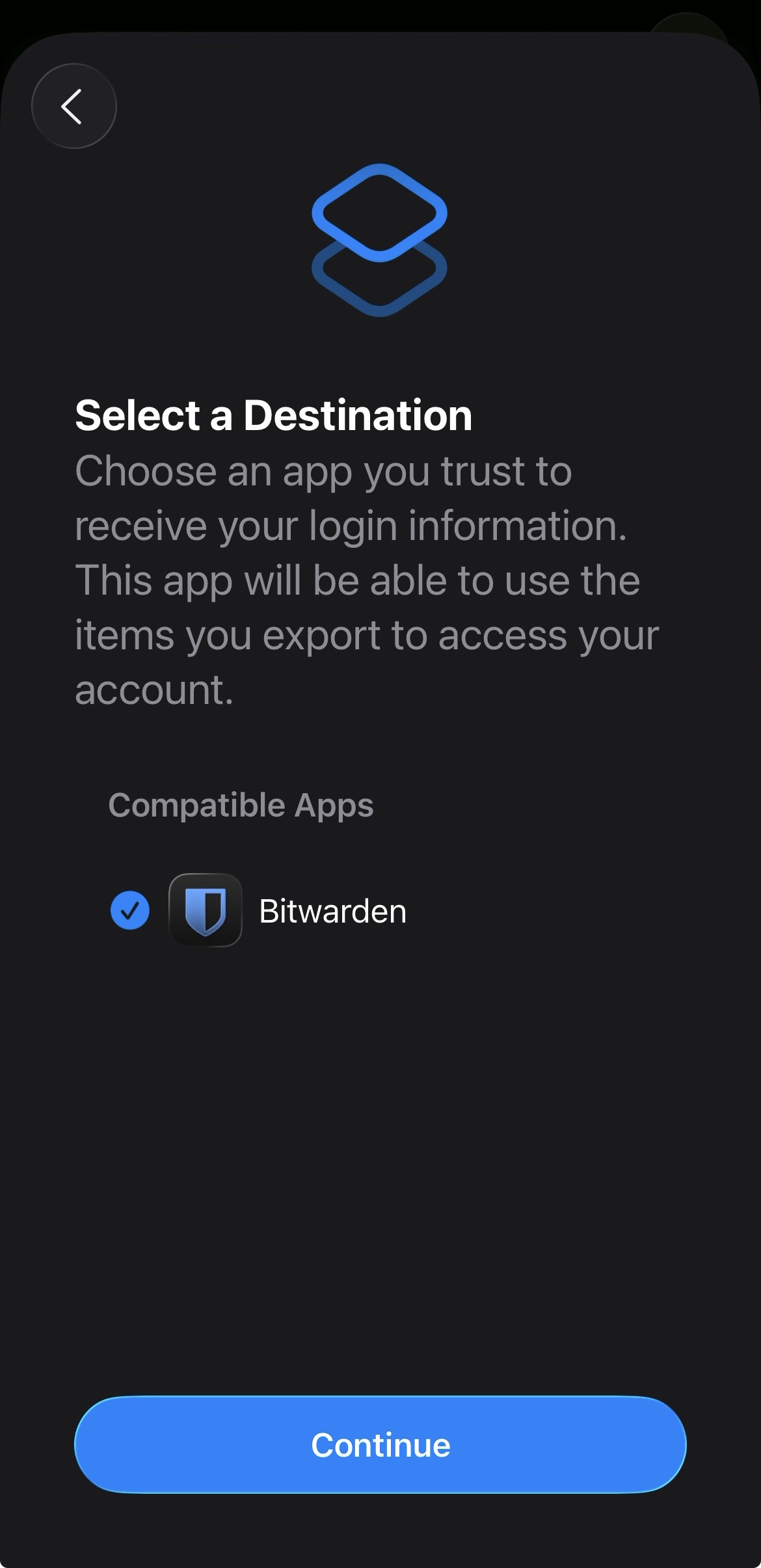
In the apple passwords app on ios it has a button to export passwords but the problem is that proton pass does not show up in the list of compatible apps
img: https://salty-mat.github.io/IMG_5693.jpg
In the image it only shows bitwarrden as a compatible app even though i have proton pass installed
5 votes -
Add Additional Family Members to Proton Pass Family
For families with more than six members (we’re a blended family with over five children between us), it would be great to have the option of adding an extra licence or two at a proportionate, discounted rate to the family plan.
I’m not expecting this to be free — I’m more than happy to pay the proportionate cost.
What are Proton’s thoughts on this?Thanks
8 votes -
Proton Pass Auto-Fill access only
Just like LastPass -- be able to share a password login, but without the recipient being able to see the actual password... they can only use it/it will autofill on their end when given permission.
SUPER important when having employees... I have to use lastpass (which isnt actually secure) bc it gives the option to share without recipient viewing passwords :/
4 votes -
Export to KeePass .kdbx
It would be really helpful if Proton Pass could export to a .kdbx compatible .csv formatted file.
10 votes -
Pin an item to the top only in its source vault
Currently, when we pin an item (alias, login, etc.), it is visible at the top while accessing any vault. This is valid behavior, but it does not cover all use cases.
An additional option should be offered to pin the item only at the top of the vault where it is located. This often helps to organize things.
8 votes
- Don't see your idea?