
Proton Pass & Authenticator
1545 results found
-
Aging Passwords
Using Proton Pass -> Pass Monitor -> Password Health
I think it would be helpful in this area to be able to monitor the age of passwords so that passwords beyond some threshold, 1 year for example, could be indicated as a candidate to have its password updated. It seems to me that old passwords become more vulnerable when they hang around for years. Perhaps there is already some way view passwords in this way.
5 votes -
Add proper support for importing passwords from the apple ios passwords app
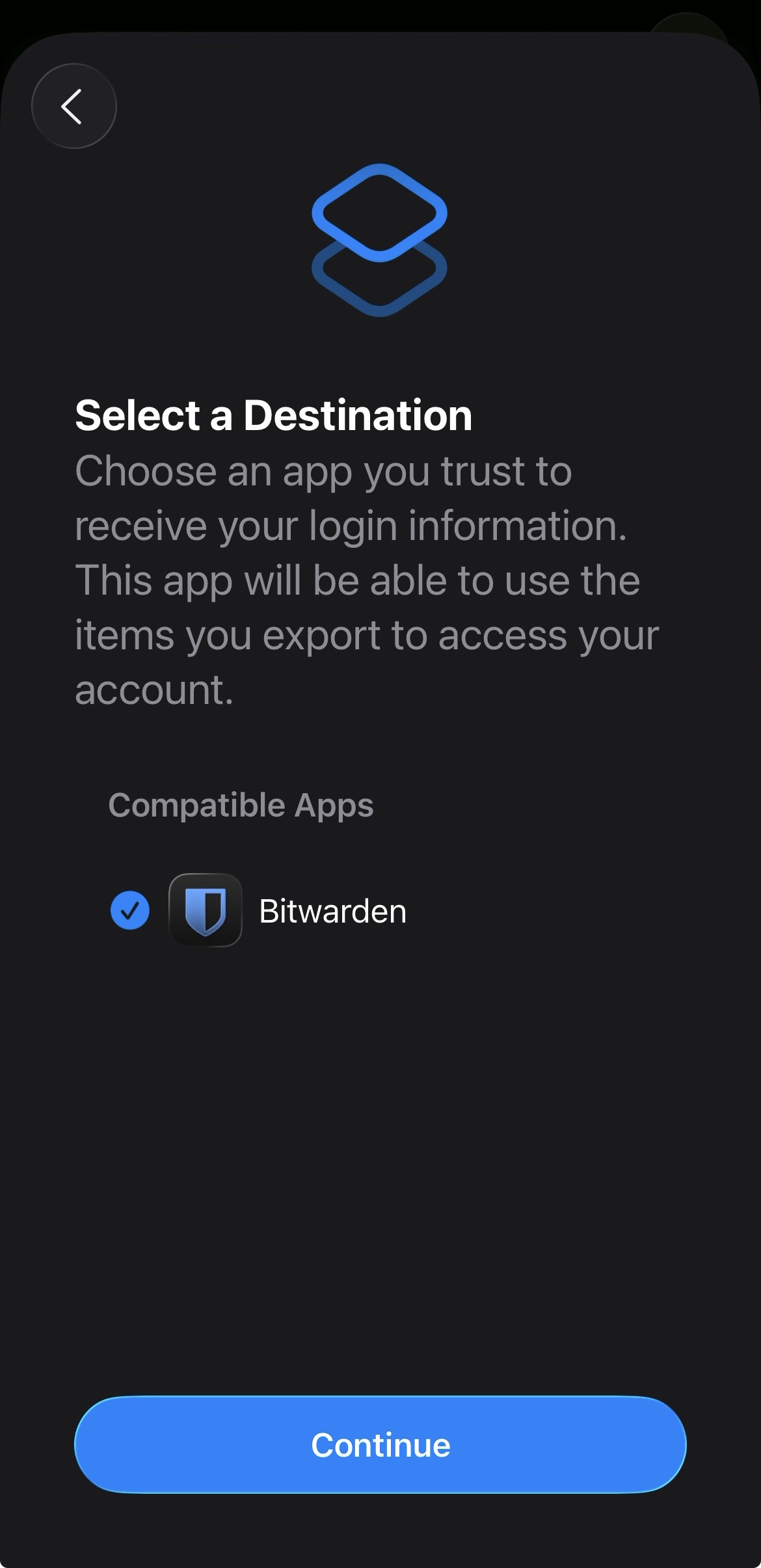
In the apple passwords app on ios it has a button to export passwords but the problem is that proton pass does not show up in the list of compatible apps
img: https://salty-mat.github.io/IMG_5693.jpg
In the image it only shows bitwarrden as a compatible app even though i have proton pass installed
5 votes -
Proton pass - give more details about the data breach
When you receive an alert saying that your personal information and bank account have leaked with no more information (where it's available for example) it's highly stressful because it's useless (where the leak comes from for example, so I can at least update my personal info, change my payment info, etc.)
5 votes -
Obscure email addresses
Add the option to obscure email addresses whereever they appear. For an example:
m*******@p*.t
5 votes -
import multi layer email folders Microsoft
Microsoft Outlook has a multilayer folder possibility. For business accounts proton it's important to be able to 1) import those ms folders, 2) create those folders in Proton mail internet and proton mail app
5 votes -
Web access for Authenticator.
I like to use Proton Authenticator, but there is a major problem for me that forces me to use another service. I often require 2FA in cases where I do not have my phone and I am unable to install applications to the computer. Ideally I would be able to access Proton Authenticator through the web, using my hardware OTP. From there I would be able to access OTP for the rest of my accounts. This issue has forced me to use a different provider for an authenticator, which I hate to do, especially since I already pay for Proton.
5 votes -
Provide a template for required data to upload any password manager export
Provide a template for required data to upload any password manager export so tat one can create a custom comma separated import file
5 votes -
5 votes
-
5 votes
-
Im visually impaired & use large fonts. Proton cuts off info, esp. action buttons on pw generate by not scaling pop up boxes
Please make Proton scaleable (“dynamic Type”) for users using larger system font sizes. Right now so much information when using Proton is cut off on my screen. It is particularly difficult when the action button is missing at the bottom of the screen that pops up to generate a password. I cannot indicate to the program to use a particular password generated or to save and fill automatically for new sites or when updating existing passwords. This is the most frustrating instance that makes the Proton suite I subscribed to nearly useless to me due to visual challenges. Your boxes…
5 votes -
Authenticator Warning
I used the Aegis authenticator prior to switching to the Proton authenticator app. One of the nice features was the numbers changing from blue to red at the 10-second mark and the phone vibration activating at the 5-second mark. I would like to see this feature added to the Proton authenticator.
5 votes -
Timeout option
I would like to have the option to set a timeout on the logged in ProtonPass session. This would enable PP to log itself out without the user having to manually sign out.
5 votes -
Let folks add a new entry if the search results come back empty.
Before entering a new login I’ll search for it to make sure it doesn’t already exist. Please add the option to create a new entry in the blank search results. Copy the search query as the title. This would save precious time and reduce wasted keyclicks.
5 votes -
Password Generation on the website (Android)
It would be great to have an option to change a password on mobile without leaving the website. At this moment you have to generate a password in Proton Pass. You have to copy and paste it afterwards. There could be a pop up like the one when logging in, to change the passwort. After generating, it automatically changes in Pass. Without leaving the website.
5 votes -
5 votes
-
Resizable sidebar
It would be useful to resize the sidebar because the names of the vaults are truncated. Furthermore, with the shared icon, there is even less space.
5 votes -
Ability to choose vault when creating a new item
When creating a new login entry in Proton Pass, there is currently no option to directly select the target vault. The entry is always created in the active/default vault, and if it belongs elsewhere, I need to move it manually afterward.
It would be much more convenient and efficient if Proton Pass allowed choosing the vault at the moment of creating a new login entry. This reduces mistakes and saves time, especially for users who work with multiple vaults.
5 votes -
5 votes
-
2FA Recovery Code Slots for Pass
Here's how I envision this:
When a user is prompted to enter a recovery code, Proton Pass could autofill a random code saved in the slots—or when a user is in need of a recovery code, they could manually generate a random recovery code from any available slot and copy their code to their clipboard.
Users must manually enter their recovery codes in Proton Pass. An option to automatically remove a recovery code when used can be toggled, and will be enabled by default.
I personally think it'd be better than saving recovery codes in notes, and it allows more…
5 votes -
Notes Feature or Additional Fields in Proton Authenticator
Hi, I would love to see a notes feature or additional fields feature with Proton Authenticator, this way both the recovery codes and 2FA codes are in the same location. Correct me if I am wrong but this is still enforcing 2FA as Proton Authenticator will act as the second factor with either the 2FA code or recovery code. As at the moment I hear a lot of people have 2FA setup on a different app while they have their recovery codes linked to their password manager which means if the password manager is compromised there is no 2FA to…
5 votes
- Don't see your idea?