
Proton Pass & Authenticator
1545 results found
-
Credit Card Autofill
First it was on the roadmap for Spring 2024. Then Summer 2025. Now it's February 2026.
This is a feature that's more valuable, and seemingly easier to implement, than having a CLI interface.
2 votes -
Reduction of redundant confirmations for existing entries
When updating existing password entries, double confirmation is currently required. This slows down the workflow and offers no discernible added security value. A single, clearly understandable confirmation would significantly improve usability without reducing the level of security.
3 votes -
Suggest existing aliases as a username when creating a new login item
When creating new login item, Proton Pass only suggests my primary email as a username. I think it should provide a searchable list of all my existing aliases. Most often, when creating new accounts, I want to use one of my aliases instead of my primary address.
I know I can do it the other way around and start by creating the login item, and in that process tap the "Hide my email" button for creating a new alias. But there are situations in which the alias I want to use already exists. And people using the free tier probably…
6 votes -
PIN Generator
Lots of services still require a PIN, so I think Proton Pass should be able to generate a secure one with configurable length.
7 votes -
Lumo-Edge: local secure agent for Proton Pass (iOS/macOS autofill improvement)
Proposal: Lumo-Edge – a local, zero-trust agent designed to improve Proton Pass autofill on Safari (iOS & macOS).
Concept:
• 100 % local, end-to-end encrypted channel
• iOS: App Group (X25519 + AES-GCM)
• macOS: local mTLS daemon
• No plaintext, no data collectionGoal:
Enable faster, safer, fully offline form autofill while maintaining Proton’s autonomy and privacy standards.Source / PoC:
https://github.com/HALL4Y/Features/releases/tag/v0.1.04 votes -
I hope Proton Pass can continue to be used even when the network is offline.
Offline Proton Pass can also be used in places with poor or blocked networks.
2 votes -
Username & Email for single ProtonPass saved Login
Currently you can only save either a username or your email with a single login in proton pass.
However some services may require a registration with an email-address and then have the login process only working with a username.
Id would be really helpful if you could save both in a single saved login in ProtonPass. You also could then add the ability to decide which one of these is primarly used for logins.
2 votes -
7 votes
-
Unlock with biometrics AND pin code on mobile
Add an option to unlock with biometrics AND pin code on mobile so shoulder surfers will not be able to login and if i'm asleep/drunk nobody can use my finger to open Proton Pass.
9 votes -
Desktop Security Key Management
When I log into an desktop app with 2FA, I'm prompted to either use a security key or OTP authentication. Since I'm on Windows, the computer defaults to Microsoft's built-in authenticator, which I don't use. Instead, I have to use OTP through Proton Pass since I currently use passkeys only through the browser extension.
Could Proton Pass possibly become the default passkey manager on the desktop level, not just in browsers?
9 votes -
Better handling of password fields with a maxlength attribute in the browser extension
Obviously having a password field with a relevantly small maxlength is already a strange choice, but some websites do this on their account registration forms, their password reset or recovery forms, and their login forms.
I'm not sure what the best handling of maxlength is for a password manager, but at a minimum drawing the user's attention to it and highlighting when we have saved or autofilled a password that does not fit in that maxlength would be good.
It creates a small security problem too, for users that use memorable (low entropy per character) passwords, they might prefer a…
4 votes -
Please, make the continues update of passwords, addresses etc. from Google Chrome, may be other browsers.
Please, make the continuous update of passwords, addresses, credit cards, etc. from Google Chrome, maybe other browsers. The way Microsoft Edge does it in Windows 11 Pro, automatically updating every change in Google Chrome, even browsing history a second ago. So, Proton becomes Master Pasword manager from all the browsers.
4 votes -
Show one-time email verification codes directly in Proton Pass
Feature request:
I heavily use Proton Pass hide-my-email aliases to sign up for services (Tinder, Instagram, banks, stores, etc.). The current friction: whenever a site sends the 6-digit verification code (or confirmation link) to confirm the email address during signup or login, I have to leave Proton Pass, open Proton Mail, and hunt for the message.
Suggestion:
It would be a game-changer if these one-time email verification codes (usually 4–8 digits) were automatically detected and displayed directly inside Proton Pass — right on the alias card itself — without ever needing to open the mailbox.
Benefits:Instant code access →…
4 votes -
Allow Proton Authenticator to Sync codes to Proton cloud.
Allow Proton Authenticator to Sync codes to Proton cloud.
Google allows me to sync my list of Authenticator codes to my account in the cloud.
If I lose my mobile phone, and can access my Google account via a recovery method, I can then access all of my data, including my Authenticator codes list, and re-download it onto the Google Authenticator app on a new phone, and I am back up and running.Without this cloud sync feature, I am wary of adopting Proton Authenticator since losing my phone amounts to losing access to all services - and potentially finances/crypto.
…
2 votes -
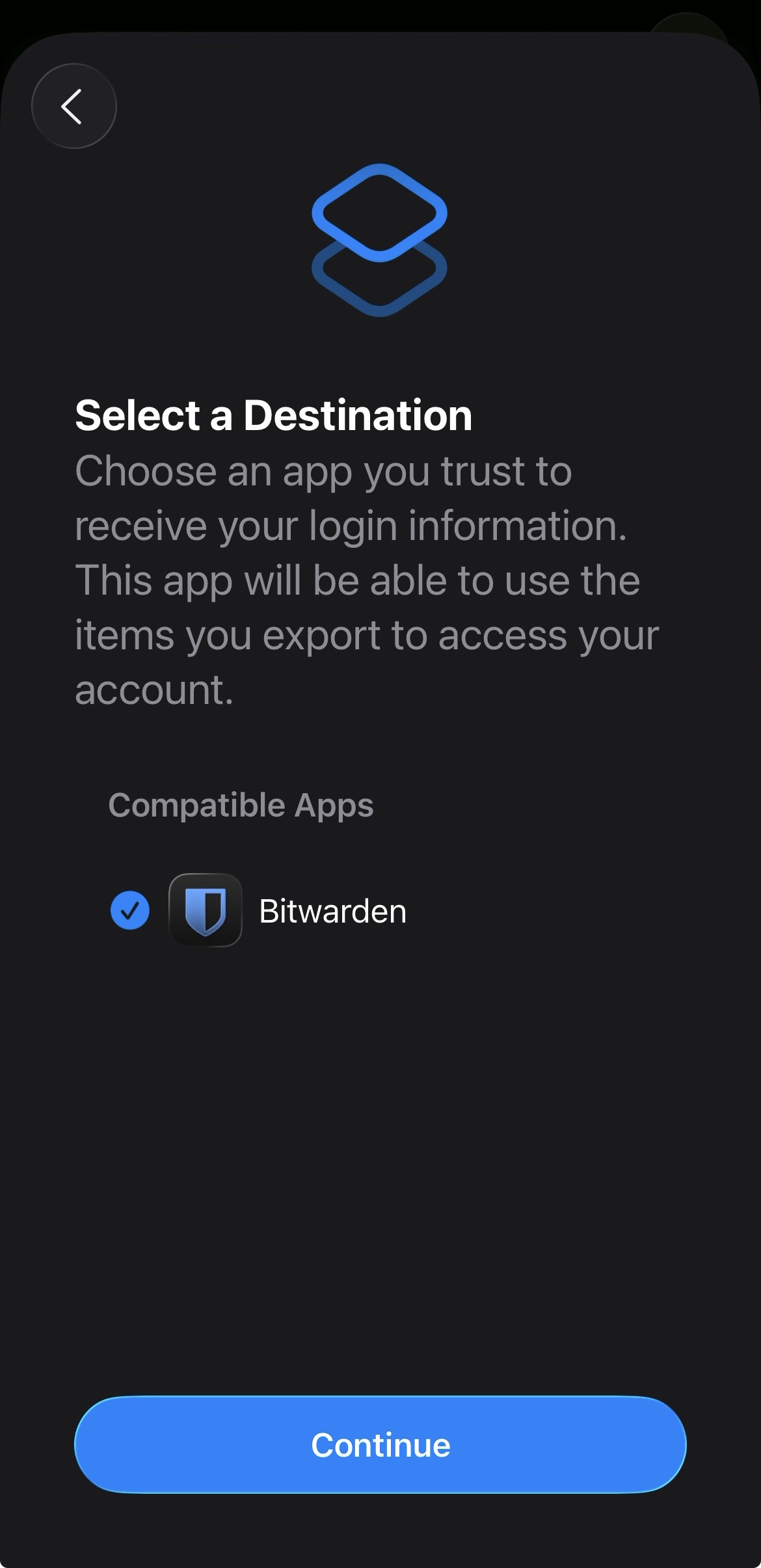
Add proper support for importing passwords from the apple ios passwords app
In the apple passwords app on ios it has a button to export passwords but the problem is that proton pass does not show up in the list of compatible apps
img: https://salty-mat.github.io/IMG_5693.jpg
In the image it only shows bitwarrden as a compatible app even though i have proton pass installed
5 votes -
WearOS Watch Support
Pleas please PLEASE I need this. I don't want it I NEED it. Imagine having your passwords and 2FA codes on your wrist PLEASE PLEASE PLEASE!!!
15 votes -
Dynamic window/interface dividing lines in Proton Pass Web + desktop
Please consider adding dynamic dividing lines or panes to Proton Pass (web app and desktop). This would allow users to resize or adjust sections such as the sidebar, vault list, and item details for improved organization and usability.
I’m not sure if the Windows version already supports this. I primarily use Proton Pass on macOS and iPhone. Currently, the fixed layout leaves quite a bit of unused screen real estate, especially on larger displays. Adding adjustable panes would greatly enhance the overall user experience.5 votes -
Proton Authenticator portable
Is it possible to have a portable version of Proton Authenticator?
I would like Proton Authenticator to be runnable directly from a USB drive, with no data stored on the host computer, and with all sensitive information securely encrypted inside the application’s own directory (e.g. <usb_drive_root>\ProtonAuthenticator.UserData\EncryptedUserData.db).
Other applications, such as Firefox, already provide a fully portable mode that can be executed entirely from a USB drive. Having a similar option for an authentication app would significantly improve security when using shared devices or when you don’t want to leave sensitive data on the system.
This feature would also make data…4 votes -
.htaccess Support
Please add support for .htaccess popup autofill.
4 votes -
2 votes
- Don't see your idea?