
Proton Pass & Authenticator
448 results found
-
Advanced quick access features
The browser add-on needs a significantly more intelligent search function with fuzzy matching, keyboard shortcuts, and a quick preview that displays relevant information without opening the entry completely. The competition already offers features such as “instant login” or “one-click login” – Proton Pass should surpass this with a system that presents not only logins, but also associated 2FA codes, security questions, and even temporary notes in a unified overlay.
2 votes -
2026: Improve the functionality and GUI of the browser extension and the P.Pass web page.
Please focus your efforts on making the ProtonPass extension and web page more user-friendly and functional! Currently, both products are not at all intuitive and are quite clunky compared to others.
1) The Firefox extension:
If an unlock code has been set (with a 2-minute delay, for example) and you are simultaneously working on the ProtonPass web page, the browser extension will close after those 2 minutes. I believe the extension should remain open for various reasons as long as the web page window is open and not locked.
Simplifying the number of displayed elements as much as possible (normal…
2 votes -
Clarify alias synced behavior during delete action in Proton Pass or SimpleLogin
Add this message to clarify what happens when deleting aliases from Proton Pass or SimpleLogin when sync is enabled between the two: "Deleting an alias here deletes it from both Proton Pass and SimpleLogin. Once deleted, the alias cannot be restored to either Proton Pass or SimpleLogin."
21 votes -
More Details and Reasons for Weak or Vulnerable Password
In Proton Pass, clicking on any of the Login Items, it shows the security level of the password. Very often it mark my existing passwords as "Weak" or "Vulnerable". ***But, it is IMPORTANT to let users know the REASON for that!!!
Like Apple iCloud Passwords, it tells you why that specific password is graded as weak. Maybe because it is reused too frequently? Leaked in other databases? Or simply the combination of letters and numbers is not secure? Too short? Too simple? But Proton Pass DOES NOT tells you why!
What I mean is, there are a lot of reasons…
8 votes -
Export Form password.eu.c2.synology.com
Import functie vanuit C2 Synology password manager
2 votes -
Aging Passwords
Using Proton Pass -> Pass Monitor -> Password Health
I think it would be helpful in this area to be able to monitor the age of passwords so that passwords beyond some threshold, 1 year for example, could be indicated as a candidate to have its password updated. It seems to me that old passwords become more vulnerable when they hang around for years. Perhaps there is already some way view passwords in this way.
4 votes -
Customize password generator and configure default settings
Generate password generates passwords that are long, Some websites have limits on the length of the password. It would be nice if we can control the length of the password and also the kind of characters in the password(alphabets/numbers/special characters)
660 votes -
Let folks add a new entry if the search results come back empty.
Before entering a new login I’ll search for it to make sure it doesn’t already exist. Please add the option to create a new entry in the blank search results. Copy the search query as the title. This would save precious time and reduce wasted keyclicks.
5 votes -
View with items that are not in any vault.
When a new login is created it Will appear in the "all items" view, together with the other bunch of items, even if they are already assigned to a vault.
It will be usefull if there is an equivalent to the "all items" view with just the ones not classified, or maybe a filter option in the all items view to show only items that not in any vault.5 votes -
Add ability to hide "add extension" bar at the top of the screen
Currently, when using Proton Pass on web without the extension installed, a small banner will persist across the top of the screen prompting the user to install the web extension. It would be a nice feature to be able to remove this banner via a small 'X' in the corner.
3 votes -
Shorten Brave/Chrome extension name
It would be much better if Brave / Chrome extension name is "Proton Pass" instead of "Proton Pass: Free Password Manager".
3 votes -
Make the "Install Proton Pass for Brave to quickly autofill your logins." popup closeable
When using Brave browser without the Proton Pass extension, you will see a permanent popup asking you to install the extension. Please add a "close button".
4 votes -
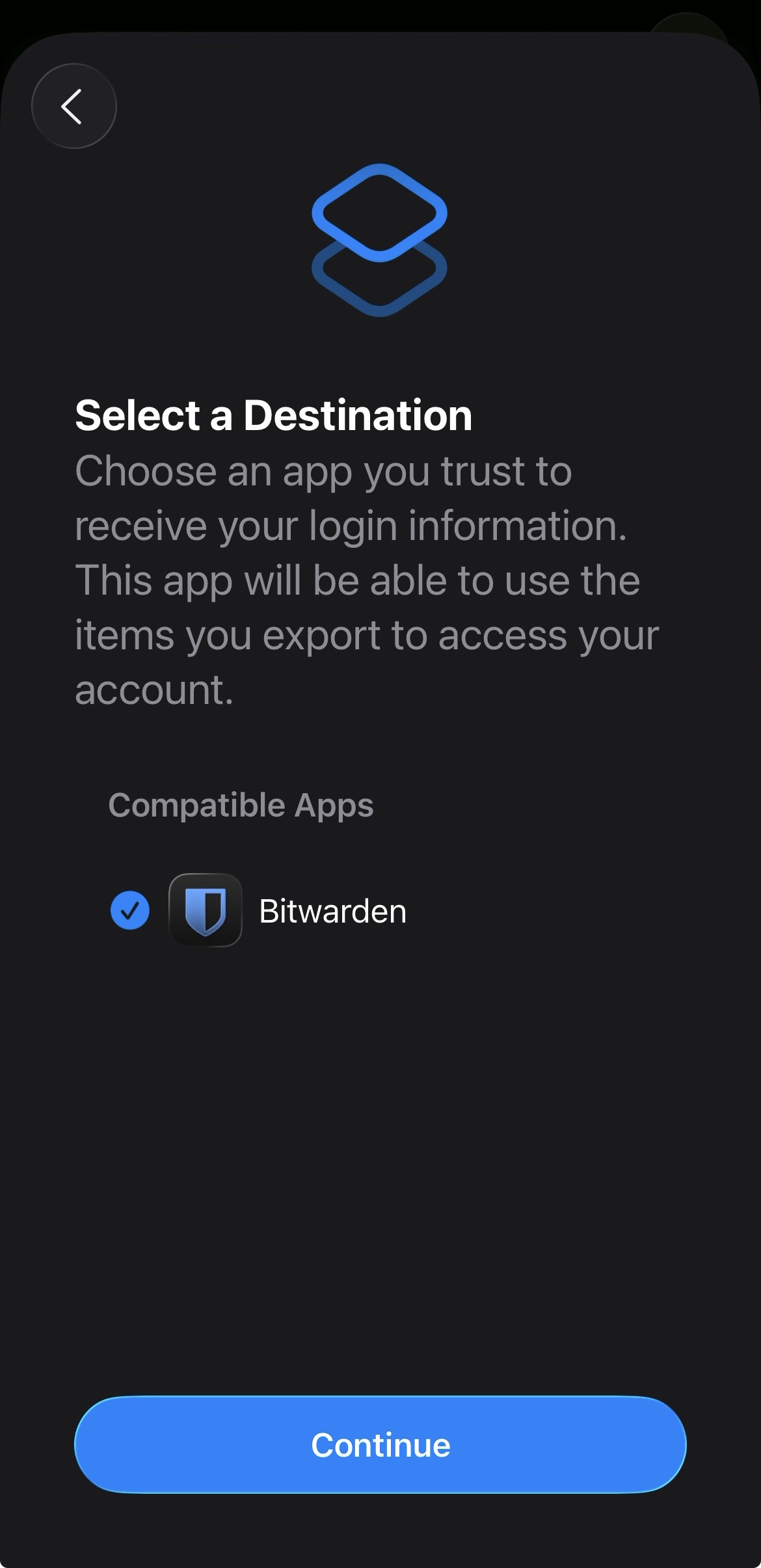
Add proper support for importing passwords from the apple ios passwords app
In the apple passwords app on ios it has a button to export passwords but the problem is that proton pass does not show up in the list of compatible apps
img: https://salty-mat.github.io/IMG_5693.jpg
In the image it only shows bitwarrden as a compatible app even though i have proton pass installed
4 votes -
Authenticator : Reverse the display order of "issuer" and "account name" in the main screen
When searching for an 2FA code account, what we want is to find the code associated with the account we’re logging into. The issuer doesn’t matter first. Since I have different accounts with the same issuer, it slows down finding the right code because the same issuer name appears multiple times in large text, while the account name I’m looking for is in small text.
2 votes -
Improve compatibility with Orion Browser
Multiple people have been reporting that on Orion Browser (Built on WebKit, supporting both Firefox and Chrome extensions) by Kagi, Proton Pass suffers from lag and intermittently tells one that the vault is empty. Since Orion is one of the most popular privacy-focused Browsers right now, I hope Proton will put some effort into improving compatibility.
Edit: Currently, the Firefox extension works best with Orion, the Chrome extension is unusable (login fails for me, it cannot communicate with the extension)
4 votes -
Move passkeys below core information
Currently in the chrome extension, on each item card, the passkeys are displayed then username, password & TOTP. I used to be able to see username, password & TOTP without scrolling. Now that passkeys are displayed at the top, I have to scroll to see my TOTP codes.
There aren't many scenarios where you would need to manually access passkey info. The core (username, password, TOTP) info is far more frequently accessed.
By moving the passkeys below the core info, information a user needs to copy can be accessed without any additional scroll.
4 votes -
More autofill on Android - Tiles, inline, accessibility, draw over
Show login credential suggestions in login fields instead of just "Get from Proton Pass". I don't want to be redirected to the app every time.
1,012 votes -
proton pass
Greetings,
I suggest that in the desktop application, the new AutoType function be given the option to launch the application or some dialog box where AutoType lets you choose the account or password so that it can automatically type this.
A more dynamic example would be, opening email, I set my shortcut keys as Ctrl + Alt + I and the box appears, then the dialog box appears so I can type the account and press other key shortcuts depending on what I want to auto-complete, whether it's Email/user, password or URL in that case.
1 vote -
[Browser Extension] Sort by Relevancy / Prefer Domain or Title
When the user visits a website, the extension performs a simple auto-search for the domain.
However, this is a fuzzy search that matches all occurrences in all fields. This means that the relevant domain might not appear at the top of the results.For example, if I visit somemail.com, the search will return all logins that contain the field somemail.com. This includes all websites where this email address is set as login credentials.
With the default “Sort by recency,” other websites can be placed at the top.
This is a problem if you don't use the autofill feature or if…
6 votes -
Improve search results display
Searching for vault items on the android client is currently a nightmare that makes the search almost unusable as the name of items in the vault are not always fully displayed. Instead, in some instances the vault item retrieved is shortened to: ...look.com as opposed to outlook.com
Please fix this to always show the full item name in the search results.
6 votes
- Don't see your idea?