
Proton Mail & Calendar
973 results found
-
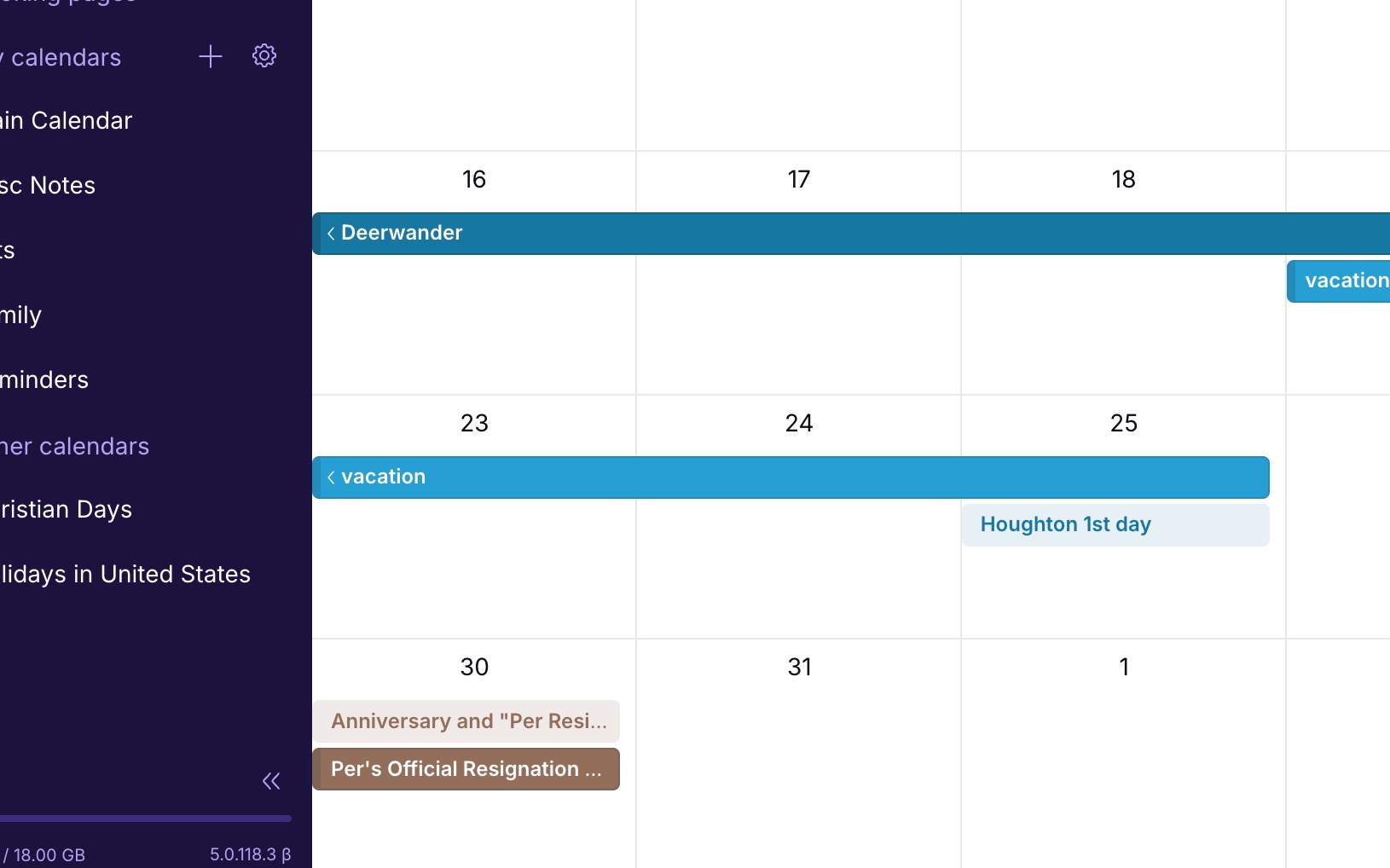
Calendar event color option for light/non-bold events
Currently all the color options for calendar events are dark/bold blocks. There should be a toggle to make each of these colors a light-block or non-bold-block. I would like some of my events/calendars to be much less visually strong than some others. Simply applying the bold color to the text adding transparency to the background color, would give this effect.
Here's an example: https://jakeparis.com/wp-content/uploads/2026/06/Screenshot-2026-06-16-at-12.54.10-PM.jpg
2 votes -
Calendar event color option for light/non-bold events
Currently all the color options for calendar events are dark/bold blocks. There should be a toggle to make each of these colors a light-block or non-bold-block. I would like some of my events/calendars to be much less visually strong than some others. Simply applying the bold color to the text adding transparency to the background color, would give this effect.
Here's an example: https://jakeparis.com/wp-content/uploads/2026/06/Screenshot-2026-06-16-at-12.54.10-PM.jpg
2 votes -
Having a button to archive an email while we are reading it without having to click on « Move to » or « … »
On iOS, when I read an email I most often want to archive it but I have to do it either through the « Move to » menu or through the « … » menu. It would be useful to have the archive button right there alongside the « Mark as unread », « Trash », « Move To », etc., buttons at the bottom of the screen when reading the email.
2 votes -
Improved week view in mobile calendar
aCalendar+ has the best week view concept that I've seen. It arrays the days in a grid of 8 boxes, the last one being a miniature month view, in either a landscape or portrait view, and it only lists appointments, not every time slot of every day. Proton Calendar only has a portrait view with 7 extremely thin columns, which can be very tedious.
Proton needs some more options in this area! The 3-day view is better, but it only lets you see a couple of days ahead, not getting the picture for the full week in one glance.
4 votes -
Tags and sub-tags
I would love it if we could have sub-tags. For example, Hawaii would be a tag nested under Travel. Although folders allow subfolders, I think tags are so much more nimble and flexible.
74 votes -
Proton Mail row view: preview pane, and default goes to next message
When viewing emails with row view, I have two suggestions
- It would be useful to have a preview pane in row view mode.
- After processing an email the window goes back to the main page, so I need to click on the next message. It would be better if by default the next message was displayed instead, or at least to have an option to choose10 votes -
Send encrypted e-mails to non-Proton Mail users without password
Currently, Proton Mail users can send secure e-mails to non-Proton mail users user password protection. This feature adds complexity to the process. Can you provide an alternative method which doesn’t require a password but instead uses a 2FA method to verify the recipient’s e-mail address (similar to applictions such as Securemyemail),
2 votes -
Support more than 4 Security Keys
Proton supports only 4 hardware security keys - this is not enough. Especially since using biometrics counts against the 4 key limit. I have three desktop computers which run my Proton accounts, and I have mobile devices which require 1 key. So I can't use the biometrics option without forcing a game of musical chairs with my security keys. I'm forced to continue using and subscribing to my 1Password account rather than Proton Pass until this limit is increased.
52 votes -
Proton Calendar: Set date by day, month and year
When creating an event in Proton Calendar, it would be great to be able to select the day, month and year separately. On the web / desktop app, you can scroll through by month which is somewhat acceptable, but on iOS, you have to scroll day by day. Very cumbersome if you are trying to add an event a year or more into the future.
4 votes -
(Current) Critical Security Vulnerability: Missing Default-Deny Policy - Why Whitelists Fail Against Zero-Click Exploits (State Trojans)
(Current Text) April 26, 2026
Dear Proton Team,Currently, Proton Mail under (Filters) "Blocked and Allowed Senders Lists" offers only a whitelist as a positive exception in a system that standardly accepts everything ("Default-Allow"). The "Allow" function serves merely to move important emails back from the Spam folder to the Inbox; it does not prevent the receipt of emails from other domains. The "Block" function serves only to block known, malicious senders.
The fundamental security problem is that for users who need to protect themselves against Zero-Click Exploits (e.g., advanced state trojans like Pegasus or similar spyware), this "Default-Allow" model…
3 votes -
Make Auto Reply Faster to Access and Place Notification at top of Mail Window
The Auto Reply / Out of Office feature should be faster to access within the Mail app or window instead of navigating to All Settings first. Then, when the Auto Reply is active, a static notification should appear at the top of the window reminding the user that Auto Reply is active. This is common in other major mail services.
4 votes -
calendar - repeating event: ever last sunday of september (thus yearly)
currently and simply not possible. please add recurring / repeating event: every year on the last / first weekday of a specific month.
13 votes -
Option to alphabetically sort labels
I would like the option to automatically sort labels alphabetically whenever I create a new label. This would make it easier to find a particular label in the side panel.
2 votes -
hover shows actual email address
Proton Mail used to display the email address of the sender when hovering over the sender's name in a list. This features seems to have disappeared !
It is especially useful when an email appears which could be spam with a faked FROM name to show the FROM address. Then you can see Amazon / Ebay/ PayPal / YourBank is actually lyingthievingspammer@123456.co.jp or whatever.Another post mentions similar about links.
This is a really useful feature.
Bring it back ! Pleeeeease !4 votes -
Critical Security Vulnerability: Missing Default-Deny Policy – Why Whitelist Fails Against Zero-Click Exploits (State Trojans)
Dear Proton Team,
Currently, Proton Mail under "Blocked and Allowed Senders Lists" offers only a whitelist as a positive exception in a system that standardly accepts everything ("Default-Allow").
The "Allowed" function serves merely to move important emails back from the Spam folder to the Inbox. It does not prevent the receipt of emails from other domains.
The "Blocked" function serves to block known, malicious senders.
The Fundamental Security Problem: For users who need to protect themselves against Zero-Click Exploits (e.g., advanced state trojans like Pegasus or similar spyware), this "Default-Allow" model is fundamentally insufficient and dangerous.
The Impossibility of a…
3 votes -
UI elements for Emails - too much & too big
When opening an email - especially on mobile - UI elements are too big, to much of them and maybe they shouldn't all be there. See screenshot here - https://drive.proton.me/urls/0G7Y7D3WF0#mL6N900V24rk
"This image is from a mailing list" - I know this and usually there is a link for unsubscribe, so not needed there. Also people might feel forced every time they open an email from a list to unsubscribe.
"Some images failed to load...." - This is also not necessary. I would rather have a general settings for all emails. Maybe you could find a solution to load images to…
3 votes -
Saving calendar entry needs to be faster on iOS
Saving a calendar entry in iOS is very very slow, please make it faster.
5 votes -
Alternating row color in inbox
Also known as zebra stripes. Title says it all. Looking to see where I can enable interchanging the background row colors between two colors (white and grey).
Simple theme change to help with readability or accessibility. Pretty commonly implement in many operating systems and other products.
4 votes -
Show time zone names (or custom labels) in the calendar view, not just GMT offsets
When two time zones are enabled, both columns are only labeled with their GMT offset. Example: Europe/Vienna and Africa/Johannesburg both display as "GMT+2" during European summer time — completely indistinguishable. In winter the offset differs by one hour, but "GMT+1 / GMT+2" still doesn't tell you which column belongs to which zone.
Please show one of the following next to (or instead of) the offset:
The IANA city name (e.g. Vienna, Johannesburg), or
A user-defined label per zone, or
The standard abbreviation (CET/CEST, SAST).3 votes -
advanced syntax in search
Mail : Advanced Search Syntax, operators and Keywords
Having an advanced search syntax ("from:user@domain.com", "to:user@domain.com", "filetype:xlsx"...) would ease and speed up the use of the search feature among mail or other apps. Many competitors propose such feature but search engines (like Duckduckgo, Brave, etc..) might also be inspiring for a powerful search syntax.
6 votes
- Don't see your idea?