
Proton Mail & Calendar
2254 results found
-
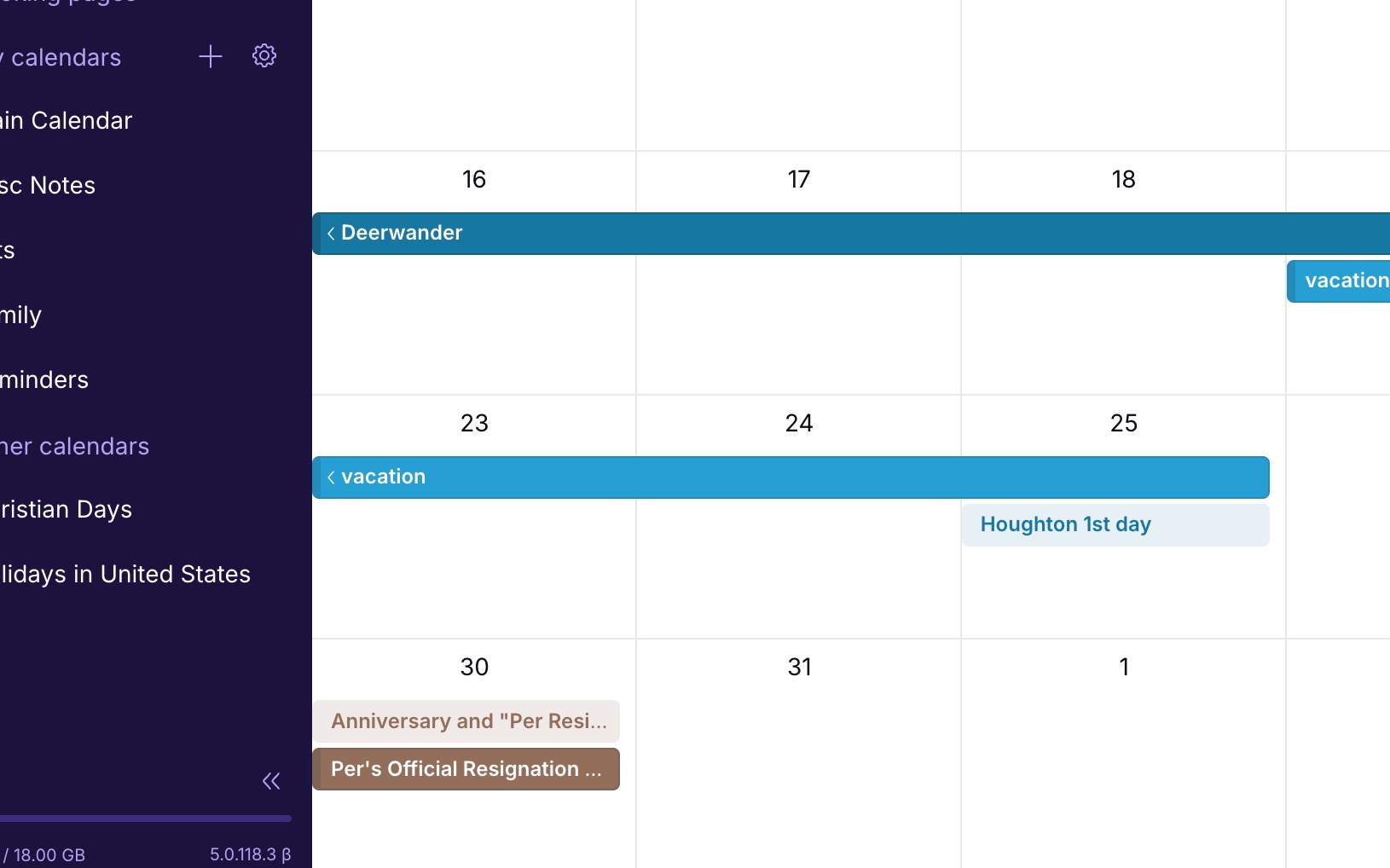
Calendar event color option for light/non-bold events
Currently all the color options for calendar events are dark/bold blocks. There should be a toggle to make each of these colors a light-block or non-bold-block. I would like some of my events/calendars to be much less visually strong than some others. Simply applying the bold color to the text adding transparency to the background color, would give this effect.
Here's an example: https://jakeparis.com/wp-content/uploads/2026/06/Screenshot-2026-06-16-at-12.54.10-PM.jpg
2 votes -
Calendar event color option for light/non-bold events
Currently all the color options for calendar events are dark/bold blocks. There should be a toggle to make each of these colors a light-block or non-bold-block. I would like some of my events/calendars to be much less visually strong than some others. Simply applying the bold color to the text adding transparency to the background color, would give this effect.
Here's an example: https://jakeparis.com/wp-content/uploads/2026/06/Screenshot-2026-06-16-at-12.54.10-PM.jpg
2 votes -
Buat yang nyari cara download Royal Dream APK versi terbaru, ini pengalaman aku. Versi terakhir sekarang v6 dengan ukuran sekitar 131,2 MB,
Buat yang nyari cara download Royal Dream APK versi terbaru, ini pengalaman aku. Versi terakhir sekarang v6 dengan ukuran sekitar 131,2 MB, ringan dan stabil di Android 5.0 ke atas. Aku selalu unduh langsung dari situs resminya biar file-nya aman dan nggak salah versi: https://royaldreamsapk.id/download.html
Langkahnya simpel: buka halaman download, klik "Download APK Android", aktifkan "izinkan instalasi dari sumber tidak dikenal" di pengaturan, lalu pasang seperti biasa. Royal Dream sendiri aplikasi game kartu & domino klasik untuk hiburan (Domino Gaple, Qiu Qiu, Rummy, sampai game arcade kasual). Buat iPhone juga ada versinya di App Store. Saran aku jangan download dari…2 votes -
Having a button to archive an email while we are reading it without having to click on « Move to » or « … »
On iOS, when I read an email I most often want to archive it but I have to do it either through the « Move to » menu or through the « … » menu. It would be useful to have the archive button right there alongside the « Mark as unread », « Trash », « Move To », etc., buttons at the bottom of the screen when reading the email.
2 votes -
Collapsible replies within an existing message
Current email messages that are replies of replies of replies are well organized in threads, however the email message itself is extremely long and having to scroll through the messages within a thread defeats the purpose if we are unable to see just the message and not the quoted text.
It would be great if you can collapse the quoted text. That's the feature request. Nothing crazy, just a way to hide sections of the email that are redundant and not useful (since the thread actually exists).
6 votes -
Improved week view in mobile calendar
aCalendar+ has the best week view concept that I've seen. It arrays the days in a grid of 8 boxes, the last one being a miniature month view, in either a landscape or portrait view, and it only lists appointments, not every time slot of every day. Proton Calendar only has a portrait view with 7 extremely thin columns, which can be very tedious.
Proton needs some more options in this area! The 3-day view is better, but it only lets you see a couple of days ahead, not getting the picture for the full week in one glance.
4 votes -
Tags and sub-tags
I would love it if we could have sub-tags. For example, Hawaii would be a tag nested under Travel. Although folders allow subfolders, I think tags are so much more nimble and flexible.
74 votes -
Indent capability on mail message editor
I am using the MacOS client and WEB client and it would be nice to have an Indent capability to improve message formatting. Currently there are only bullets/numbers and alignment options.
8 votes -
Display forwarded message in body of email
Display forwarded message in body of email instead of hiding it behind three dots
7 votes -
Proton Mail row view: preview pane, and default goes to next message
When viewing emails with row view, I have two suggestions
- It would be useful to have a preview pane in row view mode.
- After processing an email the window goes back to the main page, so I need to click on the next message. It would be better if by default the next message was displayed instead, or at least to have an option to choose10 votes -
Incorperate proton calendar with ubuntu top bar
Right now, there is no integration with ubuntu outside of the app. It would be extremely nice to not have to start the app every time I wish to check my calendar. An integration into ubuntu's top bar akin to the current calendar gui would be ideal. This would massively streamline my usage of proton calendar. Even a small extension in the top bar would be useful as well.
2 votes -
Send encrypted e-mails to non-Proton Mail users without password
Currently, Proton Mail users can send secure e-mails to non-Proton mail users user password protection. This feature adds complexity to the process. Can you provide an alternative method which doesn’t require a password but instead uses a 2FA method to verify the recipient’s e-mail address (similar to applictions such as Securemyemail),
2 votes -
Easy switch for registered emails from gmail to proton
Following the ability to connect my Proton Mail with my Gmail, I'd love suggestions in my inbox that offered me an easy way to change the email address associated with third parties.
For example, I have an account with Zalando. It would be awesome if, after an email from Zalando, there is an way for me to click-through to Zalando's account management screen where I can update my email. Providing this option for third parties who offer change of email addresses.
I'm not sure if this could be done in a way that doesn't intrude on privacy, but would be…
2 votes -
Support more than 4 Security Keys
Proton supports only 4 hardware security keys - this is not enough. Especially since using biometrics counts against the 4 key limit. I have three desktop computers which run my Proton accounts, and I have mobile devices which require 1 key. So I can't use the biometrics option without forcing a game of musical chairs with my security keys. I'm forced to continue using and subscribing to my 1Password account rather than Proton Pass until this limit is increased.
52 votes -
Make Linux desktop app (Arch/Deb/RHL)
Make Linux desktop app (Arch/Deb/RHL)
755 votes -
Proton Calendar: Set date by day, month and year
When creating an event in Proton Calendar, it would be great to be able to select the day, month and year separately. On the web / desktop app, you can scroll through by month which is somewhat acceptable, but on iOS, you have to scroll day by day. Very cumbersome if you are trying to add an event a year or more into the future.
4 votes -
Mail extension for browser
A mail extension for browsers like the Proton Pass extension.
The extension should show a counter of unread mails and provide a preview when clicking the extension icon.
So that you can see if new mails arrived even without opening the Mail UI in a tab.4 votes -
(Current) Critical Security Vulnerability: Missing Default-Deny Policy - Why Whitelists Fail Against Zero-Click Exploits (State Trojans)
(Current Text) April 26, 2026
Dear Proton Team,Currently, Proton Mail under (Filters) "Blocked and Allowed Senders Lists" offers only a whitelist as a positive exception in a system that standardly accepts everything ("Default-Allow"). The "Allow" function serves merely to move important emails back from the Spam folder to the Inbox; it does not prevent the receipt of emails from other domains. The "Block" function serves only to block known, malicious senders.
The fundamental security problem is that for users who need to protect themselves against Zero-Click Exploits (e.g., advanced state trojans like Pegasus or similar spyware), this "Default-Allow" model…
3 votes -
Strike agenda items
When deleting an event in the Proton Calendar, I still want to be reminded that it was there originally. Is it possible to offer two kinds of delete:
(A) strike through the event (so it is still visible in the calendar, but now the title is in strike through), or
(B) permanently delete the event?3 votes -
Make Auto Reply Faster to Access and Place Notification at top of Mail Window
The Auto Reply / Out of Office feature should be faster to access within the Mail app or window instead of navigating to All Settings first. Then, when the Auto Reply is active, a static notification should appear at the top of the window reminding the user that Auto Reply is active. This is common in other major mail services.
4 votes
- Don't see your idea?