
Proton Mail & Calendar
2256 results found
-
Search function in Newsletters
I use the Newsletters feature and have over 300 active newsletters that are listed. When looking to make a change it would be helpful to have a search function to easily find a particular newsletter.
3 votes -
Mute a conversation/thread
Like in other email providers, it should be possible to "mute" a thread.
By doing so, other emails coming in the thread would not trigger a notification, nor put back the archived thread in the inbox.3 votes -
Passwords for Password-protected emails selected by recipient
Currently when sending Password-protected emails to non-proton recipients the sender has to select the password, notify the recipient of the password, and manually record the password for future correspondence. It is tedious and has two major issues.
1. The first issue is if you want to send the message to multiple people they must both have the same password.
2. If a recipient receives password-protected emails from more than one protonmail senders, they would need to track and keep a log of passwords for each and every sender.
A solution would be to have the recipient select a password to…3 votes -
search bar - ios search
It would be great if the search icon/bar could be implemented at the bottom next to the write button and not at the top right corner, such as in the iOS system like in Mail, Settings, etc.
3 votes -
Move Multiple Messages Simultaneously
For better organisation it would be useful to be able to move multiple messages (in a single conversation) to another mailbox by selecting the "Move to" function in the highest message in that conversation.
Unless anyone can tell em otherwise this does not appear to be the case at present.
3 votes -
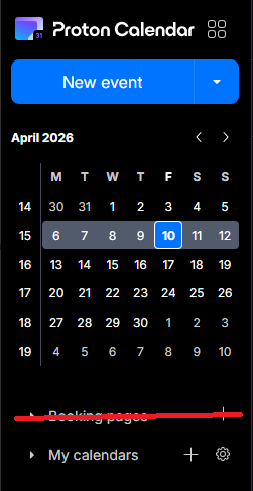
Booking Page - Disable feature altogether
The booking pages form a great feature for business users, but seeing as I use Proton as my personal account, I now have a permanent button to a feature that I don't use - and thus - have a cluttered calendar. I would prefer if I was able to disable the booking pages feature altogether, via the integrations settings, for example.
3 votes -
Couleurs mail et calendrier et personnalisation fond par images personnelles
Il conviendrait rapidement
1 . d'augmenter sensiblement la palette des choix de couleurs disponibles pour marquer les évènements courriels et calendrier.
2 de permettre la personnalisation de l'affichage avec des fonds d'images personnelles3 votes -
Auto-delete unwanted messages options
Would be useful to enable auto-delete only for trash or spam separately, and being able to decide the number of days to wait (at least among a list of presets)
3 votes -
Please enable the ability to make an email pop out so we're not restricted to reading and editing emails in the limited preview window.
I’d like to request the ability to open emails in a separate window (pop-out) directly from the inbox or preview pane.
Currently, emails can only be viewed within the preview pane, which limits visibility of content and access to full functionality. This creates friction when reviewing longer or more complex messages.
Ideally, this would function similarly to other email clients, where a user can:
preview an email in the reading pane, and open that same email in a separate window or tab for full viewing and interaction
At present, there does not appear to be a clear or consistent way…3 votes -
Ability to print a daily, weekly, monthly calendar
I "voted" for the development as a "Critical" feature but wanted to more fully express my dissatisfaction with the continued delay in activating this functionality. I happen to be a mail app user that frequently needs to print a hardcopy of the day's/week's/month's calendar. The fact that I STILL cannot do this in ProtonMail is beyond frustrating-seems like a relatively basic ask. C'mon team!
3 votes -
Proton Calendar as the default app for iCal
On macOS, it should be possible to open iCal files directly in Proton Calendar. Currently, Proton Mail/Calendar cannot be set as the default application.
3 votes -
Filters to apply to existing messages when a flag changes
Add flag changes as a trigger for filters. For example when an email is marked as read, check if a filter is applicable and then process it. Other triggers could be applying a star or manually applying a label.
If the server load would be heavy, it could be set up as an up to 24-hours until the filter will apply to spread the load.
My pipe dream for my Proton (and work) mailbox is for all mail to land in my inbox and be filed away automatically into a folder after i read it
3 votes -
Allow labels to be marked as current or archived
Basically, I have a lot of labels from an old project that aren't applicable anymore. I'd like to mark them as 'archived' so I can still search on them, but they won't be an option to apply to new items anymore. With too many old labels the list is very long. By archiving some this list well be much easier to scroll through.
3 votes -
Allow custom accent colors for individual email accounts in the Android app
Currently, when multiple accounts are logged into the Android app, they are distinguished only by email address and a predefined color. Having multiple accounts yields in my case to random colors, three having the same color, one having another color.
Users cannot assign custom colors to specific accounts to make visual identification easier.
Please add an 'Account Color' setting in the Android app's account settings, similar to what is available on iOS (if it exists there) or web, allowing users to pick from a palette to distinguish their accounts.
3 votes -
Add option to state availability of calendar items
Make day events by default as unavailable in booking pages. now that is not the case.
Also consider creating a flag in a calendar event that makes the invite free or unavailable. Sometimes you have these calendar events that are just reminders.
3 votes -
"Sender contains" filter
When I create a filter and try to use "Sender Contains", it seems proton is looking for the actual email address and not even looking at the sender's display name.
For example, I have an email from "xyz store", but the email is "mail@sendfoxmail.com". My filter says if "Sender Contains" "xyz store" then move it to "abc Folder".
However, since Proton is not looking at the Display name, it does not apply the filter.
Desired solution: Proton looks at the sender's email address AND Sender's display name.
3 votes -
View Starred / Favourite Contacts
Proton Mail for Web should allow marking individual contacts as "Starred" or "Favourite".
Coinciding with that, the Contacts pane should have a "Starred" or "Favourites" tab in addition to "Contacts" and "Groups".
Although this is not a critical feature, there are already at least two good reasons for it:
All of the extra encrypted fields in Contacts makes Proton Mail a good place not just to store your e-mail contacts, but your entire address book, including phone numbers, mailing addresses, birthdates (etc). However, this leads to the addition of many seldom-used entries that one doesn't necessarily need or want to…
3 votes -
More views and automatic detection of travel information
Auto creation of calendar events based on travel information in mails (like Google)
More views options like 3 weeks, agenda and two weeks.3 votes -
set time zone manually
Proton mail uses the browser time zone for all events and there is not a way to set it manually. I use Librewolf to minimize browser fingerprinting and one of it's features (which is not easy to turn off separately) is that is displays the time zone to websites as Zulu / GMT, instead of local time. This means that calendar events come in with a time shift displayed in email. They are correct in the calendar since Calendar allows you to set the time in the top bar.
3 votes -
Sticky behavior for tags/labels for priority sorting (e.g., in Inbox)...
Create an option to make a tag/label "sticky". Or, option to make all messages with a specific custom tag(s)/label(s) sticky in the Inbox and other folders. Starred doesn't quite do it, as you cannot set that as a sort condition. Sticky custom tag/label would be more precise and flexible than 'starred', because one might 'star' a message for multiple reasons.
And/or, option to set a tag or folder as the default view, upon application loading.
Use case: tag "needs followup" or "to do" as default view so that user sees that first thing.
Note: 'Sticking' meaning that they appear prioritized…
3 votes
- Don't see your idea?