
Proton Mail & Calendar
2272 results found
-
Translate emails in foreign languages automatically
Add an option to automatically translate emails, especially those in languages like Dutch or Chinese (in general, languages the user does not understand).
26 votes -
Shared booking pages between users in an org
We need an ability for people to book meetings with multiple of our team-mates at once, rather than just one at a time. This requires taking into account both calendars/schedules and available times. This is crucial for being able to migrate away from Calendly + GSuite.
6 votes -
Open event location on mapping site/app (google, apple, open street maps)
Currently, the location icon and address data in a Proton Calendar appt. does nothing. It would be nice if clicking on it would open a map program such as Google Maps to get directions to appt.
1,419 votes -
Contacts and calendar sync bridge for major platforms (iOS/Mac/Android/etc.)
I am a big fan of how seamlessly Tuta integrates contacts with my iPhone. I am currently trying out Proton as well as Tuta to decide which one to use for my emails in future. Why don't you develop a similar feature for contacts and calendars on the major platforms?
In the Apple ecosystem in particular, certain features could be used much more seamlessly if contacts and calendars were managed via the native interface.
3 votes -
2 votes
-
Creation of shared inboxes
I would like to create shared inboxes to use together with other Proton users. They should have a seperate email address that can't be used to login, but can be seen when logged in to the personal account.
The inbox should be sharable, so I can share it with anyone with a Proton account. If one of the users that the inbox is shared with has a paid account, these features should be available for the shared inbox as well :)
25 votes -
Enforce Username Privacy via Primary Email Address Lockdown
As a Proton mail user,
I want all incoming mail sent to my primary Proton username (email address) to automatically bounce back to the sender as "undeliverable" (as if the account does not exists), unless the email originates from an official Proton mail domain,
So that I an keep my primary account username entirely hidden and free of clutter, forcing all external correspondence (i.e. everything except for official Proton correspondence) to go through my managed aliases or Proton Pass aliases*I understand I can have something similar by creating a custom Sieve with reject or discard, but it is not…
5 votes -
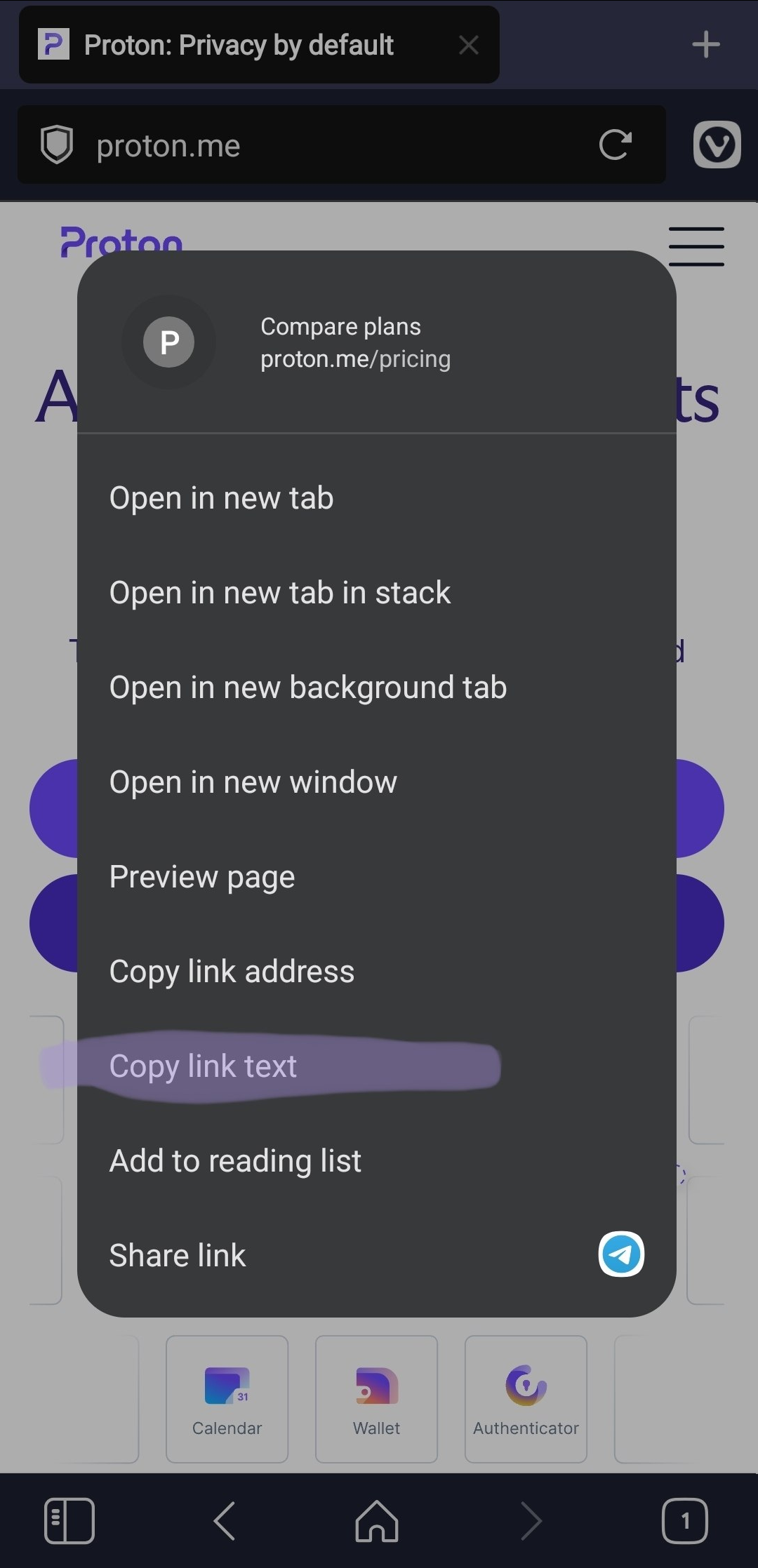
Add an option to copy link text
Add an option to copy the visible text of a link when right-clicking it.
This is useful because selecting anchor link is difficult or impossible.
Real behavior https://i.ibb.co/fV1YWBx8/image.png
Expected behavior https://i.ibb.co/qL6ZRHrT/image.png5 votes -
sort inbox by oldest first and by sender in android
I would like to see options for the above in the Android app. I don't like threads, and want to be able to catch up with older information before reading newer email. I like that I can work that way in the Windows app, but get frustrated when using Android.
2 votes -
What happened to the mail notification counter for the task bar?
As i see, this question came up already, but the feature didn't return. A small counter number in the tas bar's icon would be nice again.
2 votes -
Add email or domain into sorting categories (Or is it available and I didn’t find it)
I love the new feature of sorting emails, and I wonder if there can be feature to add a specific domain or email into a category. Would that be something possible? Or already existing?
2 votes -
search results in mail should have columns for folder and kategorie.
search results in mail should have columns for folder and kategorie. one should be able to sort and filter by these with a mouse click
2 votes -
Increase attachment size
The 25M limit on attachments, I get from a server load perspective, but it sucks as a user. Every time I grab a video clip these days the codecs create enormous files and even when you trim them the frame rates and resolution are always too high to create something under 25M. That cap should really be raised because I can't use proton whenever I need to get something like to someone else.
6 votes -
Remind me if no reply
I frequently send emails where I need to follow up at a later time. An example might be boarding passes for a flight, or a thread that will be relevant when I meet a particular contact on a certain day.
Boomerang for Gmail does this well. I can schedule an email to return to my inbox at a given time. But what really makes this useful is that I can define a condition in some cases. "If plumber does not respond within two weeks, THEN return this email to my inbox" or better yet "If plumber does not respond within…
454 votes -
Improve Android Tablet and Desktop Resizability
Please improve proton android apps to support Android Tablets, Android Desktop, Chromebook and Googlebook. https://developer.android.com/about/versions/17/changes/ff-restrictions-ignored
3 votes -
Please stop enabling new UI features by default – and let us hide the Unread button
I would like to see two changes in Proton Mail:
Allow users to hide the permanent “Unread” button at the bottom of the mobile app (Android). I don't need it, especially when it constantly shows “Unread 0”, and it unnecessarily takes up screen space.
Don't enable new features such as Email Categories by default. I never asked for categories and didn't want them, yet they were automatically enabled and I had to spend time finding the setting to turn them off.
One of the reasons I use Proton is that I prefer software that respects user choice. Automatically enabling new…
3 votes -
Sub-accounts to not show emails sent to any other account
When I log in using a sub-account name all of the emails from the default parent account are shown. Can logging in using a sub-account show only emails sent to that sub-account email address please. This is requested for security reasons, wanting only a sub-account to be used on my mobile so if someone accesses the device they can't view emails sent to any of the other parent/default or sub-account email addresses. Ideally sub-accounts would have their own passwords, too.
4 votes -
Option to remove mail counter in conversation view
The current view of emails in the inbox shows a small counter of emails in the conversation like this:
[5] subject of the message
Allthough it is sometimes interesting to know how much emails a conversation has, most of the time this counter is visually distracting and creating too much noise for me.
It would be best to have an option for deactivating the counter.
Thanks and keep up the good work!
Martin5 votes -
Calendar Reminders/Tasks with Checkboxes
Adding a task checkbox to an individual calendar item that can be viewed in day/week/month views and activated in agenda would greatly help to manage and track task-based items like financial dates each month, similar to how Apple reminders works with repeating tasks, only incorporated into the calendar.
428 votes -
show business logo in all Proton apps
Right now the business logo is only visible when accessing Proton via the website, it would be nice having the business logo on all apps from the Proton Workspace.
3 votes
- Don't see your idea?