
Proton Mail & Calendar
2300 results found
-
Move Multiple Messages Simultaneously
For better organisation it would be useful to be able to move multiple messages (in a single conversation) to another mailbox by selecting the "Move to" function in the highest message in that conversation.
Unless anyone can tell em otherwise this does not appear to be the case at present.
3 votes -
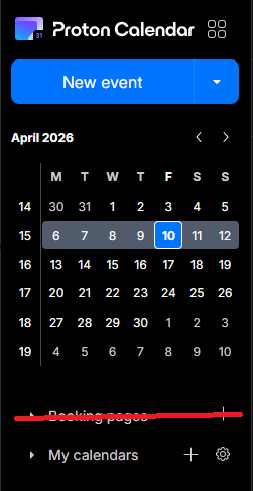
Booking Page - Disable feature altogether
The booking pages form a great feature for business users, but seeing as I use Proton as my personal account, I now have a permanent button to a feature that I don't use - and thus - have a cluttered calendar. I would prefer if I was able to disable the booking pages feature altogether, via the integrations settings, for example.
3 votes -
Auto-delete unwanted messages options
Would be useful to enable auto-delete only for trash or spam separately, and being able to decide the number of days to wait (at least among a list of presets)
3 votes -
Please enable the ability to make an email pop out so we're not restricted to reading and editing emails in the limited preview window.
I’d like to request the ability to open emails in a separate window (pop-out) directly from the inbox or preview pane.
Currently, emails can only be viewed within the preview pane, which limits visibility of content and access to full functionality. This creates friction when reviewing longer or more complex messages.
Ideally, this would function similarly to other email clients, where a user can:
preview an email in the reading pane, and open that same email in a separate window or tab for full viewing and interaction
At present, there does not appear to be a clear or consistent way…3 votes -
Ability to print a daily, weekly, monthly calendar
I "voted" for the development as a "Critical" feature but wanted to more fully express my dissatisfaction with the continued delay in activating this functionality. I happen to be a mail app user that frequently needs to print a hardcopy of the day's/week's/month's calendar. The fact that I STILL cannot do this in ProtonMail is beyond frustrating-seems like a relatively basic ask. C'mon team!
3 votes -
Filters to apply to existing messages when a flag changes
Add flag changes as a trigger for filters. For example when an email is marked as read, check if a filter is applicable and then process it. Other triggers could be applying a star or manually applying a label.
If the server load would be heavy, it could be set up as an up to 24-hours until the filter will apply to spread the load.
My pipe dream for my Proton (and work) mailbox is for all mail to land in my inbox and be filed away automatically into a folder after i read it
3 votes -
Allow labels to be marked as current or archived
Basically, I have a lot of labels from an old project that aren't applicable anymore. I'd like to mark them as 'archived' so I can still search on them, but they won't be an option to apply to new items anymore. With too many old labels the list is very long. By archiving some this list well be much easier to scroll through.
3 votes -
Allow custom accent colors for individual email accounts in the Android app
Currently, when multiple accounts are logged into the Android app, they are distinguished only by email address and a predefined color. Having multiple accounts yields in my case to random colors, three having the same color, one having another color.
Users cannot assign custom colors to specific accounts to make visual identification easier.
Please add an 'Account Color' setting in the Android app's account settings, similar to what is available on iOS (if it exists there) or web, allowing users to pick from a palette to distinguish their accounts.
3 votes -
"Sender contains" filter
When I create a filter and try to use "Sender Contains", it seems proton is looking for the actual email address and not even looking at the sender's display name.
For example, I have an email from "xyz store", but the email is "mail@sendfoxmail.com". My filter says if "Sender Contains" "xyz store" then move it to "abc Folder".
However, since Proton is not looking at the Display name, it does not apply the filter.
Desired solution: Proton looks at the sender's email address AND Sender's display name.
3 votes -
View Starred / Favourite Contacts
Proton Mail for Web should allow marking individual contacts as "Starred" or "Favourite".
Coinciding with that, the Contacts pane should have a "Starred" or "Favourites" tab in addition to "Contacts" and "Groups".
Although this is not a critical feature, there are already at least two good reasons for it:
All of the extra encrypted fields in Contacts makes Proton Mail a good place not just to store your e-mail contacts, but your entire address book, including phone numbers, mailing addresses, birthdates (etc). However, this leads to the addition of many seldom-used entries that one doesn't necessarily need or want to…
3 votes -
More views and automatic detection of travel information
Auto creation of calendar events based on travel information in mails (like Google)
More views options like 3 weeks, agenda and two weeks.3 votes -
set time zone manually
Proton mail uses the browser time zone for all events and there is not a way to set it manually. I use Librewolf to minimize browser fingerprinting and one of it's features (which is not easy to turn off separately) is that is displays the time zone to websites as Zulu / GMT, instead of local time. This means that calendar events come in with a time shift displayed in email. They are correct in the calendar since Calendar allows you to set the time in the top bar.
3 votes -
Sticky behavior for tags/labels for priority sorting (e.g., in Inbox)...
Create an option to make a tag/label "sticky". Or, option to make all messages with a specific custom tag(s)/label(s) sticky in the Inbox and other folders. Starred doesn't quite do it, as you cannot set that as a sort condition. Sticky custom tag/label would be more precise and flexible than 'starred', because one might 'star' a message for multiple reasons.
And/or, option to set a tag or folder as the default view, upon application loading.
Use case: tag "needs followup" or "to do" as default view so that user sees that first thing.
Note: 'Sticking' meaning that they appear prioritized…
3 votes -
Ability to view what core program tasks are in-process
I'm a software developer, and I think of the application of filter rules as core program in-process tasks. The filter is something user-defined, but the invocation and application of that filter is a task enacted by the actual program. Having the ability to view when a core program task is in-process would be beneficial. For example: if I import email from an unsupported client, that could be viewed as a task in an in-program task manager queue; after importing, if I create a filter to send all mail from joe@schmoe.com to my Trash folder and choose to apply it to…
3 votes -
Customizable Android notification actions
There are currently three actions on the notification "Archive", "Trash" and "Mark Read". It would be great to be able to customize those such as we already can with the swipe actions.
I for one would never have mark read and archive there, but would add snooze and spam.
3 votes -
Allow undo on android notification quick action
Whenever seeing a notification you have three options "Archive", "Trash" and "Mark read". Clicking any of them will perform the action immediately, but very often I click "Archive" instead of "Trash" (muscle memory from Gmail listing delete as the first option) and it would be nice to undo on the same spot without having to open the app. Other mail apps like the aforementioned gmail allow undoing.
3 votes -
Overhaul of folders and unread email identification
I know there are similar requests in this vain, but I wanted to consolidate ways to deal with the "problem" here.
With the emphasis on aliases and the use of SimpleLogin (or similar) within Proton Mail ("PM"), for those of us that are (to a fault) uber-organized, the sidebar has become a huge list of folders to help manage all the emails from all the aliases. Filters place emails directly into the appropriate folders to be dealt with. In an overkill of organization, subfolders are used as well.
Example: a master folder might be "Travel" and general travel-related emails end…
3 votes -
Improve Calendar UI for more transparency
I migrated my business from M365 to Proton Business. Unfortunately, it’s not really possible to use the calendar for professional work. It would be helpful if you could change the resolution of the calendar view (e.g., hours, 30 minutes, 15 minutes). This would allow you to properly display and read appointments that last only 30 minutes.
3 votes -
Sharing calendar with non proton users to show a webpage and not to download a .ics
Hey, is this the year 2010 ? Because when I share a calendar and it gives me a link, I'd expect that this links shows the Proton Calendar webapp with my calendar in it. And I can then say if this link is viewer or editor. I don't know, like Google Docs, Proton Docs, Proton Sheets and oh everyone ??
Seriously how is Proton still in the Stone Age where they thought it was an okay thing to have a share link that was a mere « download a .ics » link ??? That freaking baffles me. Proton, get your…
3 votes -
Add a 1 button apply all Filters to existing emails somewhere on the main page.
When creating filters for the first time, you have to either go to the settings menu to create and run them or you have to click the check box of an email > click the move the folder icon > select the folder > select 'Always Move sender's emails'. To apply that filter to past messages, you still have to go into filter settings, and run that 1 filter against the entire inbox.
If someone has a mailbox that they've never organized, this adds a lot of unnecessary back and forth between the Inbox to select an email and create…
3 votes
- Don't see your idea?