
Proton Mail & Calendar
- or
No existing idea results
- ~ No ideas found ~
2342 results found
-
Allow custom text for the colors on calender items
The colors have nice names but are not recognizable when tagging a calenderitem. mmm did i make the birthdays light or dark green...?
7 votes -
Unified mail and calendar view
Please add an option to unify email and calendar views. Its very inefficient to switch back and forth when scheduling acitvities that are prompted by email.
2 votes -
Ablage zusätzlicher Button für Gelesen und verschieben zu Alle Emails
es gibt ja Archiv und Alle Emails
und es gibt den Button "Archivieren"
Mir persönlich erschliesst sich nicht dass es 2 Ordner gibt. Wenn ich ein email nicht mehr benötige bzw. aufbewahren will - lösche ich es. Dh. alles was ich aufbewahre kommt per Klick ins Archiv.
Wenn Ihr das weiterhin trennen wollt, wäre es m.E. sehr hilfreich wenn es auch einen Button gibt für "aus Posteingang entfernen".
Für meinen Bedarf (seit 2005 gmail-Nutzer gewesen) genügen die Buttons "löschen" und "archivieren"2 votes -
Je veux pouvoir recevoir et envoyer des emails de mon compte professionnel office 365 avec mon client Proton pour éviter Outlook
Actuellement j'ai deux clients de messagerie :
- Proton pour mes comptes perso (et porivé)
- Outlook pour mon compte pro (office 365)
Vous avez ajouté la possibilité de lire et d'envoyer des messages de gmail ce serait-bien de pouvoir faire pareil avec Office 365.2 votes -
Top HR Consulting in India for Small Businesses | CP HR
Managing a growing team can get messy pretty fast, but you do not have to handle the stress all by yourself. CP HR Services offers excellent HR Consulting in India to help you streamline everything from hiring the right people to setting up clear company policies. We step in to handle the time-consuming paperwork, employee compliance, and payroll management so you can focus entirely on expanding your business. Our team works closely with you to build a happy, productive workplace culture that keeps your staff motivated. Head over to our website today to see how we can help your team win!
https://www.cphrservices.in/hr-consulting/Managing a growing team can get messy pretty fast, but you do not have to handle the stress all by yourself. CP HR Services offers excellent HR Consulting in India to help you streamline everything from hiring the right people to setting up clear company policies. We step in to handle the time-consuming paperwork, employee compliance, and payroll management so you can focus entirely on expanding your business. Our team works closely with you to build a happy, productive workplace culture that keeps your staff motivated. Head over to our website today to see how we can help your team…
2 votes -
Reply to email with aliases
When replying to an email, and it was sent from an alias, auto select that alias, so the person knows who it is from. Having to manually select an email address can get tedious. A toggle could be added to allow this behavior or not.
4 votes -
Select multiple events at once in Calendar
I don't understand why this feature doesn't already exist. I imported my schedule into Calendar, but now I'm stuck with events that don't apply to me. Instead of being able to select these events all at once, I have to delete them one by one. Plus, the fact that you can't just press the “Delete” key on the keyboard to delete an event more quickly is pretty annoying.
4 votes -
File sharing: Add option to share with public link AND EMAIL the link right away with mail app
When sharing a file by creating a public link, it would be very handy if you could instantly send this link via email.
So when you created the link, there should be a button that directly opens the mail app and pastes the created link into the body of a new email.
It would also be nice if you could create an email template with a custom text (configurable in settings) that is also pasted in the mail like:"Hi, i would like to share a file with you. You can download it here
<<link>>
kind regards, Peter" as the template text - and <<link>> will be replaced with the URL when composing the email.When sharing a file by creating a public link, it would be very handy if you could instantly send this link via email.
So when you created the link, there should be a button that directly opens the mail app and pastes the created link into the body of a new email.
It would also be nice if you could create an email template with a custom text (configurable in settings) that is also pasted in the mail like:"Hi, i would like to share a file with you. You can download it here
<<link>>
kind regards, Peter" as the…6 votes -
Calendar event color option for light/non-bold events
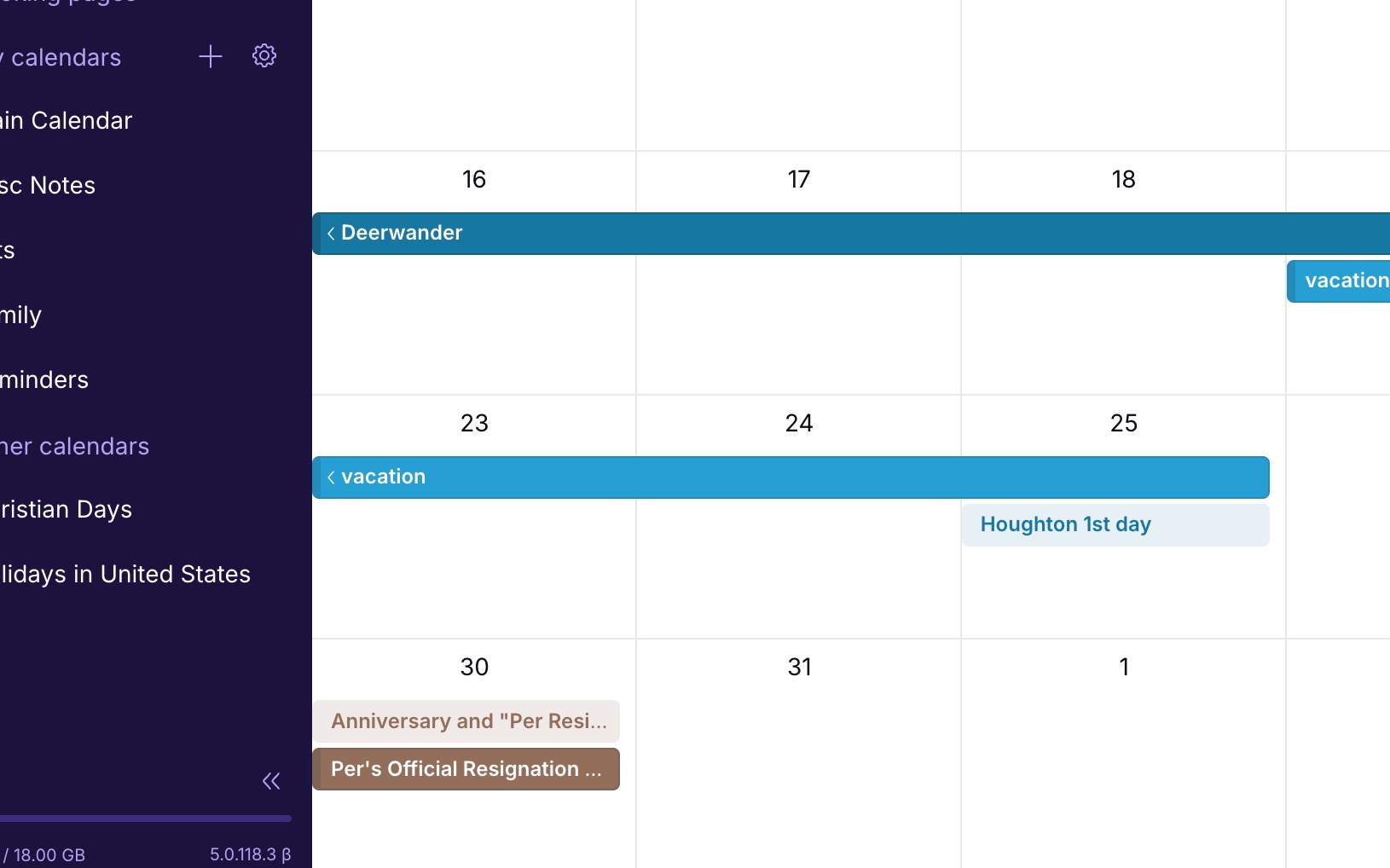
Currently all the color options for calendar events are dark/bold blocks. There should be a toggle to make each of these colors a light-block or non-bold-block. I would like some of my events/calendars to be much less visually strong than some others. Simply applying the bold color to the text adding transparency to the background color, would give this effect.
Here's an example: https://jakeparis.com/wp-content/uploads/2026/06/Screenshot-2026-06-16-at-12.54.10-PM.jpg
2 votes -
Calendar event color option for light/non-bold events
Currently all the color options for calendar events are dark/bold blocks. There should be a toggle to make each of these colors a light-block or non-bold-block. I would like some of my events/calendars to be much less visually strong than some others. Simply applying the bold color to the text adding transparency to the background color, would give this effect.
Here's an example: https://jakeparis.com/wp-content/uploads/2026/06/Screenshot-2026-06-16-at-12.54.10-PM.jpg
2 votes -
Improved week view in mobile calendar
aCalendar+ has the best week view concept that I've seen. It arrays the days in a grid of 8 boxes, the last one being a miniature month view, in either a landscape or portrait view, and it only lists appointments, not every time slot of every day. Proton Calendar only has a portrait view with 7 extremely thin columns, which can be very tedious.
Proton needs some more options in this area! The 3-day view is better, but it only lets you see a couple of days ahead, not getting the picture for the full week in one glance.
4 votes -
Make Linux desktop app (Arch/Deb/RHL)
Make Linux desktop app (Arch/Deb/RHL)
759 votes -
Incorperate proton calendar with ubuntu top bar
Right now, there is no integration with ubuntu outside of the app. It would be extremely nice to not have to start the app every time I wish to check my calendar. An integration into ubuntu's top bar akin to the current calendar gui would be ideal. This would massively streamline my usage of proton calendar. Even a small extension in the top bar would be useful as well.
2 votes -
Send encrypted e-mails to non-Proton Mail users without password
Currently, Proton Mail users can send secure e-mails to non-Proton mail users user password protection. This feature adds complexity to the process. Can you provide an alternative method which doesn’t require a password but instead uses a 2FA method to verify the recipient’s e-mail address (similar to applictions such as Securemyemail),
2 votes -
Easy switch for registered emails from gmail to proton
Following the ability to connect my Proton Mail with my Gmail, I'd love suggestions in my inbox that offered me an easy way to change the email address associated with third parties.
For example, I have an account with Zalando. It would be awesome if, after an email from Zalando, there is an way for me to click-through to Zalando's account management screen where I can update my email. Providing this option for third parties who offer change of email addresses.
I'm not sure if this could be done in a way that doesn't intrude on privacy, but would be great if possible and really help me with migrating my life (not to be dramatic) over to Proton's ecosystem.
Following the ability to connect my Proton Mail with my Gmail, I'd love suggestions in my inbox that offered me an easy way to change the email address associated with third parties.
For example, I have an account with Zalando. It would be awesome if, after an email from Zalando, there is an way for me to click-through to Zalando's account management screen where I can update my email. Providing this option for third parties who offer change of email addresses.
I'm not sure if this could be done in a way that doesn't intrude on privacy, but would be…
2 votes -
Support more than 4 Security Keys
Proton supports only 4 hardware security keys - this is not enough. Especially since using biometrics counts against the 4 key limit. I have three desktop computers which run my Proton accounts, and I have mobile devices which require 1 key. So I can't use the biometrics option without forcing a game of musical chairs with my security keys. I'm forced to continue using and subscribing to my 1Password account rather than Proton Pass until this limit is increased.
52 votes -
Proton Calendar: Set date by day, month and year
When creating an event in Proton Calendar, it would be great to be able to select the day, month and year separately. On the web / desktop app, you can scroll through by month which is somewhat acceptable, but on iOS, you have to scroll day by day. Very cumbersome if you are trying to add an event a year or more into the future.
4 votes -
Mail extension for browser
A mail extension for browsers like the Proton Pass extension.
The extension should show a counter of unread mails and provide a preview when clicking the extension icon.
So that you can see if new mails arrived even without opening the Mail UI in a tab.4 votes -
(Current) Critical Security Vulnerability: Missing Default-Deny Policy - Why Whitelists Fail Against Zero-Click Exploits (State Trojans)
(Current Text) April 26, 2026
Dear Proton Team,Currently, Proton Mail under (Filters) "Blocked and Allowed Senders Lists" offers only a whitelist as a positive exception in a system that standardly accepts everything ("Default-Allow"). The "Allow" function serves merely to move important emails back from the Spam folder to the Inbox; it does not prevent the receipt of emails from other domains. The "Block" function serves only to block known, malicious senders.
The fundamental security problem is that for users who need to protect themselves against Zero-Click Exploits (e.g., advanced state trojans like Pegasus or similar spyware), this "Default-Allow" model is fundamentally insufficient and dangerous. An attacker can register thousands of domains or use hacked servers to send malicious emails. A "Block" list can never cover all future, unknown attackers; as soon as a new, malicious domain is created, it is not on the list, and the email is accepted. Furthermore, as long as the Proton server accepts every connection from an unknown domain (even if it is later moved to Spam), there is a critical risk that a Zero-Click Exploit could be executed during the processing phase, such as rendering images, parsing metadata, or analyzing attachments. The malicious code does not even need the user to open it; it can compromise the email client or server infrastructure as soon as the data touches the server. Many users mistakenly believe that an "Allow" list automatically blocks everything else. Technically, this is not the case. The current list is merely a filter ensuring that certain emails do not land in Spam, not a firewall that cuts off access for everyone else.
I therefore demand the introduction of a separate, explicit setting "Allow Only Permitted Senders" that fulfills the following technical requirements. First, the whitelist must offer flexible granularity by supporting both individual email addresses and entire domains. This allows users to define permitted senders with two distinct levels of granularity to balance maximum security with practical usability. Individual email addresses are essential for high-security scenarios where only a specific person is trusted (e.g., john.doe@company.com); this prevents access even if other accounts within the same domain are compromised. Entire domains, on the other hand, serve for the efficient management of trusted organizations or partners (e.g., @trusted-partner.com) and allow all current and future senders from that domain without manual maintenance. The system must evaluate incoming mail against both lists, with a specific address rule taking precedence over a general domain rule if conflicts arise.
Second, server-side rejection at the TCP/SMTP level is required. The server must immediately reject the connection before any data transfer if the sender is not explicitly on the whitelist. This requires validation already during the SMTP handshake, ideally immediately after the EHLO/HELO command or at the latest before the MAIL FROM command. If the sender is not allowed, the server must immediately terminate the TCP connection or return an SMTP error code (e.g., 550 Access Denied or 554 Transaction Failed) before the actual email data transfer (DATA command) begins. No data packets containing potential exploits may be received; the server must not buffer or analyze the email content even temporarily if the sender is not on the list. The connection must be severed at the entrance so that no data packet containing a potential exploit is received by the server infrastructure.
Third, full user control must be guaranteed. Users must be given the opportunity to completely close their digital gate ("Air-Gap" principle for email) without relying on infinite and never-complete blocklists. The responsibility for maintaining the whitelist lies with the user; this is the principle of every high-security system.
Proton advertises worldwide with "maximum protection" and "end-to-end encryption." Yet, without a "Default-Deny" option that supports both address and domain whitelisting, the door remains physically open to unknown attackers. With this function, Proton would be the only commercial email provider enabling users to protect themselves against state surveillance and zero-day attacks through strict perimeter security. For journalists, whistleblowers, and activists, this is not an optional comfort feature, but a matter of survival. The ability to whitelist entire domains simplifies communication with teams, while the option to whitelist single addresses ensures precision against targeted attacks.
Please evaluate this request for technical feasibility and prioritize its integration into the roadmap for security updates. Proton should offer this choice to substantiate its position as the world's safest provider.
Thank you for your work on a safer internet.
(Current Text) April 26, 2026
Dear Proton Team,Currently, Proton Mail under (Filters) "Blocked and Allowed Senders Lists" offers only a whitelist as a positive exception in a system that standardly accepts everything ("Default-Allow"). The "Allow" function serves merely to move important emails back from the Spam folder to the Inbox; it does not prevent the receipt of emails from other domains. The "Block" function serves only to block known, malicious senders.
The fundamental security problem is that for users who need to protect themselves against Zero-Click Exploits (e.g., advanced state trojans like Pegasus or similar spyware), this "Default-Allow" model…
3 votes -
Strike agenda items
When deleting an event in the Proton Calendar, I still want to be reminded that it was there originally. Is it possible to offer two kinds of delete:
(A) strike through the event (so it is still visible in the calendar, but now the title is in strike through), or
(B) permanently delete the event?3 votes
- Don't see your idea?