
Proton Mail & Calendar
- or
No existing idea results
- ~ No ideas found ~
2346 results found
-
cloumn view in ipad app
mail list left to choose the one to read - and the active mail viewed on the right
4 votes -
Show email threads as (expandable) stacks / more details in the list to the left
Unclear if that feature has been asked for before, the search for "stacked" was negative so far "group" not exactly what I would be suggesting.
Using the Proton client coming from Apple mail my colleagues and I struggle with (unfortunately often) large email threads with clients. We are used to be able to see grouped emails as expandable stacks being able to go directly to an email in within the stack from the overview list. Sorted from current to oldest top-down.
Currently in proton in the (left side) list it only shows the number of emails grouped together, making it necessary to scroll down in the details (right side). Also showing (fact that there are attachments) in said list view would make it easier to find the one email that may carry an important attachment while the others just talk about that one.
hope to have described that so it can be understood - discussions welcome ;)
Unclear if that feature has been asked for before, the search for "stacked" was negative so far "group" not exactly what I would be suggesting.
Using the Proton client coming from Apple mail my colleagues and I struggle with (unfortunately often) large email threads with clients. We are used to be able to see grouped emails as expandable stacks being able to go directly to an email in within the stack from the overview list. Sorted from current to oldest top-down.
Currently in proton in the (left side) list it only shows the number of emails grouped together, making it…
2 votes -
Add Folder‑Search Filter When Moving Emails in Mobile Apps
In the web app, when I move an email to a folder, a filter appears that lets me type the folder name—or part of it—to quickly select the desired folder. This feature isn’t available in the mobile apps, even though it would be very helpful for avoiding scrolling through all the folders.
6 votes -
push
Auto-dismiss push notifications when email is read on another device
Currently, when I receive a push notification on my iOS device about a new email, the notification remains visible even after I've opened and read that email on another device (such as my laptop or desktop). This creates notification clutter and doesn't reflect the actual state of my inbox.
Proposed Feature:
Implement cross-device notification synchronization so that push notifications are automatically dismissed on iOS when the corresponding email is read on any other logged-in device.Use Case:
Receive email notification on iPhone
Open and read the email on laptop/desktop
Notification automatically disappears from iPhone lock screen and notification centerBenefits:
Reduces notification clutter
Provides accurate inbox state across all devices
Improves user experience by eliminating manual notification dismissal
Brings Proton Mail in line with other modern email clients that support this featureAuto-dismiss push notifications when email is read on another device
Currently, when I receive a push notification on my iOS device about a new email, the notification remains visible even after I've opened and read that email on another device (such as my laptop or desktop). This creates notification clutter and doesn't reflect the actual state of my inbox.
Proposed Feature:
Implement cross-device notification synchronization so that push notifications are automatically dismissed on iOS when the corresponding email is read on any other logged-in device.Use Case:
Receive email notification on iPhone
Open and read the email on laptop/desktop
Notification…5 votes -
I'd like to be able to choose whether to leave past events in color or gray like now.
You don't just work with the calendar looking forward; you often need to go back, and all the gray makes it difficult to see, especially when you have a lot of calendars and poor eyesight. Google Calendar lets you select how you want to view past events. That's what I need.
11 votes -
allow passkey login for ProtonMail
Please allow passkey login to ProtonMail (some of us use something other than Proton Pass as our password manager).
147 votes -
Move Multiple Messages Simultaneously
For better organisation it would be useful to be able to move multiple messages (in a single conversation) to another mailbox by selecting the "Move to" function in the highest message in that conversation.
Unless anyone can tell em otherwise this does not appear to be the case at present.
3 votes -
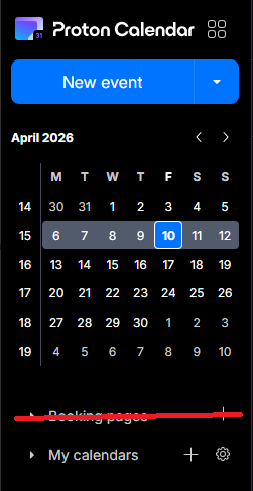
Booking Page - Disable feature altogether
The booking pages form a great feature for business users, but seeing as I use Proton as my personal account, I now have a permanent button to a feature that I don't use - and thus - have a cluttered calendar. I would prefer if I was able to disable the booking pages feature altogether, via the integrations settings, for example.
3 votes -
Couleurs mail et calendrier et personnalisation fond par images personnelles
Il conviendrait rapidement
1 . d'augmenter sensiblement la palette des choix de couleurs disponibles pour marquer les évènements courriels et calendrier.
2 de permettre la personnalisation de l'affichage avec des fonds d'images personnelles3 votes -
Option to disable email notifications when editing events with guests
Currently, editing any detail of an event with guests (even minor typos or description tweaks) forces an email update to all attendees. This creates unnecessary noise and inbox clutter.
Request: Add a checkbox in the edit dialog: "Send update to guests" (default: checked).
- If unchecked, save changes silently without emailing attendees.
- Essential for correcting typos or adding minor notes without spamming guests.
Why: Other calendar tools allow this granularity. Proton Calendar needs a way to distinguish between major changes (requiring notification) and minor edits.
Thank you,
Regards2 votes -
Waytime
Waytime - Please… add to the Time - Waytime like Apple or others do.
2 votes -
Ensuring Core Email Address Privacy in Replies
I use SimpleLogin and recently replied to a sent message, which embedded my core email address in the body of the message making it visible to all recipients
In the same way there are alerts inside SimpleLogin to say, for example, that you cannot reply to yourself from an alias, it would be very helpful for there to be a real time scan to prevent your core email address being visible inside an email. This could either be a toggle in global settings or in the reply panel itself to enable exclusion of those recipients who have Proton mail addresses
Remembering to go through a whole email looking for a core email address isn't going to happen, so some automation would make sense.
I use SimpleLogin and recently replied to a sent message, which embedded my core email address in the body of the message making it visible to all recipients
In the same way there are alerts inside SimpleLogin to say, for example, that you cannot reply to yourself from an alias, it would be very helpful for there to be a real time scan to prevent your core email address being visible inside an email. This could either be a toggle in global settings or in the reply panel itself to enable exclusion of those recipients who have Proton mail addresses
…
2 votes -
Auto-spam emails from unsubscribed lists
It'd be nice if it were possible to automatically flag as spam any email from a distribution list for which I used Proton Mail's "Unsubscribe" feature to remove myself from the list. The idea is that if the list owner is not going to honor unsubscribe requests, and since I already indicated that I do not want to receive those emails, then the emails from that list are spam and should be treated as such. An automatic method to take care of this would be handy.
2 votes -
Move calendar events
I know this is an option on the web version but on the IOS/mobile apps we NEED to be able to drag and drop events without having to open them and reselect the date or time. This is a critical feature for any functioning calendar app in my opinion.
8 votes -
Expand subfolders during drag and drop in Proton Mail web interface
When dragging and dropping a message in the Proton Mail web interface, hovering on a folder/label with nested subfolders/sublabels for more than a threshold period (eg 500ms) should expand the immediate child subfolders. Folder tree should stay expanded after releasing mouse.
Support dragging and dropping of existing folders/labels to create nested subfolders/sublabels.
7 votes -
Event cancellation and rescheduling.
When an appointment or event is cancelled or rescheduled I often need a record of the originally scheduled day and time.
At minimum I would like the ability to add strikethrough text to the event title, so that I know that the event was cancelled.
Ideally I would like a cancel button (next to the delete and edit buttons) that strikes the event title and turns off notifications, and asks if I would like to reschedule. If I reschedule, it will duplicate the original event and allow me to set a new date (and modify the other settings, if needed). This would leave the original event struck through without notifications and adds a new event at a new date and time.
Of course the implementation can vary, especially if you want to expand this for events with other participants.
Note: I primarily use the Android app so if this is available elsewhere please bring it to Android.
When an appointment or event is cancelled or rescheduled I often need a record of the originally scheduled day and time.
At minimum I would like the ability to add strikethrough text to the event title, so that I know that the event was cancelled.
Ideally I would like a cancel button (next to the delete and edit buttons) that strikes the event title and turns off notifications, and asks if I would like to reschedule. If I reschedule, it will duplicate the original event and allow me to set a new date (and modify the other settings, if needed).…
16 votes -
Support iCalendar RFC 5545 Recurrence Properties
Currently, Calendar imports do not support "Events based on recurrence rules that are not supported by Proton Calendar". The current Calendar UI supports a very limited set of recurrence rules meaning imports are also limited. This significantly impacts the ability to create and/or import calendar events that use somewhat common recurrence rules not currently supported by Proton. In UserVoice, there are a number of suggestions to support various combinations of additional recurrence rules. My recommendation is to "consolidate" these into this (???) recommendation for supporting all recurrence rules defined in the iCalendar specification (RFC 5545) (see https://icalendar.org/iCalendar-RFC-5545/3-8-5-recurrence-component-properties.html).
This recommendation could be implemented in a phased approach where imports could be implemented first to provide the desired capabilities until the UI implementations for adding/editing events can be accomplished. For this to work, I know the Calendar display would need to be modified to display these imported recurrence rules. To minimize that effort, a human-friendly text representation could easily be generated from the recurrence rule for display in the calendar. (NOTE: See an implementation example in https://www.npmjs.com/package/rrule for the 'toText()' method.)
For the benefit of other users/voters, the recurrence properties specified in an iCalendar (RFC 5545) event include:
* Recurrence Rule (RRULE) - The recurrence rule is used in computing the recurrence set. The current set of Proton supported recurrence rules are included in RRULE. (See the RRULE Tool at https://icalendar.org/rrule-tool.html for the RRULE possibilities).
* Recurrence Date-Times (RDATE) - a list of specific date/date-times to include in the recurrence set.
* Exception Date-Times (EXDATE) - a list of specific date/date-times to exclude from the recurrence set.
Even the implementation of these recurrence properties could be implemented in a phased approach starting with the RRULE.Currently, Calendar imports do not support "Events based on recurrence rules that are not supported by Proton Calendar". The current Calendar UI supports a very limited set of recurrence rules meaning imports are also limited. This significantly impacts the ability to create and/or import calendar events that use somewhat common recurrence rules not currently supported by Proton. In UserVoice, there are a number of suggestions to support various combinations of additional recurrence rules. My recommendation is to "consolidate" these into this (???) recommendation for supporting all recurrence rules defined in the iCalendar specification (RFC 5545) (see https://icalendar.org/iCalendar-RFC-5545/3-8-5-recurrence-component-properties.html).
This recommendation…
3 votes -
incremental download
Allow email download to begin at a certain date and time. I back up my email every month. It's not really necessary to download the entire thing every time.
2 votes -
Inbox view - dislpay most recent label
The inbox view currently displays the top-most label in the hierarchy of labels if an email chain has more than one label. It should display the label assigned to the most recent email, the one actually displayed in the inbox view. The one relevant to the email entry right next to it. For example the most recently received email has a label L but previously there was a label A assigned to one of the past emails from the same sender. Label A is displayed incorrectly where a more recent and more accurate label L should be showing. Label A is not relevant to the email at hand at all.
Practical example:
Use-case example:
I have different custom domains, each has a different label. Receiving email from the same sender groups the email into one chain. If the same sender sent an email to more of my domains, they get different labels correctly, however they do not display correctly. The top most label is displayed with a (+more labels) next to it - not the most recent email's label.The inbox view currently displays the top-most label in the hierarchy of labels if an email chain has more than one label. It should display the label assigned to the most recent email, the one actually displayed in the inbox view. The one relevant to the email entry right next to it. For example the most recently received email has a label L but previously there was a label A assigned to one of the past emails from the same sender. Label A is displayed incorrectly where a more recent and more accurate label L should be showing. Label A…
2 votes -
Add opt-out for internal delivery of calendar invitations
When a Proton user invites another Proton user to a calendar event, Proton resolves the recipient against its internal directory and delivers the invite directly into Proton Calendar — bypassing any external email flow entirely. There is no setting to disable this behavior.
This breaks workflows for users who rely on external calendars (Google Calendar, Outlook) as their primary calendar. The invite never reaches the external calendar, requiring manual .ics export/import every time.
Requested feature:
A toggle under Settings → Calendar → Invitations:"Receive calendar invitations via standard iCalendar email (disable internal delivery)"
This would restore interoperability with any RFC 5545-compliant calendar client and respect the user's choice of calendar tool — regardless of whether they hold a Proton account.
When a Proton user invites another Proton user to a calendar event, Proton resolves the recipient against its internal directory and delivers the invite directly into Proton Calendar — bypassing any external email flow entirely. There is no setting to disable this behavior.
This breaks workflows for users who rely on external calendars (Google Calendar, Outlook) as their primary calendar. The invite never reaches the external calendar, requiring manual .ics export/import every time.
Requested feature:
A toggle under Settings → Calendar → Invitations:"Receive calendar invitations via standard iCalendar email (disable internal delivery)"
This would restore interoperability with any RFC…
2 votes
- Don't see your idea?