
Proton Mail & Calendar
966 results found
-
Automatic alphabetical sorting of folders and subfolders
Hi! It's a waste of time to go and click on the sort button. It would be so ùuch easier if the sorting could be automatic. And we would have the choice between automatic and manual.
12 votes -
Auto-forwarding/Migration Free
I am hesitant to commit to Proton Mail given auto-forwarding is only accessible with a paid subscription. The only reason I could migrate from Gmail to Proton was that the auto-forwarding function at Gmail is free and accessible. If I ever decided to migrate away from Proton, I do not want to be paying a monthly fee indefinitely in order to do so.
5 votes -
Include Calendar in MailPlus
Would make Plus more useful for one-two person shops.
2 votes -
Requesting read receipts in Proton Mail
Currently, read receipts must be set individually for each new email. Would it be possible to add an option in the general settings to request read receipts for all new messages?
6 votes -
Calendar Weekly View: Select hours for better visibility
add an option to "zoom in" on specific hours, or alternatively add selection tool for a "work day". For instance, I don't need to constantly see the hours of 10pm to 7am, as I never schedule events then. But currently in the weekly view they're always visible, pushing the existing events further down on the screen. Thanks!
9 votes -
Hide folders and categories feature when not used
Folders and categories are a great feature, but if they are not in use, I don't want to see the icons below my e-mail folders. I'd like to be able to hide them for a cleaner UI.
3 votes -
Calendar reminders with "Urgent" option
Be able to create "urgent" reminders like the ones just introduced in the native iOS Calendar App. Very useful!:
https://www.macrumors.com/2025/11/04/ios-26-2-alarms-reminders-app/"In iOS 26.2, there's a new option to set an alarm to go off when creating a reminder in the Reminders app. When adding a reminder, selecting a time and then toggling on the "Urgent" option will cause an alarm to go off at the designated time."
"Alarms that you set in the Clock app can also be integrated into the Reminders app by allowing the app to access Alarms in the Settings app.
When a Reminder alarm activates, it…
7 votes -
Allow custom text for the colors on calender items
The colors have nice names but are not recognizable when tagging a calenderitem. mmm did i make the birthdays light or dark green...?
7 votes -
Ablage zusätzlicher Button für Gelesen und verschieben zu Alle Emails
es gibt ja Archiv und Alle Emails
und es gibt den Button "Archivieren"
Mir persönlich erschliesst sich nicht dass es 2 Ordner gibt. Wenn ich ein email nicht mehr benötige bzw. aufbewahren will - lösche ich es. Dh. alles was ich aufbewahre kommt per Klick ins Archiv.
Wenn Ihr das weiterhin trennen wollt, wäre es m.E. sehr hilfreich wenn es auch einen Button gibt für "aus Posteingang entfernen".
Für meinen Bedarf (seit 2005 gmail-Nutzer gewesen) genügen die Buttons "löschen" und "archivieren"2 votes -
Mail and Calendar view both simultaneously. /ProtonMail-desktop.deb
Find it inefficient to constantly switch between Mail and Calendar within the same window when need to view both simultaneously.
ie. you can't have distinct, separate windows for Mail and Calendar open at once. I guess its not suited to multi monitor setup ATM.Its great though so keep it up:)
7 votes -
File sharing: Add option to share with public link AND EMAIL the link right away with mail app
When sharing a file by creating a public link, it would be very handy if you could instantly send this link via email.
So when you created the link, there should be a button that directly opens the mail app and pastes the created link into the body of a new email.
It would also be nice if you could create an email template with a custom text (configurable in settings) that is also pasted in the mail like:"Hi, i would like to share a file with you. You can download it here
<<link>>
kind regards, Peter" as the…6 votes -
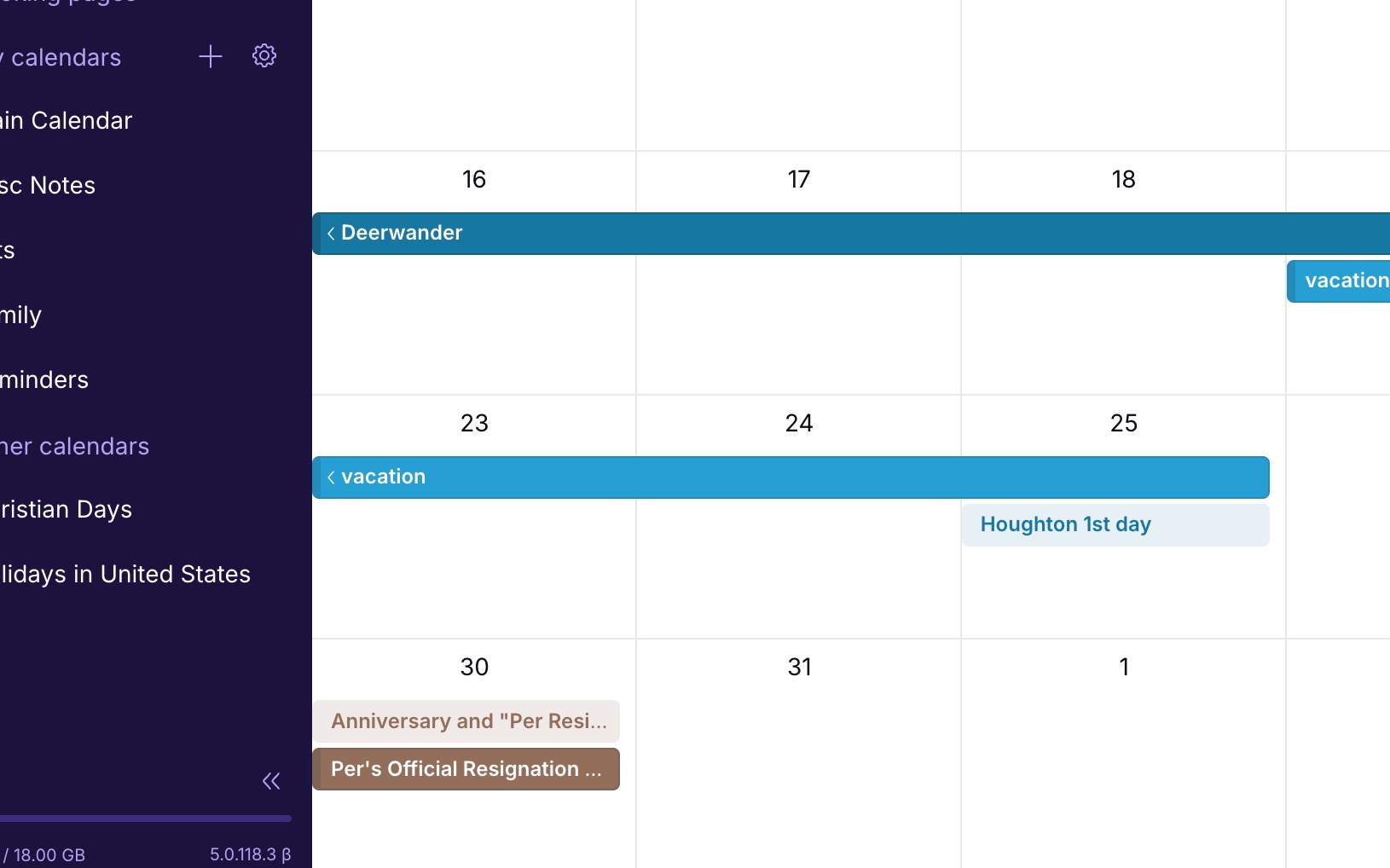
Calendar event color option for light/non-bold events
Currently all the color options for calendar events are dark/bold blocks. There should be a toggle to make each of these colors a light-block or non-bold-block. I would like some of my events/calendars to be much less visually strong than some others. Simply applying the bold color to the text adding transparency to the background color, would give this effect.
Here's an example: https://jakeparis.com/wp-content/uploads/2026/06/Screenshot-2026-06-16-at-12.54.10-PM.jpg
2 votes -
Calendar event color option for light/non-bold events
Currently all the color options for calendar events are dark/bold blocks. There should be a toggle to make each of these colors a light-block or non-bold-block. I would like some of my events/calendars to be much less visually strong than some others. Simply applying the bold color to the text adding transparency to the background color, would give this effect.
Here's an example: https://jakeparis.com/wp-content/uploads/2026/06/Screenshot-2026-06-16-at-12.54.10-PM.jpg
2 votes -
Having a button to archive an email while we are reading it without having to click on « Move to » or « … »
On iOS, when I read an email I most often want to archive it but I have to do it either through the « Move to » menu or through the « … » menu. It would be useful to have the archive button right there alongside the « Mark as unread », « Trash », « Move To », etc., buttons at the bottom of the screen when reading the email.
2 votes -
Improved week view in mobile calendar
aCalendar+ has the best week view concept that I've seen. It arrays the days in a grid of 8 boxes, the last one being a miniature month view, in either a landscape or portrait view, and it only lists appointments, not every time slot of every day. Proton Calendar only has a portrait view with 7 extremely thin columns, which can be very tedious.
Proton needs some more options in this area! The 3-day view is better, but it only lets you see a couple of days ahead, not getting the picture for the full week in one glance.
4 votes -
Tags and sub-tags
I would love it if we could have sub-tags. For example, Hawaii would be a tag nested under Travel. Although folders allow subfolders, I think tags are so much more nimble and flexible.
74 votes -
Proton Mail row view: preview pane, and default goes to next message
When viewing emails with row view, I have two suggestions
- It would be useful to have a preview pane in row view mode.
- After processing an email the window goes back to the main page, so I need to click on the next message. It would be better if by default the next message was displayed instead, or at least to have an option to choose10 votes -
Send encrypted e-mails to non-Proton Mail users without password
Currently, Proton Mail users can send secure e-mails to non-Proton mail users user password protection. This feature adds complexity to the process. Can you provide an alternative method which doesn’t require a password but instead uses a 2FA method to verify the recipient’s e-mail address (similar to applictions such as Securemyemail),
2 votes -
Support more than 4 Security Keys
Proton supports only 4 hardware security keys - this is not enough. Especially since using biometrics counts against the 4 key limit. I have three desktop computers which run my Proton accounts, and I have mobile devices which require 1 key. So I can't use the biometrics option without forcing a game of musical chairs with my security keys. I'm forced to continue using and subscribing to my 1Password account rather than Proton Pass until this limit is increased.
52 votes -
Proton Calendar: Set date by day, month and year
When creating an event in Proton Calendar, it would be great to be able to select the day, month and year separately. On the web / desktop app, you can scroll through by month which is somewhat acceptable, but on iOS, you have to scroll day by day. Very cumbersome if you are trying to add an event a year or more into the future.
4 votes
- Don't see your idea?