
Proton Mail & Calendar
1892 results found
-
Reply, Reply all switching
When already composing an email, I'd love to easily switch between reply and reply all.
Currently I need to manually copy all emails or start composing an new email, copying over the contents.
2 votes -
Storing showing read/unread prefference
Enable making showing only read/unread/... etc a default. We can already filter on this (on desktop using Show filter in the top right), but this isn't stored. I would love for this to be stored somehow. This could be done in many ways.
- Store it as user preference after change
- Adding an additional setting to the settings that allows us to set the defaultIt is stored in the url (
#filter=unread), but this is reset when clicking on the inbox button.2 votes -
A better cleaner, simpler new message window
A broader open window more like google (sorry) but it is clean,simple and I don't feel like I'm trying to view the world through a mailbox slit.
Also please when making a response.2 votes -
Add event to calendar from email app
Possibility to add and event to the calendar from an email on the mobile app, as it exists on the desktop app or online
2 votes -
All Settings
Please allow clicking on the upper right hand “cog icon” to send you to the full “All Settings” page. A recent update made it so that it is a two step process to land on this page.
Currently, when you click on the cog icon in the upper right corner, the blue “All Settings” button appears. I perceived it not as a link, but as a title (or subject heading). I had to contact customer support to find my way to the complete All Settings page. It wasn't intuitive for me. A one step process would be simpler and more…
2 votes -
Proton Calendar: add Repeat Event and All Day fields to default calendar settings
When we create a new calendar, the Repeat Event field in it is set to Does not Repeat by default and there's not way to change this default while editing the calendar.
It is very inconvenient in some cases, for example for birthdays. For every birthday we enter into the Birthdays calendar, we have to change the Repeat Event field value to Every year manually, and if we forget to do it, the calendar won't remind us of the birthday the next year.
It would be great if while creating a calendar or editing it we could set its default…
2 votes -
SimpleLogin Alias Export CSV Should Include Display Names
The "Display Name" field for aliases should be backed up into the CSV file that gets produced when going to Alias import/export -> Export Aliases under Settings.
At present, notes entered under "Alias Description" are included, but Display Names are absent.
The Display Name field allows for custom per-alias user entered names that should certainly be preserved in backups, and restored in the event that the CSV file gets used "for a future batch import" -- which is one of its explicitly stated purposes.
At present, my manual workaround is to ensure that custom Display Names are also copied and…
2 votes -
Nicknames
Please add a nicknames field for protonmail contacts. It would be helpful if this worked with the iOS dictation feature for voice input for to, cc and bcc fields.
2 votes -
Use the user portion of a random-generated alias for mail origin authenticatin
When users sign up for services (e.g. Facebook) they might use a random generated email alias like facebook.com.spar731@passinbox.com, note that the domain of the website who this alias was intended for (facebook.com), is in the user portion of the alias and can be used as a form of data origin authentication like so:
Whenever a user receives an email, the proton mail client checks whether the domain of the sender is present in either the user portion of the beneficiary of that mail (FACEBOOK.COM.spar731@passinbox.com) OR that the domain of the sender is in some sort of whitelist…
2 votes -
Option for one time pay for mail native app and bridge
Its ridiculous that I need pay 4$ per month just to use proton bridge, I dont need more space or any other option in paid plan, I just need bridge for use my favourite mail client.
Im ready to pay 50$ one time to use it.
2 votes -
Simplify and Optimize Date & Time Input for Appointments
Mask (live formatting while typing)
As the user types, raw numeric input is automatically formatted in real time. Example: typing 1000 instantly displays as 10:00 while still in the field.Auto-Format on Blur (on leaving the field)
When the user leaves the input field, shorthand date entries are automatically expanded into the full formatted date. Example: 220226 → 22.02.2026Raw Input Parsing / Smart Date Recognition
The system intelligently interprets numeric raw input and recognizes it as a date without requiring the user to type separators manually. Example: 220226 is parsed and recognized as the date February 22, 2026.Users…
2 votes -
I would like to be able to add an existing free Proton account as one of the 10 additional accounts in Proton Mail Plus.
I would like to be able to add an existing free Proton account as one of the 10 additional accounts in Proton Mail Plus.
2 votes -
Edit Notification Type in Calendar ios app when creating events
When adding an event in Calendar ios app, you cannot edit the type of notification. Not even sure how the type is chosen, as it does not say.
If you want to change to alert, it has to be done via browser.
Would be nice to choose Alert or email. Or have a default setting for notification type for events
2 votes -
Proton Calendar for Wear OS & Apple Watch
I'd love to see Proton Calendar come to Wear OS and Apple Watch as a native app.
Right now, the only way to see Proton Calendar events on a smartwatch is to sync through Google Calendar or Apple Calendar, which means handing over your encrypted schedule to the very companies whose data practices drove many of us to Proton in the first place. That's a real privacy gap.
What I'd love to see:
Next event complication on watch faces
Haptic reminders
Quick event creation via voice dictation, encrypted and synced instantly
One-tap Proton Meet join directly from wrist notifications
Proton…2 votes -
Allow auto accept for calendar invites
Please allow the optional activation of auto-accepting calendar invites. If possible via filter, so the user can auto-accept invites from several adresses and/or from everyone.
2 votes -
2 votes
-
Show sender’s brand icon in iOS push notifications instead of ProtonMail app icon
Currently, every push notification received on iOS displays the ProtonMail app icon, regardless of who sent the email.
I would like the notification to show the sender’s own brand icon or favicon instead of the fixed ProtonMail logo.
This would make it much easier and faster to recognize the source of each email directly from the lock screen or notification center.
ProtonMail already displays sender favicons beautifully inside the inbox. Extending this same experience to iOS push notifications would greatly improve the overall user experience.
Thank you for considering this feature!
2 votes -
Booking Page - Disable feature altogether
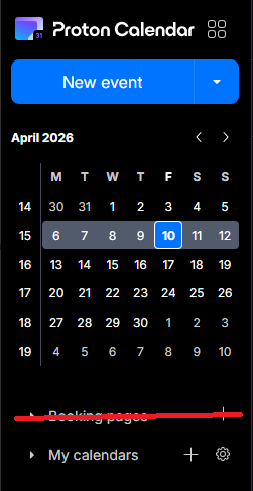
The booking pages form a great feature for business users, but seeing as I use Proton as my personal account, I now have a permanent button to a feature that I don't use - and thus - have a cluttered calendar. I would prefer if I was able to disable the booking pages feature altogether, via the integrations settings, for example.
2 votes -
Couleurs mail et calendrier et personnalisation fond par images personnelles
Il conviendrait rapidement
1 . d'augmenter sensiblement la palette des choix de couleurs disponibles pour marquer les évènements courriels et calendrier.
2 de permettre la personnalisation de l'affichage avec des fonds d'images personnelles2 votes -
enable reminders to be sent to phone as text messages
As someone who needs strong, clear reminders that don't require me to remember to check my email and then have to click the currently oblique email reminders in proton, I would love to see the option to have event reminders sent to me by text message - as often as I need them.
2 votes
- Don't see your idea?