
Proton Pass & Authenticator
597 results found
-
hide email on desktop app launch
itd be better if the email address for your proton acc didnt show up whenever you open the desktop app
2 votes -
Improve compatibility with Orion Browser
Multiple people have been reporting that on Orion Browser (Built on WebKit, supporting both Firefox and Chrome extensions) by Kagi, Proton Pass suffers from lag and intermittently tells one that the vault is empty. Since Orion is one of the most popular privacy-focused Browsers right now, I hope Proton will put some effort into improving compatibility.
Edit: Currently, the Firefox extension works best with Orion, the Chrome extension is unusable (login fails for me, it cannot communicate with the extension)
6 votes -
Add option to set custom expiration for shared links
The secure link sharing feature in Proton Pass is great, but having more control over how long a link stays active would make it even better. Right now, the available options are fixed - 1 hour, 24 hours, 7 days, etc. In many cases, 1 hour is too short, while 24 hours is too long.
Allowing users to set a custom expiration time - for example, 2, 3, or 4 hours - would make the feature much more flexible and practical for real-world use. A simple option to choose the number of hours (or even minutes) could be a big…9 votes -
import multi layer email folders Microsoft
Microsoft Outlook has a multilayer folder possibility. For business accounts proton it's important to be able to 1) import those ms folders, 2) create those folders in Proton mail internet and proton mail app
5 votes -
Allow to copy paste suggested passwords
Sometimes it's needed to copy a suggested password before the login data is updated. You might have to enter the current password too, or just want to wait for confirmation, so being able to copy, finish the process and then updating the data manually with the copied password can make sense. Currently it seems not possible at all to copy, even in the expanded view (when clicking on settings).
2 votes -
Pass Monitor - Inactive 2FA
Let me turn off monitoring for inactive 2FA without turning off any of the other monitoring features. Most of my 2FAs are in Proton Authenticator, which doesn't even have a correlator to tie it to the Proton Pass entries. Also I have quite a few where for various reasons I cannot use the 2FA on the related site. For all of these, I still want the remaining monitor features enabled.
3 votes -
30 Minute Auto-lock
Hi everyone,
Minor suggestion to add a time between 10 minutes and 1 hour.
30 Minutes would be my choice.
6 votes -
More Details and Reasons for Weak or Vulnerable Password
In Proton Pass, clicking on any of the Login Items, it shows the security level of the password. Very often it mark my existing passwords as "Weak" or "Vulnerable". ***But, it is IMPORTANT to let users know the REASON for that!!!
Like Apple iCloud Passwords, it tells you why that specific password is graded as weak. Maybe because it is reused too frequently? Leaked in other databases? Or simply the combination of letters and numbers is not secure? Too short? Too simple? But Proton Pass DOES NOT tells you why!
What I mean is, there are a lot of reasons…
10 votes -
Title: Windows app UX issues: fixed minimum window height and layout shifting due to scrollbar behavior
The Windows app has several strange and frustrating UX/design decisions.
1) Fixed minimum window height makes layout unusable
Current behavior:
- The app has a minimum window height that cannot be reduced.
- If I have a 2x2 layout (4 codes total), I cannot resize the window to fit exactly those blocks.
- There is always a large empty area at the bottom — roughly ~70% of a code block height.
Why this is bad:
- Wastes screen space
- Prevents clean, compact layouts
- Feels completely unnecessary for a codes-based UI
Expected behavior:
- Allow free vertical resizing
- Let the window snap tightly to…
2 votes -
Enable Proton Pass browser extension to be pinned
Currently, the Proton Pass browser extension drops-down from the browser toolbar for use, but when the page being displayed is clicked, the extension disappears. This is annoying, for usually, one is about to copy-n-paste both a website user ID and a password, hence, one must again click on the extension button to copy the password. Please enable the extension to be pinned so that the user has control over when the extension is visible.
10 votes -
Exports personnalisés
Avoir la possibilité de personnaliser les données exportées :
- choix des coffres
- choix des types de données (identifiants, wifi...)3 votes -
Have a clear & accessible button OR keyboard shortcut to lock Proton Pass (desktop and browser extension)
It can be helpful to have a clearly-identifiable lock button for both the browser extensions and desktop apps. I use Firefox on my MacBook and I work at environments where I have to physically move away from my laptop ever so often, and have to move around a quite a lot. It'd be less fatiguing and (importantly) more secure if I could quickly lock my the desktop app and/or extension before moving away from my laptop. Just a little QoL feature that would be fantastic :-)
3 votes -
Make the "generated password history" cross-plateform
Could you make the "generated password history" cross-plateform ?
Because if I generate one on my phone, and after that I check on my PC, the generated password does not appear there.... also happens the other way round.3 votes -
Improve search results display
Searching for vault items on the android client is currently a nightmare that makes the search almost unusable as the name of items in the vault are not always fully displayed. Instead, in some instances the vault item retrieved is shortened to: ...look.com as opposed to outlook.com
Please fix this to always show the full item name in the search results.
8 votes -
Passkey Management Enhancement with search ability
When managing or confirming passkeys for a large number of accounts, there's currently no way to search or filter specific entries. This makes it difficult to navigate and manage accounts efficiently, especially for users with extensive credentials saved.
10 votes -
Add QR code as an additional field
Add QR code as an optional additional field to Proton Pass. This would allow event tickets to be easily stored and used on entry to gigs. New field could either import/scan an existing QR code or be input by typing it's text representation.
3 votes -
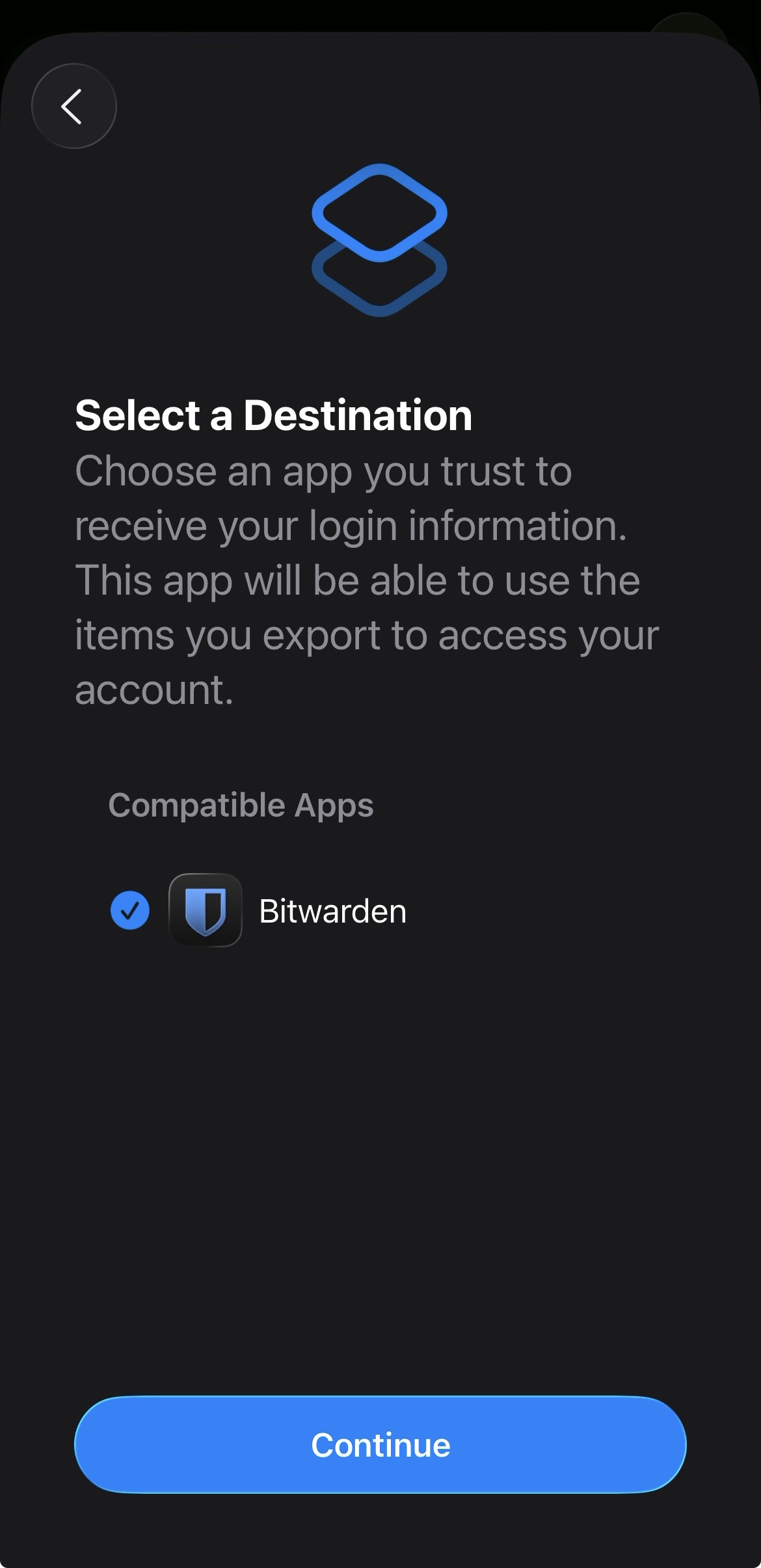
Add proper support for importing passwords from the apple ios passwords app
In the apple passwords app on ios it has a button to export passwords but the problem is that proton pass does not show up in the list of compatible apps
img: https://salty-mat.github.io/IMG_5693.jpg
In the image it only shows bitwarrden as a compatible app even though i have proton pass installed
4 votes -
Disable saving Authenticator keys
Hi!
ProtonPAss offers saving 2FA/MFA Authenticator keys on my Android phone, which is pointless. Can you add some detection logic to skip offering password/key saving inside Authenticator app?3 votes -
Search results should show count for results from other vaults
Way too often, I will search for a password, only to end up with no results, or otherwise feel like my passwords are missing. This creates panic, but the real issue is I had a vault selected (which wasn't the vault containing the item I was looking for). I've talked to other users and they have also experienced this.
I see this as an easy fix: at the bottom of the search results, it should say something like "and ## additional items in other vaults. [search all items]"
I've experienced this on mobile (android), desktop (mac), and browser (chrome).
3 votes -
Alias Email Contacts Edits (deletion) and Search Function
Along with the post "Faster alias contacts w search and multiple select," the ability to delete multiple unneeded contact addresses is needed. I had hundreds to sort through and to delete manually. I took me over two hours to clean it up. Also, because it took me so long to sort through hundreds of contacts, i couldn't find a previous created contact. The system does not tell you it already exists, it just goes back to the main contacts list...then having to sort through hundreds to find the one you created & need is like finding a needle in a…
4 votes
- Don't see your idea?