
Proton Mail & Calendar
- or
No existing idea results
- ~ No ideas found ~
1543 results found
-
Spell check and auto correction for an email message SUBJECT line
As mentioned in the title - when composing a message
5 votes -
upcoming
List view of upcoming events
(besides the 'day', '3 days', 'week' and 'month' views)
4 votes -
Android agenda
Add Android agenda feature allowing other apps to create events and to read events : for instance the air france app, the sncf app and other travel company apps can add an event directly, or the garmin watch can read the events to display in the morning report
2 votes -
Allow group contacts duplicate
A feature allowing to duplicate a group of contacts would be useful. Let say you want a group of people that you invite to an event but then want to create a sub group for those who will participate. Instead of having to enter manually all the names, you could just copy the initial group and remove the ones not participating, thanks.
5 votes -
Proton app customization
Allow the ability to customize proton mail with proton app icons. They would be where they currently are. You could also turn off ones you may not want. This would allow you to have the ability to access all of protons apps, but all in one place. You could also add a drop down menu and select the proton app you want to open.
4 votes -
Drastically Improve Preview Text (Very Simple Fix)
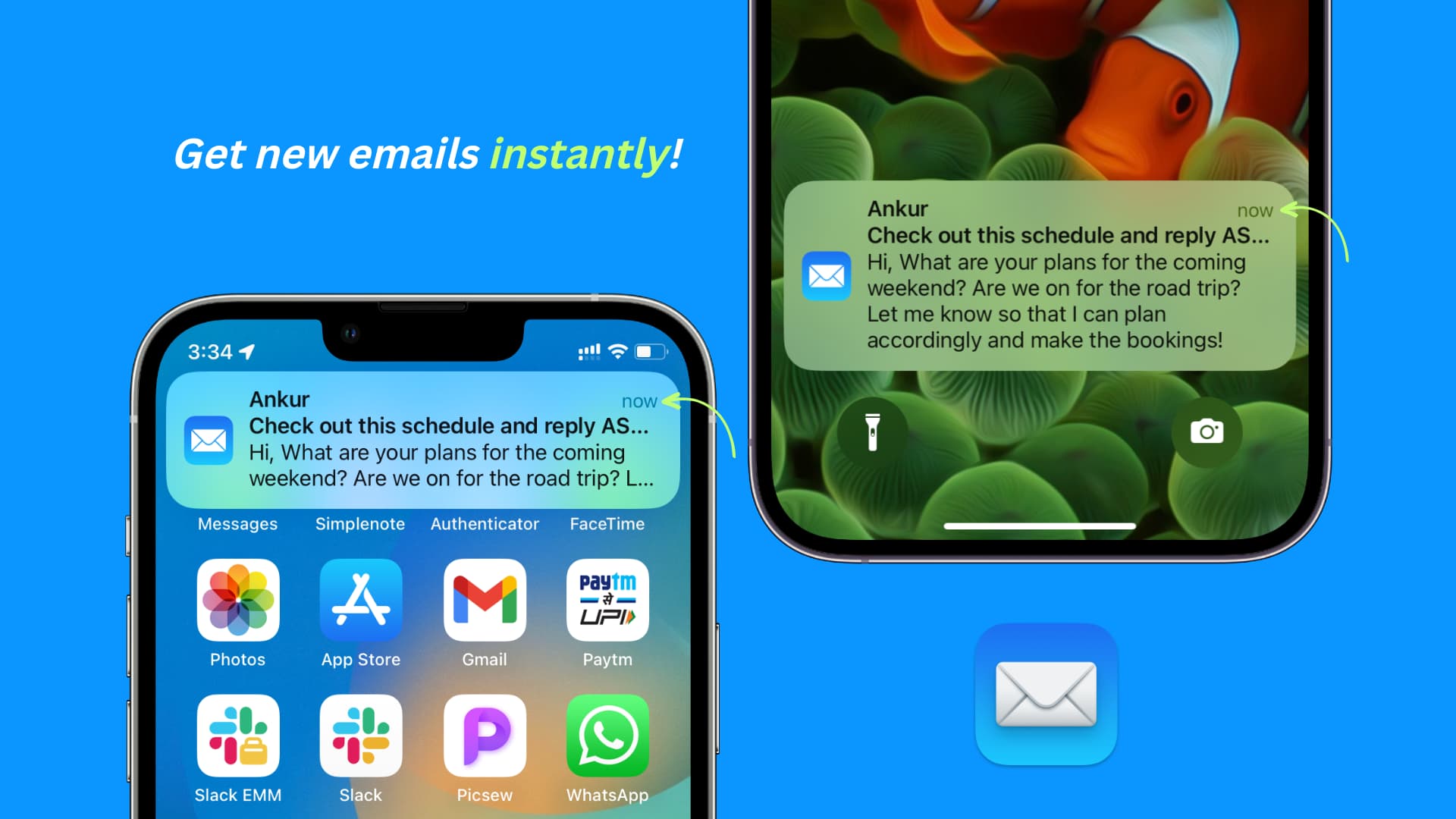
This is SUCH an unbearably simple, easy, and game changing feature (I have no idea why it hasn't been implemented yet). This primarily relates to the iOS app, but the web app can use improvements too.
Please allow for multi-line previews! An optional 4 to 5 lines of preview text from the email would be great.
Why in the world would you forcefully limit notifications to an incredibly uninformative mere line or two?
You can't even read the content of emails at a glance because the default preview is so horrendously limited (and it looks ugly as **** in general and in comparison to other apps). And many, (if not most) users can't even plug their account into a 3rd party app that DOES allow larger email previews because of the Proton Bridge paywall + restriction.
It's a great quality of life improvement allowing users to actually see the content of emails at a glance, and in many cases get excited for the good news contained in those emails without having to open them yet.
It's JUST like how you/anyone would want to see a preview of what your best friend or loving partner said in a text. It's informative, time-saving, and a fantastic deliverer of good news.
The current situation (mostly a 1 line preview) is horribly inefficient and uninformative. It's like a clickbaity title where you're forced to click into the article or video EVERY SINGLE TIME because the sliver of info they give you in the title is entirely useless.
But it doesn't have to be that way. Please add an option setting to increase the line preview of emails in Proton.
Desktop:
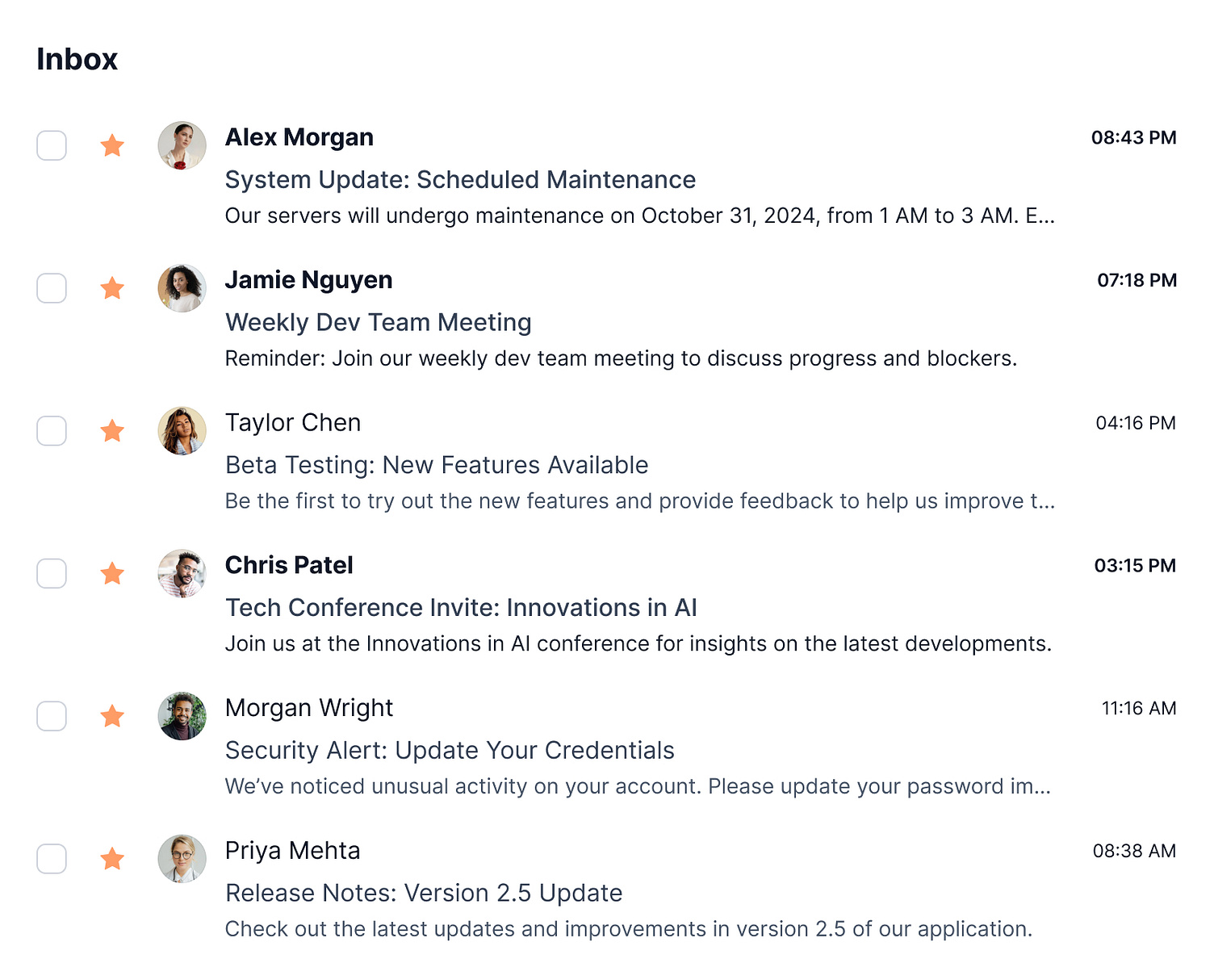
Additionally, on desktop the emails ONLY show the sender and subject line. They could EASILY be made more useful and informative by (optionally) including the body of text/content of the email after the subject line (like literally EVERY other email platform).
Proton mail is made to be so inefficient and time wasting with it's current state of hyper limited previews.
The current version of Proton is practically THIS useless and uninformative, telling you next to nothing: https://i.pinimg.com/736x/33/c2/a9/33c2a92933c35db8bd5f72f107ff2f61.jpg
Mobile example of the right/helpful way: https://media.idownloadblog.com/wp-content/uploads/2023/03/Get-new-emails-instantly-on-iPhone.jpg (The lockscreen example: notice how you can INSTANTLY see the important information at a glance and therefore respond accordingly, i.e. address it now or save it for later)
Desktop example: https://cdn.dribbble.com/userupload/17527141/file/original-5c6b164008e276669e337b2794c72b1d.jpg?resize=1504x1214&vertical=center
This is SUCH an unbearably simple, easy, and game changing feature (I have no idea why it hasn't been implemented yet). This primarily relates to the iOS app, but the web app can use improvements too.
Please allow for multi-line previews! An optional 4 to 5 lines of preview text from the email would be great.
Why in the world would you forcefully limit notifications to an incredibly uninformative mere line or two?
You can't even read the content of emails at a glance because the default preview is so horrendously limited (and it looks ugly as **** in general…
2 votes -
Allow connection to password protected .ics links
We currently can't connect calendar subscription that are password protected.
I can't link my university schedule to proton calendar because of this issue.
4 votes -
Fix Delete Email Functionality in Android App
When you have an email open in the app and delete it after reading, you are returned to your inbox and many times the email you supposedly just deleted still appears in your inbox. Refreshing the view does not resolve the issue. It doesn't happen every time, but more often than not. From what I can recall, this has been an issue since release.
4 votes -
Could you please work to incorporate task manager features in Proton calendar? This is critical to be able to replace apps like Todoist.
The current way to enter events is fine, but it's a bit archaic. We also need to be able to add tasks that can be checked off. AI could be used to streamline data entry for both of these processes.
63 votes -
[Mobile app] Option to wrap event titles across multiple lines in month view
In month view, event titles are currently limited to a single line, which makes it difficult to read longer titles — especially when screen space is tight. It would be great to have a toggle or setting that allows event titles to wrap onto two or even three lines if needed.
This would make the calendar much easier to scan at a glance, without needing to open each event. To keep the layout clean, the number of lines could be capped (e.g., max. 2 or 3), and events could dynamically expand in height if necessary.
7 votes -
ProtonGroups/ProtonLists to send secure and private newsletters
A proton based newsletter service
I send a newsletter to thousands of subscribers. Due to my subject, many of my subscribers are using Proton or a PGP-compatible service. It is sad that I can’t send an encrypted newsletter.
This could be a paid feature that would allow paid user like myself to send an email to a list of subscribers.
- For each "ProtonGroup", there would be a simple public interface where people could subscribe/unsubscribe
- Optionnally, people could subscribe by sending a mail to a newsletter+subscribe@ adress
- Each ProtonGroup would have a list of emails adresses that are allowed to send email to the whole list.
That’s it. No complex "campaign concept", no tracking. Just an email sent to thousands of subscribers and encrypted if the subscribers are using Proton !
A proton based newsletter service
I send a newsletter to thousands of subscribers. Due to my subject, many of my subscribers are using Proton or a PGP-compatible service. It is sad that I can’t send an encrypted newsletter.
This could be a paid feature that would allow paid user like myself to send an email to a list of subscribers.
- For each "ProtonGroup", there would be a simple public interface where people could subscribe/unsubscribe
- Optionnally, people could subscribe by sending a mail to a newsletter+subscribe@ adress
- Each ProtonGroup would have a list of emails adresses that are allowed to send…
2 votes -
Group/merge status update mails
//What?
Group and/or merge status update mails automatically based on recurring and/or recognized key indicators like track&trace number, purchase order number, support ticket number, etc.//Why?
Current inbox is spammed with (unnecessary) status update e-mails, creating a confusing and cluttered inbox.//How?
Automatically group status update e-mails - outside of a conversation - based on sender e-mail + key indicator rules. Instead of a new e-mail appearing in inbox, create or update current group so all e-mails related to a specific subject (e.g. purchase order) stay together. Comparable to conversations in Mail or chats in any given text messaging app.
E.g.:
1. While online shopping, one might receive multiple confirmation e-mails: "order received", "payment received", "order picked", "order sent", "order delivered". Instead of these being separate e-mails -> group by "order no." + sender e-mail.- While waiting for a DHL package, one may receive the following e-mails: "label made", "package received by DHL", "Delivery due to tomorrow", "Out for delivery today". Instead of these being separate e-mails -> group by "track&trace no." + sender e-mail.
//What?
Group and/or merge status update mails automatically based on recurring and/or recognized key indicators like track&trace number, purchase order number, support ticket number, etc.//Why?
Current inbox is spammed with (unnecessary) status update e-mails, creating a confusing and cluttered inbox.//How?
Automatically group status update e-mails - outside of a conversation - based on sender e-mail + key indicator rules. Instead of a new e-mail appearing in inbox, create or update current group so all e-mails related to a specific subject (e.g. purchase order) stay together. Comparable to conversations in Mail or chats in any given text messaging app.…2 votes -
Make it possible to take a screenshot from my email in Android
I want to take a screenshot from an email in the Proton app (Android), but something ('turned off by your administrator') is blocking that. I want to be able to change that setting. I'm my own admin, but can't turn it on.
2 votes -
After select two or more Emails, forwarded them as enclosed files in one email
Select two or more Emails from different folders, and then using the forward function to send them as an attachment in one Email to a specific sender.
3 votes -
improved alias email forwarding for multiple domain names
Currently, I see an option to create multiple aliases across different domains, but all aliases must point to the same inbox and a single email. This creates a limitation if I want finer control over how aliases from different domains are routed especially that you multiple domains from alias management.
Feature Request:
Add support for multiple bindings between aliases and inboxes, so that:
• Aliases created under different domains can be directed to different inboxes.
• Admins can define domain-specific routing rules (e.g., *@domain1.com *@domain2.com → inbox A, *@domain3.com → inbox B).This would allow greater flexibility, improved organization, and brand/domain separation without requiring multiple instances or complex workarounds.
Currently, I see an option to create multiple aliases across different domains, but all aliases must point to the same inbox and a single email. This creates a limitation if I want finer control over how aliases from different domains are routed especially that you multiple domains from alias management.
Feature Request:
Add support for multiple bindings between aliases and inboxes, so that:
• Aliases created under different domains can be directed to different inboxes.
• Admins can define domain-specific routing rules (e.g., *@domain1.com *@domain2.com → inbox A, *@domain3.com → inbox B).This would allow greater flexibility, improved organization, and…
4 votes -
Drag to select multiple emails via checkboxes
In the web version, selecting multiple emails could be made much easier by allowing users to click and hold on one checkbox, then drag the mouse down (while still holding the click) to highlight and select additional adjacent emails. This way, you could select five or more emails in a single movement without clicking each individually. Services like Yandex Mail have this feature and it is very convenient; bringing it to Proton Mail would greatly improve user experience for bulk actions.
4 votes -
Custom TLS Certificates for Custom Domains
I think it is important that users are able to upload and use custom certificate for their custom domains on Proton.
This would still involve using Let's Encrypt, the main difference is not using Proton's certificate for connections made for custom domains.
This will require being able to securely and privately upload or generate a necessary private certificate, and then creating the let's encrypt entry.
2 votes -
Remove the paid email tools if you don't have the service
Remove the AI paid email tools if you don't have paid for them.
All those buttons are not usable and thus useless in the window and just occupying space.I don't want to see the options that as a paying user you are trying to upsell to me.
2 votes -
automatic (or ability to set a) label for imported emails
I import lots of emails form other services (Gmail, Yahoo etc), and it's annoying to check every time from which account that email is from.
It would be nice to have the possibility to add label automatically to imported emails or at least to distinguish them from the one I receive directly on ProtonMail.2 votes -
Add searchable unencrypted text via user input button or link
Problem, Emails can only be searched by the subject or the fixed header info neither of which can be altered by the user on incoming mail. We all know this isnt sufficient for many searches, but also understand the end to end encryption challenges.
Simple Solution, Id propose a single button or link on each email received or created that pops up a field where the user can type or paste in text meant to be searchable. That would be a quick fix for being able to find important emails, and of course the user would have to understand that data would not be stored encrypted any more than the subject line is now, at least not under their private key, but maybe under a proton known key so it can be searched but still reasonably secure from compromise.
Maybe not for the uber paranoid user, but for the average person and business user not fearing a subpoena release of this content it would be a very useful feature.
Just an easy way to quickly cut and paste a paragraph, add an account number etc. to be more quickly found later. I would use this on many more important emails that don't have reasonably descriptive and searchable subject lines.Problem, Emails can only be searched by the subject or the fixed header info neither of which can be altered by the user on incoming mail. We all know this isnt sufficient for many searches, but also understand the end to end encryption challenges.
Simple Solution, Id propose a single button or link on each email received or created that pops up a field where the user can type or paste in text meant to be searchable. That would be a quick fix for being able to find important emails, and of course the user would have to understand that…
3 votes

- Don't see your idea?