
Proton Mail & Calendar
2246 results found
-
Advanced PGP Key Management for Proton Mail Users
Description
Currently, Proton Mail allows users to manually add PGP public keys to external addresses only.
This creates several limitations for users with more complex encryption setups or personal key hierarchies.
Problem 1: Limited Manual Control
Users cannot manually specify whether an email should be:
- Signed only
- Encrypted only
- Signed and encrypted
Instead, Proton Mail enforces a fixed default behavior per contact.
If a user wishes to change how messages are sent, they must manually adjust the contact’s encryption settings each time.
This slows down workflows and complicates secure communication.
Problem 2: External Keys for Proton Addresses
Some Proton users…
11 votes - Signed only
-
cloumn view in ipad app
mail list left to choose the one to read - and the active mail viewed on the right
4 votes -
push
Auto-dismiss push notifications when email is read on another device
Currently, when I receive a push notification on my iOS device about a new email, the notification remains visible even after I've opened and read that email on another device (such as my laptop or desktop). This creates notification clutter and doesn't reflect the actual state of my inbox.
Proposed Feature:
Implement cross-device notification synchronization so that push notifications are automatically dismissed on iOS when the corresponding email is read on any other logged-in device.Use Case:
Receive email notification on iPhone
Open and read the email on laptop/desktop
Notification…5 votes -
Indent capability on mail message editor
I am using the MacOS client and WEB client and it would be nice to have an Indent capability to improve message formatting. Currently there are only bullets/numbers and alignment options.
7 votes -
I'd like to be able to choose whether to leave past events in color or gray like now.
You don't just work with the calendar looking forward; you often need to go back, and all the gray makes it difficult to see, especially when you have a lot of calendars and poor eyesight. Google Calendar lets you select how you want to view past events. That's what I need.
11 votes -
Move Multiple Messages Simultaneously
For better organisation it would be useful to be able to move multiple messages (in a single conversation) to another mailbox by selecting the "Move to" function in the highest message in that conversation.
Unless anyone can tell em otherwise this does not appear to be the case at present.
3 votes -
Booking Page - Disable feature altogether
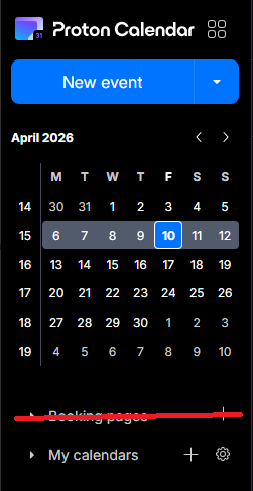
The booking pages form a great feature for business users, but seeing as I use Proton as my personal account, I now have a permanent button to a feature that I don't use - and thus - have a cluttered calendar. I would prefer if I was able to disable the booking pages feature altogether, via the integrations settings, for example.
3 votes -
Option to disable email notifications when editing events with guests
Currently, editing any detail of an event with guests (even minor typos or description tweaks) forces an email update to all attendees. This creates unnecessary noise and inbox clutter.
Request: Add a checkbox in the edit dialog: "Send update to guests" (default: checked).
- If unchecked, save changes silently without emailing attendees.
- Essential for correcting typos or adding minor notes without spamming guests.
Why: Other calendar tools allow this granularity. Proton Calendar needs a way to distinguish between major changes (requiring notification) and minor edits.
Thank you,
Regards2 votes -
Waytime
Waytime - Please… add to the Time - Waytime like Apple or others do.
2 votes -
Ensuring Core Email Address Privacy in Replies
I use SimpleLogin and recently replied to a sent message, which embedded my core email address in the body of the message making it visible to all recipients
In the same way there are alerts inside SimpleLogin to say, for example, that you cannot reply to yourself from an alias, it would be very helpful for there to be a real time scan to prevent your core email address being visible inside an email. This could either be a toggle in global settings or in the reply panel itself to enable exclusion of those recipients who have Proton mail addresses
…
2 votes -
Auto-spam emails from unsubscribed lists
It'd be nice if it were possible to automatically flag as spam any email from a distribution list for which I used Proton Mail's "Unsubscribe" feature to remove myself from the list. The idea is that if the list owner is not going to honor unsubscribe requests, and since I already indicated that I do not want to receive those emails, then the emails from that list are spam and should be treated as such. An automatic method to take care of this would be handy.
2 votes -
Move calendar events
I know this is an option on the web version but on the IOS/mobile apps we NEED to be able to drag and drop events without having to open them and reselect the date or time. This is a critical feature for any functioning calendar app in my opinion.
8 votes -
Event cancellation and rescheduling.
When an appointment or event is cancelled or rescheduled I often need a record of the originally scheduled day and time.
At minimum I would like the ability to add strikethrough text to the event title, so that I know that the event was cancelled.
Ideally I would like a cancel button (next to the delete and edit buttons) that strikes the event title and turns off notifications, and asks if I would like to reschedule. If I reschedule, it will duplicate the original event and allow me to set a new date (and modify the other settings, if needed).…
16 votes -
incremental download
Allow email download to begin at a certain date and time. I back up my email every month. It's not really necessary to download the entire thing every time.
2 votes -
Inbox view - dislpay most recent label
The inbox view currently displays the top-most label in the hierarchy of labels if an email chain has more than one label. It should display the label assigned to the most recent email, the one actually displayed in the inbox view. The one relevant to the email entry right next to it. For example the most recently received email has a label L but previously there was a label A assigned to one of the past emails from the same sender. Label A is displayed incorrectly where a more recent and more accurate label L should be showing. Label A…
2 votes -
Add opt-out for internal delivery of calendar invitations
When a Proton user invites another Proton user to a calendar event, Proton resolves the recipient against its internal directory and delivers the invite directly into Proton Calendar — bypassing any external email flow entirely. There is no setting to disable this behavior.
This breaks workflows for users who rely on external calendars (Google Calendar, Outlook) as their primary calendar. The invite never reaches the external calendar, requiring manual .ics export/import every time.
Requested feature:
A toggle under Settings → Calendar → Invitations:"Receive calendar invitations via standard iCalendar email (disable internal delivery)"
This would restore interoperability with any RFC…
2 votes -
Automatically detect and prefill event time from text entered in the description field
When a calendar event description starts with a time (e.g., '17:00' or '5 PM'), automatically detect it with regex and prefill the event’s time fields—simple to implement, high user value, inspired by Google Calendar. (or let me know and I will implement it for you <3)
9 votes -
sieve filter redirect extension
Implement sieve language extension redirect with :copy https://emailstuff.org/rfc/rfc3894
8 votes -
allow passkey login for ProtonMail
Please allow passkey login to ProtonMail (some of us use something other than Proton Pass as our password manager).
145 votes -
Auto-delete unwanted messages options
Would be useful to enable auto-delete only for trash or spam separately, and being able to decide the number of days to wait (at least among a list of presets)
3 votes
- Don't see your idea?