
Proton Mail & Calendar
- or
1554 results found
-
Direct Event Access from Month View (Pop-up/Zoom)
Streamline access! Currently, clicking a day in the month view switches to the "day view." We suggest opening a quick pop-up (zoom) listing that day's events instead. Click, preview, done. Fewer clicks, better efficiency!
2 votes -
Proton Calendar - Support for Serbian public holidays
Hi!
I've been using Proton services for quite a while now. I would really like to see Serbian public holidays added to the Proton Calendar since that's the main calendar I'm using now.
That's the only feature I'm currently missing from Google Calendar -> Serbian public holidays.
Appreciate your hard work! Thanks and cheers.
2 votes -
In the confirmation prompt, tell which folder we are deleting all emails from (emptying).
In the confirmation prompt, tell which folder we are emptying.
Currently, when we empty the trash, it says:
"Delete all messages
All messages stored in this folder will be permanently deleted.
Are you sure you want to delete all messages in this folder?"I would like that "this folder" be replaced by "trash".
Also in the other folders it says:"Are you sure you want to move all messages in this location to trash?"
I would like that "this location" be replaced by "<name_of_the_folder>".
This to prevent costly mistakes.
Microsoft Outlook does this, for one.4 votes -
Calendar reminders
When I create a new appointment and want to set a reminder the default value is 60 minutes before, which is fine.
Then you have the option to add another "custom" reminder which I usually use to add the alternative "1 Day before".But the default suggestions are:
* at the time of the event
* 10 minutes
* 30 minutes
* 1 hour
* 1 week
* CUSTOMwhich means that you always have to press custom and, edit the predefined value (which is 15),
set the value to 1 instead, and then finally choose the option "Days" and click Done.I believe there is an unecessary big gap between the predefined 1 Hour to 1 week? The option to be reminded 1 day ahead is somewhat buried in several steps.
Just my opinion, maybe there are many more users that would have the 1 Day reminder more accessible?
Keep up the good work!
When I create a new appointment and want to set a reminder the default value is 60 minutes before, which is fine.
Then you have the option to add another "custom" reminder which I usually use to add the alternative "1 Day before".But the default suggestions are:
* at the time of the event
* 10 minutes
* 30 minutes
* 1 hour
* 1 week
* CUSTOMwhich means that you always have to press custom and, edit the predefined value (which is 15),
set the value to 1 instead, and then finally choose the option…2 votes -
Dynamic Folders
It would be good to have the functionality that shows e-mail based on specific search criteria. Ideally a broad one that is capable of using fields and tags, but MVP would be to have a folder that allows a view on documents that contain tag an and b. Example. For example the option to tag a document with invoice [document tag], project, [status], [supplier]. In case you would like to have a view that shows all the invoices for projects, you create a folder that searches for tag "invoice", and tag "project". It is a simple example but it offers opportunities to better manage the e-mails.
It would be good to have the functionality that shows e-mail based on specific search criteria. Ideally a broad one that is capable of using fields and tags, but MVP would be to have a folder that allows a view on documents that contain tag an and b. Example. For example the option to tag a document with invoice [document tag], project, [status], [supplier]. In case you would like to have a view that shows all the invoices for projects, you create a folder that searches for tag "invoice", and tag "project". It is a simple example but it offers…
2 votes -
Nuance in 'Not Spam' / Move to Inbox Filter
Contact Form 7 sends form submissions to me using my own email address as the sender, which Proton correctly flags as failing SPF checks. These messages go to my Junk folder - and that’s fine, because it prevents spoofed messages from landing in my inbox.
However, every so often a genuine form submission ends up in Junk as well. When I move that message to my inbox in Proton Mail Desktop for Mac, the app automatically marks the sender as “not spam” at the same time. I would like to be able to move a single message out of Junk without Proton treating the sender as safe. Ideally, these would be two separate actions so I can keep the email in my inbox but still manage the sender’s spam status manually.
Contact Form 7 sends form submissions to me using my own email address as the sender, which Proton correctly flags as failing SPF checks. These messages go to my Junk folder - and that’s fine, because it prevents spoofed messages from landing in my inbox.
However, every so often a genuine form submission ends up in Junk as well. When I move that message to my inbox in Proton Mail Desktop for Mac, the app automatically marks the sender as “not spam” at the same time. I would like to be able to move a single message out of Junk…
2 votes -
Visual distinction between "all day" events and events at a certain time
In Google calendar, all day events have a solid fill, and "timed" events have a border. This is helpful because often people (and I) will just make an all day event to signify something I need to remember, and don't actually need to prepare for at a certain time. Its nice to see that distinction on the monthly view.
5 votes -
SMTPUTF8 Support for sending emails via protonmail.ch
It's possibly been mentioned previously (although I couldn't find it with a cursory search), but how about adding SMTPUTF8 support for the SMTP relay(s) at protonmail.ch?
Obviously not a critical or important issue as such, just as "nice to have" so some mail formats will display properly without being mangled in conversion.
2 votes -
Make Proton Mail PEC/REM compatible
Following PEC, the Posta elettronica certificata in Italy and Switzerland, Europe will introduce the REM (Registered Electronic E-mail) . It would be nice if Proton could offer a extra service reinforcing its position as "secure" email.
3 votes -
move to folder - button focus for keyboard nav
In the web interface, I can navigate labels via the keyboard, set them, then just hit enter and it will focus the button and apply them.
When moving a mail to another folder I can navigage which folder to move to with the keyboard, but hitting enter does not focus on the button and I need to reach for the mouse.
Auto focus for keyboard navigation in the same way as the label popup would be nice to have.
3 votes -
Better Select/Select All in mobile app (iPhone)
It is frustrating to try to select a word (thus to expand the selection to a sentence or whatever) in an email I compose in your moble app. Repeated taps are ineffective then when the Select box does pop up, if's often not quick enough, and I've tapped somewhere else. If I'm trying to copy just a sequence of words, or sentence, I often get frustrated and delete the phrase and retype it were I want.
Other apps, like in Mac Mail or Notepad, etc. work much better in this regard. Seems like something you should address. Thanks in advance.
3 votes -
Spell check and auto correction for an email message SUBJECT line
As mentioned in the title - when composing a message
5 votes -
upcoming
List view of upcoming events
(besides the 'day', '3 days', 'week' and 'month' views)
4 votes -
Android agenda
Add Android agenda feature allowing other apps to create events and to read events : for instance the air france app, the sncf app and other travel company apps can add an event directly, or the garmin watch can read the events to display in the morning report
2 votes -
Allow group contacts duplicate
A feature allowing to duplicate a group of contacts would be useful. Let say you want a group of people that you invite to an event but then want to create a sub group for those who will participate. Instead of having to enter manually all the names, you could just copy the initial group and remove the ones not participating, thanks.
5 votes -
Proton app customization
Allow the ability to customize proton mail with proton app icons. They would be where they currently are. You could also turn off ones you may not want. This would allow you to have the ability to access all of protons apps, but all in one place. You could also add a drop down menu and select the proton app you want to open.
4 votes -
Drastically Improve Preview Text (Very Simple Fix)
This is SUCH an unbearably simple, easy, and game changing feature (I have no idea why it hasn't been implemented yet). This primarily relates to the iOS app, but the web app can use improvements too.
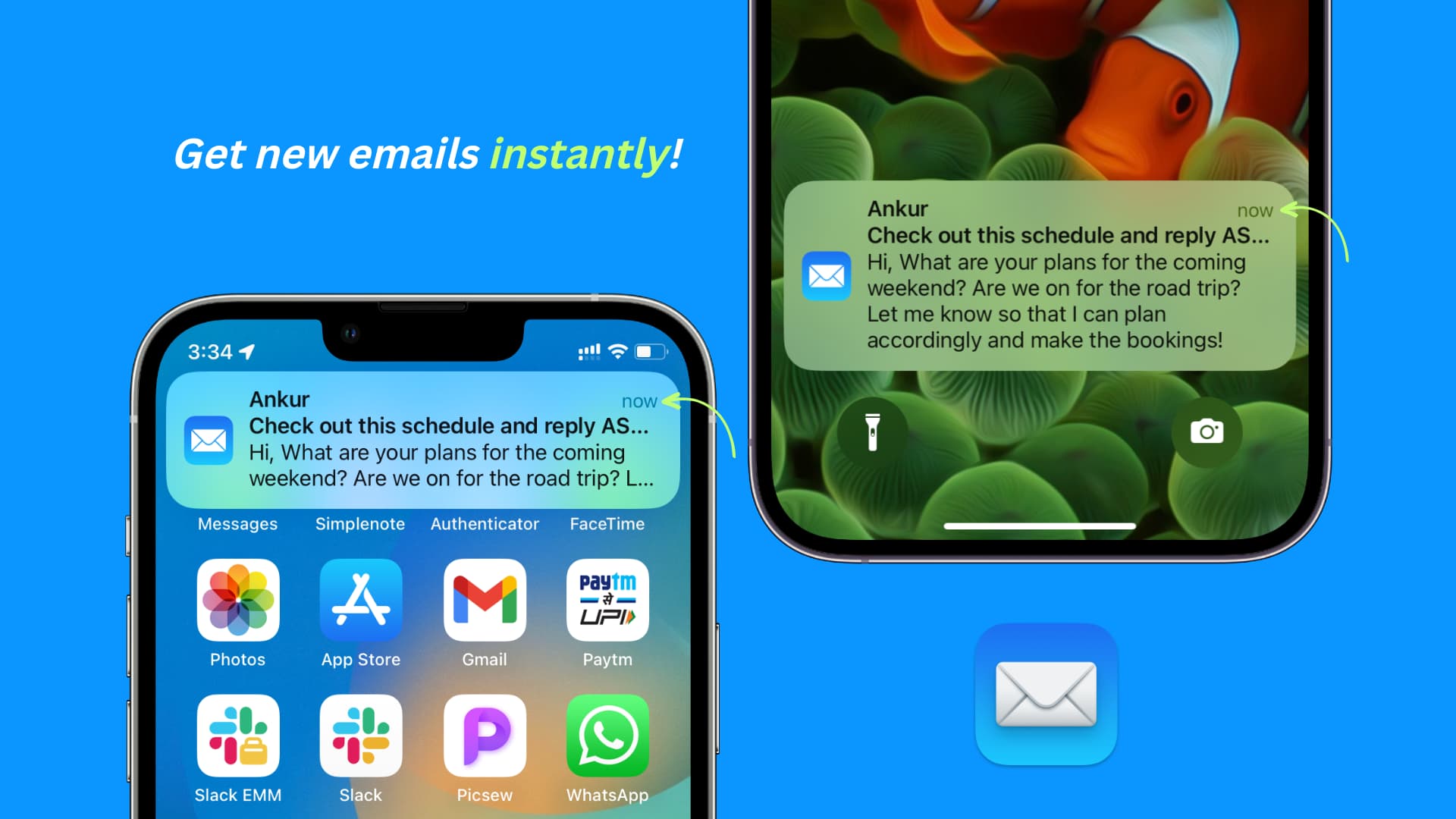
Please allow for multi-line previews! An optional 4 to 5 lines of preview text from the email would be great.
Why in the world would you forcefully limit notifications to an incredibly uninformative mere line or two?
You can't even read the content of emails at a glance because the default preview is so horrendously limited (and it looks ugly as **** in general and in comparison to other apps). And many, (if not most) users can't even plug their account into a 3rd party app that DOES allow larger email previews because of the Proton Bridge paywall + restriction.
It's a great quality of life improvement allowing users to actually see the content of emails at a glance, and in many cases get excited for the good news contained in those emails without having to open them yet.
It's JUST like how you/anyone would want to see a preview of what your best friend or loving partner said in a text. It's informative, time-saving, and a fantastic deliverer of good news.
The current situation (mostly a 1 line preview) is horribly inefficient and uninformative. It's like a clickbaity title where you're forced to click into the article or video EVERY SINGLE TIME because the sliver of info they give you in the title is entirely useless.
But it doesn't have to be that way. Please add an option setting to increase the line preview of emails in Proton.
Desktop:
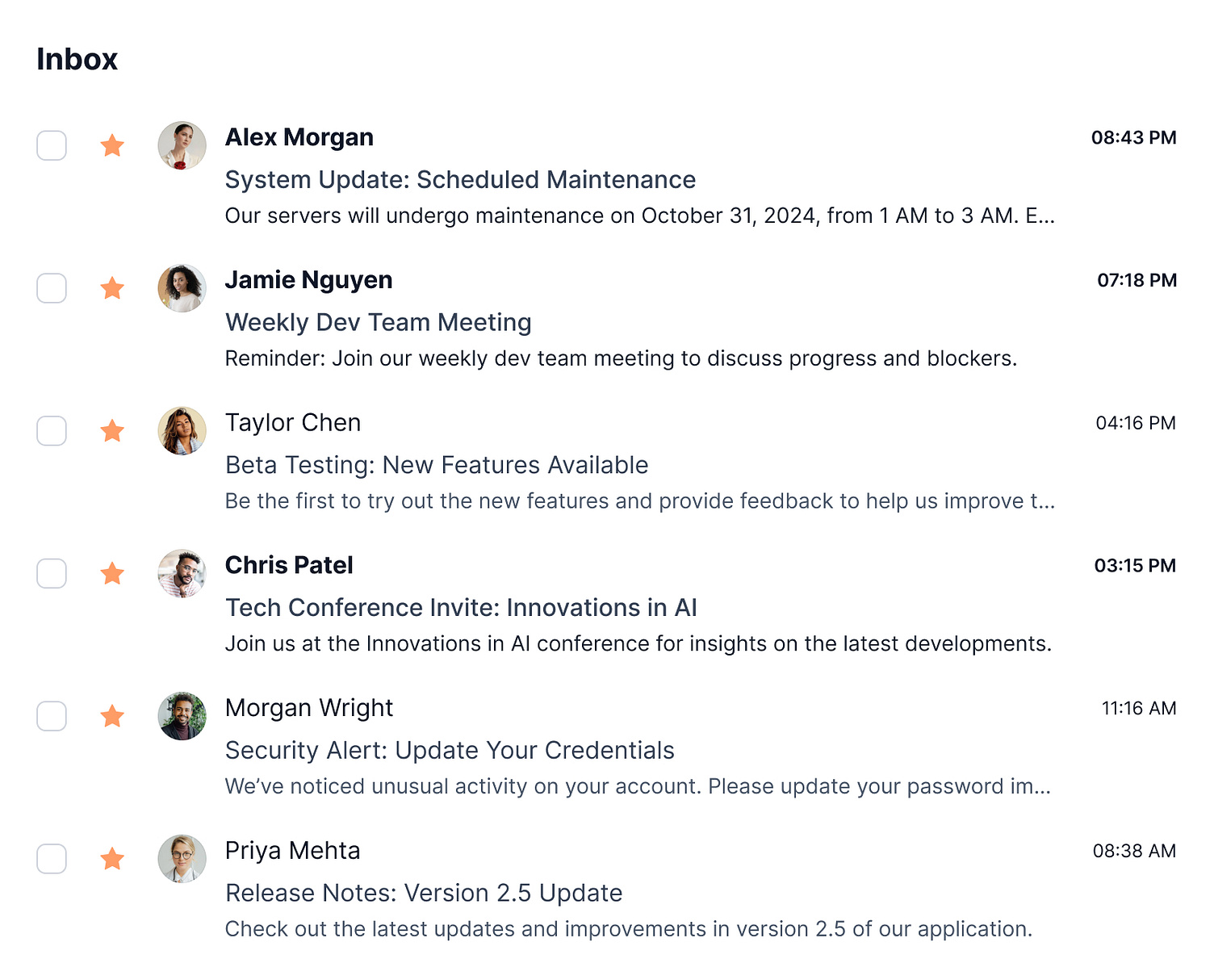
Additionally, on desktop the emails ONLY show the sender and subject line. They could EASILY be made more useful and informative by (optionally) including the body of text/content of the email after the subject line (like literally EVERY other email platform).
Proton mail is made to be so inefficient and time wasting with it's current state of hyper limited previews.
The current version of Proton is practically THIS useless and uninformative, telling you next to nothing: https://i.pinimg.com/736x/33/c2/a9/33c2a92933c35db8bd5f72f107ff2f61.jpg
Mobile example of the right/helpful way: https://media.idownloadblog.com/wp-content/uploads/2023/03/Get-new-emails-instantly-on-iPhone.jpg (The lockscreen example: notice how you can INSTANTLY see the important information at a glance and therefore respond accordingly, i.e. address it now or save it for later)
Desktop example: https://cdn.dribbble.com/userupload/17527141/file/original-5c6b164008e276669e337b2794c72b1d.jpg?resize=1504x1214&vertical=center
This is SUCH an unbearably simple, easy, and game changing feature (I have no idea why it hasn't been implemented yet). This primarily relates to the iOS app, but the web app can use improvements too.
Please allow for multi-line previews! An optional 4 to 5 lines of preview text from the email would be great.
Why in the world would you forcefully limit notifications to an incredibly uninformative mere line or two?
You can't even read the content of emails at a glance because the default preview is so horrendously limited (and it looks ugly as **** in general…
2 votes -
Allow connection to password protected .ics links
We currently can't connect calendar subscription that are password protected.
I can't link my university schedule to proton calendar because of this issue.
4 votes -
Fix Delete Email Functionality in Android App
When you have an email open in the app and delete it after reading, you are returned to your inbox and many times the email you supposedly just deleted still appears in your inbox. Refreshing the view does not resolve the issue. It doesn't happen every time, but more often than not. From what I can recall, this has been an issue since release.
4 votes -
Could you please work to incorporate task manager features in Proton calendar? This is critical to be able to replace apps like Todoist.
The current way to enter events is fine, but it's a bit archaic. We also need to be able to add tasks that can be checked off. AI could be used to streamline data entry for both of these processes.
63 votes

- Don't see your idea?