
Proton Mail & Calendar
2283 results found
-
Linux arm64 Builds
adding Linux arm64 builds
17 votes -
Passwords for Password-protected emails selected by recipient
Currently when sending Password-protected emails to non-proton recipients the sender has to select the password, notify the recipient of the password, and manually record the password for future correspondence. It is tedious and has two major issues.
1. The first issue is if you want to send the message to multiple people they must both have the same password.
2. If a recipient receives password-protected emails from more than one protonmail senders, they would need to track and keep a log of passwords for each and every sender.
A solution would be to have the recipient select a password to…3 votes -
search bar - ios search
It would be great if the search icon/bar could be implemented at the bottom next to the write button and not at the top right corner, such as in the iOS system like in Mail, Settings, etc.
3 votes -
Enhanced filter and newsletter management
Someone already suggested dynamic filter creations and it's an amazing idea. I want to expand it and suggest something similar for newsletters.
The pop-up saying "This message is from a mailing list should include 3 actions, and after one is selected, the pop-up should never appear again for that newsletter:
- Accept
- Unsubscribe
- Filter (this prompts the user to select what to do with these emails like in the filter creation flow and automatically creates a filter for the newsletter)7 votes -
Temporary Disable a SMTP token & the ability to monitor usage
The only way to disable a SMTP is to delete it.
It would be nice to have a method of temporarily disabling a token to stop its use for sending mails OR any mails received from a specific token user can be temporarily redirected into a black hole like /dev/null.
What is the need.
An application or a server that is setup to mailout with a token could go rogue and spew out a lot mails. Configuring postfix with a token on a linux box gives users freedom to do want they want with the built-in mailers like sendmail and…2 votes -
email sweep
Microsoft's Outlook email app has a feature called "Sweep," which allows one to highlight an email, and then take action on and set up a rule for all emails from that sender.
Options include:
Move all messages from the Inbox folder
Move all messages from the Inbox folder and any future messages
Always keep the latest message and move the rest from the inbox folder
Always move messages older than ten days from the inbox folderThe default destination is "Deleted Items." Other options include:
Junk Email
Inbox
Archive
or any other folder the user chooses or creates.It is…
10 votes -
Proton Mail Desktop Email Client - Multiple Accounts
I would like to see a Proton Mail Desktop Email Client (app), where I can view the status of all 6 of my Proton Mail accounts simultaneously, without having to constantly switch between each one separately. Basically similar to desktop Mac Mail app or Thunderbird app, but for Proton Mail accounts only.
103 votes -
cloumn view in ipad app
mail list left to choose the one to read - and the active mail viewed on the right
4 votes -
Add Folder‑Search Filter When Moving Emails in Mobile Apps
In the web app, when I move an email to a folder, a filter appears that lets me type the folder name—or part of it—to quickly select the desired folder. This feature isn’t available in the mobile apps, even though it would be very helpful for avoiding scrolling through all the folders.
6 votes -
push
Auto-dismiss push notifications when email is read on another device
Currently, when I receive a push notification on my iOS device about a new email, the notification remains visible even after I've opened and read that email on another device (such as my laptop or desktop). This creates notification clutter and doesn't reflect the actual state of my inbox.
Proposed Feature:
Implement cross-device notification synchronization so that push notifications are automatically dismissed on iOS when the corresponding email is read on any other logged-in device.Use Case:
Receive email notification on iPhone
Open and read the email on laptop/desktop
Notification…5 votes -
I'd like to be able to choose whether to leave past events in color or gray like now.
You don't just work with the calendar looking forward; you often need to go back, and all the gray makes it difficult to see, especially when you have a lot of calendars and poor eyesight. Google Calendar lets you select how you want to view past events. That's what I need.
11 votes -
Move Multiple Messages Simultaneously
For better organisation it would be useful to be able to move multiple messages (in a single conversation) to another mailbox by selecting the "Move to" function in the highest message in that conversation.
Unless anyone can tell em otherwise this does not appear to be the case at present.
3 votes -
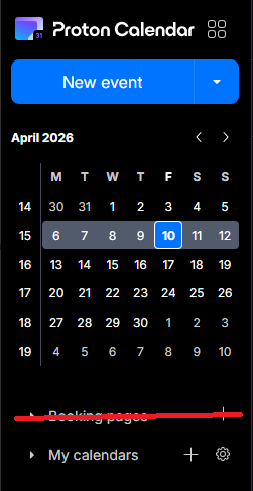
Booking Page - Disable feature altogether
The booking pages form a great feature for business users, but seeing as I use Proton as my personal account, I now have a permanent button to a feature that I don't use - and thus - have a cluttered calendar. I would prefer if I was able to disable the booking pages feature altogether, via the integrations settings, for example.
3 votes -
Couleurs mail et calendrier et personnalisation fond par images personnelles
Il conviendrait rapidement
1 . d'augmenter sensiblement la palette des choix de couleurs disponibles pour marquer les évènements courriels et calendrier.
2 de permettre la personnalisation de l'affichage avec des fonds d'images personnelles3 votes -
Option to disable email notifications when editing events with guests
Currently, editing any detail of an event with guests (even minor typos or description tweaks) forces an email update to all attendees. This creates unnecessary noise and inbox clutter.
Request: Add a checkbox in the edit dialog: "Send update to guests" (default: checked).
- If unchecked, save changes silently without emailing attendees.
- Essential for correcting typos or adding minor notes without spamming guests.
Why: Other calendar tools allow this granularity. Proton Calendar needs a way to distinguish between major changes (requiring notification) and minor edits.
Thank you,
Regards2 votes -
Waytime
Waytime - Please… add to the Time - Waytime like Apple or others do.
2 votes -
Ensuring Core Email Address Privacy in Replies
I use SimpleLogin and recently replied to a sent message, which embedded my core email address in the body of the message making it visible to all recipients
In the same way there are alerts inside SimpleLogin to say, for example, that you cannot reply to yourself from an alias, it would be very helpful for there to be a real time scan to prevent your core email address being visible inside an email. This could either be a toggle in global settings or in the reply panel itself to enable exclusion of those recipients who have Proton mail addresses
…
2 votes -
Auto-spam emails from unsubscribed lists
It'd be nice if it were possible to automatically flag as spam any email from a distribution list for which I used Proton Mail's "Unsubscribe" feature to remove myself from the list. The idea is that if the list owner is not going to honor unsubscribe requests, and since I already indicated that I do not want to receive those emails, then the emails from that list are spam and should be treated as such. An automatic method to take care of this would be handy.
2 votes -
Move calendar events
I know this is an option on the web version but on the IOS/mobile apps we NEED to be able to drag and drop events without having to open them and reselect the date or time. This is a critical feature for any functioning calendar app in my opinion.
8 votes -
Event cancellation and rescheduling.
When an appointment or event is cancelled or rescheduled I often need a record of the originally scheduled day and time.
At minimum I would like the ability to add strikethrough text to the event title, so that I know that the event was cancelled.
Ideally I would like a cancel button (next to the delete and edit buttons) that strikes the event title and turns off notifications, and asks if I would like to reschedule. If I reschedule, it will duplicate the original event and allow me to set a new date (and modify the other settings, if needed).…
16 votes
- Don't see your idea?