
Proton Mail & Calendar
2239 results found
-
reply
make the reply button and the attachments icnos floating so that reply button is not only at the top of an email while the attachment at the bottom. keep them always visible while scrolling and reading the email
3 votes -
Conflict alerts
Calendar events may be tagged as "exclusive". The user can select in settings if new entries will default to exclusive or not.
Any time an exclusive event overlaps with another exclusive event, the user is given a warning about the conflict, so they can then decide how to resolve it.
If two exclusive events are booked close to each other and they both have addresses listed, an estimated travel time could be generated and a warning given if there isn't going to be enough time to travel from one location to the next.
This will be beneficial when importing events…
3 votes -
Es wäre praktisch, wenn man im Kalender per Scrollen stufenlos durch die Monate navigieren könnte, anstatt jeden Monat einzeln über die Pfei
Idee: Scroll-Navigation durch die Monate in Proton Calendar
Derzeit wechselt man zwischen den Monaten nur über die Pfeiltasten (vor/zurück), sodass immer genau ein Monat angezeigt wird. Das Vor- und Zurückspringen über mehrere Monate hinweg erfordert daher wiederholtes Klicken.
Vorschlag: eine durchgehende Scroll-Funktion ergänzen. Beim Scrollen mit Mausrad oder Touchpad würde der Kalender fließend in den nächsten bzw. vorherigen Monat übergehen – vergleichbar mit dem Verhalten vieler Smartphone-Kalender. Die Pfeiltasten könnten parallel erhalten bleiben.
Nutzen: schnelleres und intuitiveres Blättern, besonders bei der Planung mehrere Monate im Voraus. Das spart Klicks und macht die Orientierung über längere Zeiträume angenehmer.6 votes -
Timer to delete notification emails after # of days since they arrived.
When creating filters I'd like to add a timer to run it. For example, when I get a certain email automatic notification wait 7 days or 30 days then delete it.
Maybe you can create an automatic category where all notification emails will be automatically marked with a timer to then be move to trash. In trash they have another 30 days until permanently deleted.3 votes -
Incorperate proton calendar with ubuntu top bar
Right now, there is no integration with ubuntu outside of the app. It would be extremely nice to not have to start the app every time I wish to check my calendar. An integration into ubuntu's top bar akin to the current calendar gui would be ideal. This would massively streamline my usage of proton calendar. Even a small extension in the top bar would be useful as well.
2 votes -
Enforce Username Privacy via Primary Email Address Lockdown
As a Proton mail user,
I want all incoming mail sent to my primary Proton username (email address) to automatically bounce back to the sender as "undeliverable" (as if the account does not exists), unless the email originates from an official Proton mail domain,
So that I an keep my primary account username entirely hidden and free of clutter, forcing all external correspondence (i.e. everything except for official Proton correspondence) to go through my managed aliases or Proton Pass aliases*I understand I can have something similar by creating a custom Sieve with reject or discard, but it is not…
5 votes -
Send encrypted e-mails to non-Proton Mail users without password
Currently, Proton Mail users can send secure e-mails to non-Proton mail users user password protection. This feature adds complexity to the process. Can you provide an alternative method which doesn’t require a password but instead uses a 2FA method to verify the recipient’s e-mail address (similar to applictions such as Securemyemail),
2 votes -
Easy switch for registered emails from gmail to proton
Following the ability to connect my Proton Mail with my Gmail, I'd love suggestions in my inbox that offered me an easy way to change the email address associated with third parties.
For example, I have an account with Zalando. It would be awesome if, after an email from Zalando, there is an way for me to click-through to Zalando's account management screen where I can update my email. Providing this option for third parties who offer change of email addresses.
I'm not sure if this could be done in a way that doesn't intrude on privacy, but would be…
2 votes -
Hide username/email from the browser tab title for better privacy
I have a small suggestion that would honestly be a lifesaver for opsec. Currently, Proton Mail displays the full email address in the browser tab. This is a bit risky when sharing screenshots or screen sharing in university or work groups, as it’s incredibly easy to accidentally leak your address.
It would be amazing if we could get an option to hide the email address from the tab title, or just have it say "Inbox" instead. It’s a small tweak but would go a long way in making the web app feel even more secure.
6 votes -
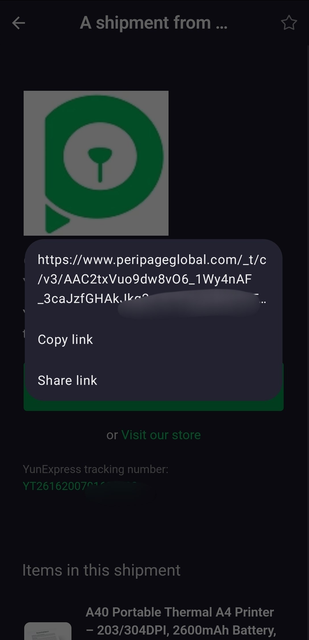
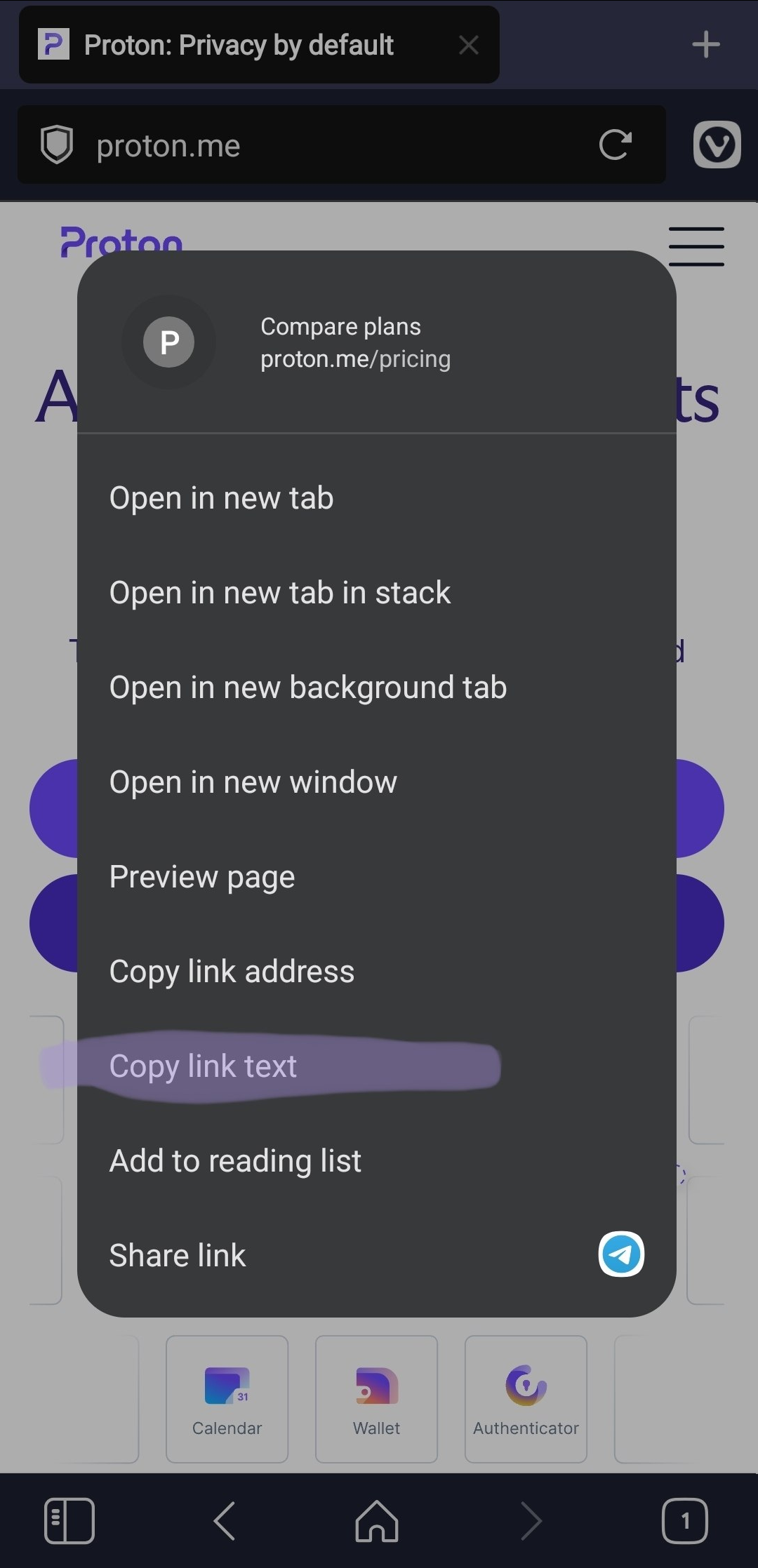
Add an option to copy link text
Add an option to copy the visible text of a link when right-clicking it.
This is useful because selecting anchor link is difficult or impossible.
Real behavior https://i.ibb.co/fV1YWBx8/image.png
Expected behavior https://i.ibb.co/qL6ZRHrT/image.png5 votes -
Bulk import/export of sieve filters
As a power-user I have extensive Sieve scripts that are split up into domains of functionality so that it is easier to manage and so that I can run smaller pieces of the larger filter set against my existing mailbox if that is necessary without it needing to run the whole filter.
I also keep them in version control and have a suite of tests that I run against them when making changes. When I'm done with implementing something new it is really frustrating to have to go to each one individually, copy the contents and paste them into the…
5 votes -
filter messages with calendar invite
There are a lot of filters you can apply to messages (unread, has attachment, etc) can a filter be added for messages with calendar invites. This can be helpful when you need to join a meeting and you're trying to find that link
3 votes -
newsletter digest
Creating a daily or weekly digest message of newsletters. I can see the implementation being like an automatically generated email (opt in) that takes all the sender addresses and subject lines from every messages sorted into the newsletter view and delivered back into the inbox. This would condense messages quickly to make sure nothing important was missed and allow you to skip over everything else. This would be EXTRA useful if newsletters could be completely removed from the inbox view, or is a new -newsletter view was created. Really cut down on the clutter without the chance of missing something…
2 votes -
Invert Newsletter View
I appreciate how the newsletter view concentrates the noise to one place but what would be way more helpful is a the view of all the messages that are not in the newsletter view. If either the messages in the newsletter view were excluded from the inbox or even just a new view that was the inbox sans -newsletter would be amazing. this would allow the important things wouldn't be buried in the newsletters.
3 votes -
Option to alphabetically sort labels
I would like the option to automatically sort labels alphabetically whenever I create a new label. This would make it easier to find a particular label in the side panel.
2 votes -
Update Inactivity Policy
As a Proton user who infrequently logs into their Proton account
I want to ensure my account is not delete due to inactivity as per https://proton.me/support/inactive-accounts
So I want Proton to modify their inactive-acount rules to IF (account inactivity > 12 months AND space used > X*) THEN delete ELSE do nothing*where Proton decides an publishes what the amount of space used needs to be, e.g. > 1gb
2 votes -
Dynamic email / alias addressing
This would be most likely against the way email is working nowadays, but could every email I create be sent from dynamically created alias so I do not own a real, static email address as such and I am not prone to any spam, phishing attemps and so on?
I could imagine me, my digital identity, my emails being of a digital pod which could be contacted only when I would have made a first, initial attempt.
I am not even sure if this technically makes sense,
2 votes -
Protonmail: Move "Labels" to be on top of "Categories" in the left side pane.
Many users use categories to archive emails and labels to tag emails for followup. Currently, one must scroll past all the categories before being able to see the labels. Providing an option for the user to place labels above categories would make protonmail more user friendly.
4 votes -
New account from existing email address,previously under the main user account.
Allow an existing email address under the main user account to be "moved" or changed to be a new account.
This should include the ability to take all emails that were sent to/from that email address and place them into mailboxes for the new account.
For example, someone has been using an email address for a business purpose. They have a Proton business account and created a email address under their account for use with business purposes. Later on they decide to create and account strictly for business use (that may need to be shared with an assistant). It would…
4 votes -
server-side integration for proton mail
Proton Mail lacks a developer-facing event/API platform for backend automation. I need machine-to-machine notifications for incoming email (webhooks/events) and programmatic mail access without relying on Proton Bridge or desktop clients.
Maybe allow users to opt into developer integrations (webhooks/API access) for specific addresses or folders, even if that requires a different trust model or user-granted application permissions.
Or api access via user-held keys.2 votes
- Don't see your idea?